Mass messages let eligible creators reach a selected audience. Review recipients, content and any paid-media price before creating a campaign.
Before you start
Sign in to the account you want to use. Creator-only controls appear only for accounts with the relevant access. If you manage someone else’s account, confirm you are in the correct workspace before making a change. The pictures use fictional example data; your balances, names, available options and screen layout may differ.
Step by step
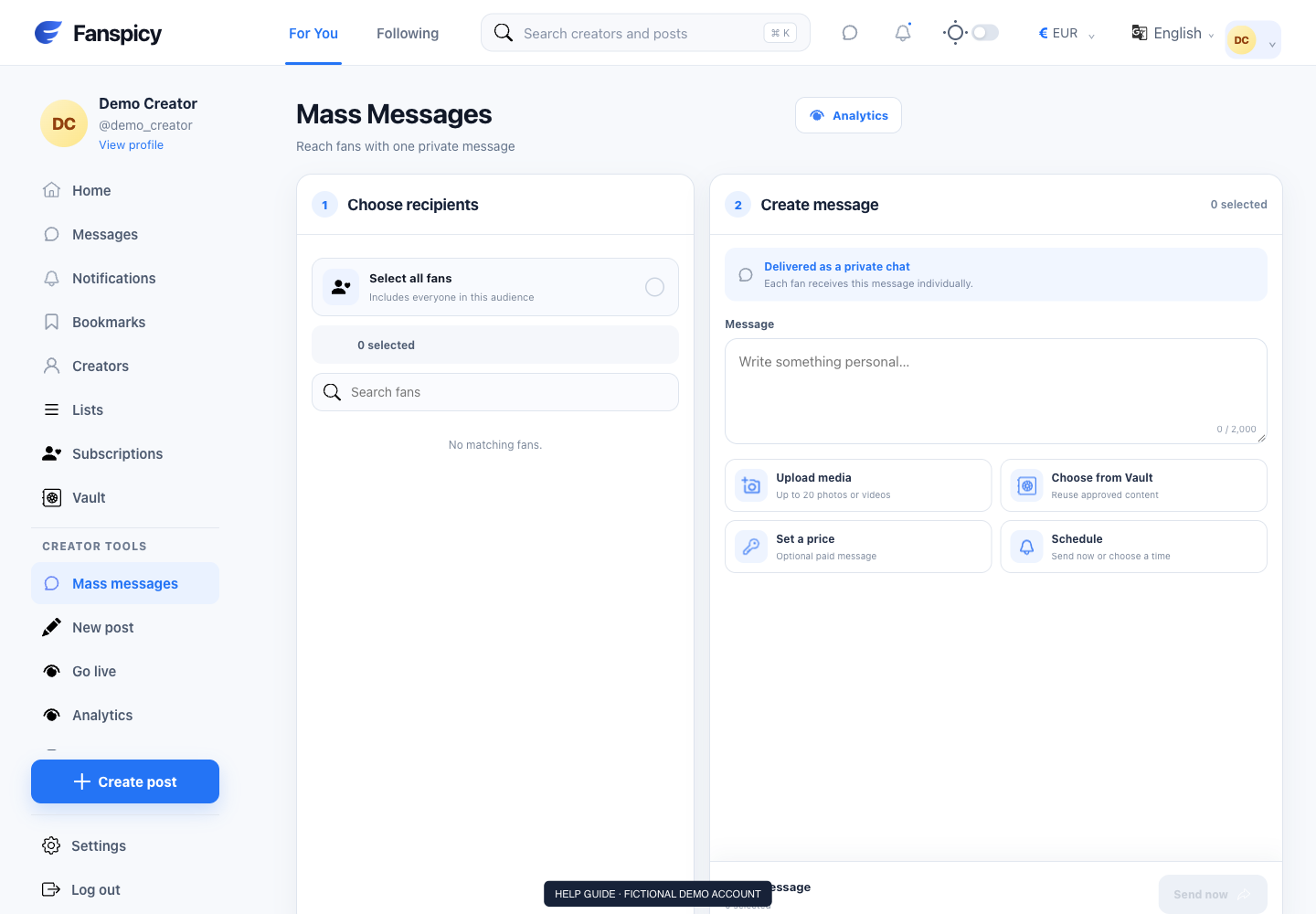
- Open Mass messages from Creator tools.
- Review the available recipient filters and select the intended audience.
- Write the message and add appropriate media.
- Check the price and any scheduling controls shown.
- Review the campaign before submitting it.
- Use the campaign statistics or history view to inspect progress and results.
Check the result
A created campaign is not proof every recipient received or purchased its content. Use campaign records and statistics for those claims. Cancellation is a separate action and may not undo messages already sent.
If something is not working
If results look incorrect, report the campaign reference, filters and expected audience. Avoid creating a duplicate campaign while the original is being checked.
When reporting a problem, include the page, approximate time, what you expected and what happened instead. A screenshot of the error can help. Hide private messages and payment details that are unrelated to the issue. Never send your password, verification code, recovery code or API secret.