Trackable links help compare the results of individual promotions. Give each campaign its own recognizable label so you can distinguish social channels, posts or collaborations.
Before you start
Sign in to the account you want to use. Creator-only controls appear only for accounts with the relevant access. If you manage someone else’s account, confirm you are in the correct workspace before making a change. The pictures use fictional example data; your balances, names, available options and screen layout may differ.
Step by step
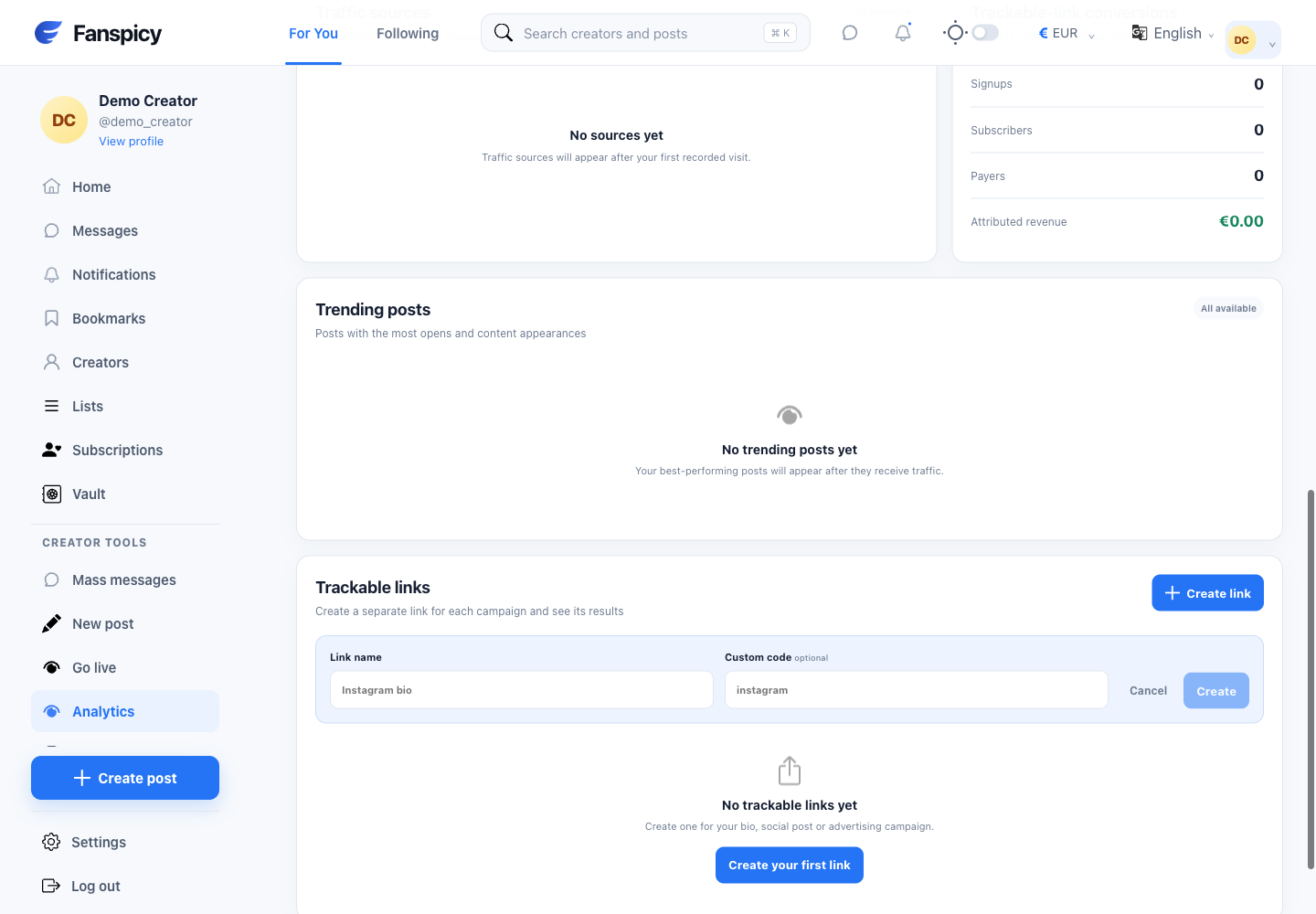
- Open Analytics and scroll to Trackable links.
- Select the create-link action.
- Enter a useful label and, if wanted, a custom code accepted by the form.
- Save the link and copy the generated URL.
- Share it only in places that allow your content and promotion.
- Return to Analytics, choose a date range and review that link’s recorded results.
Check the result
Attribution is limited to the events and dates actually tracked. A link click is not a paid subscription, and total subscriber count is not the same as link-attributed subscribers.
If something is not working
If a code is rejected, check the validation message or try another code. If results are missing, check the date range and whether you shared the generated link. Do not promise a particular reach or revenue from creating a link.
When reporting a problem, include the page, approximate time, what you expected and what happened instead. A screenshot of the error can help. Hide private messages and payment details that are unrelated to the issue. Never send your password, verification code, recovery code or API secret.