

Зміст
A DM on Instagram is a direct message: a private conversation between you and one other person, or a small group, that never appears on your profile. You can send text, photos, emojis, GIFs, stickers, videos and replies to Stories in it. Think of it as the back room of the app. Posts and comments are the public stage, and DMs are where people talk one to one.
This guide explains what a DM is, how to send and answer one, how message requests decide who reaches your inbox, and how to keep your conversations safe. It also looks at why DMs matter so much to creators, who increasingly treat private messaging as the core of their fan relationships.
TL;DR
- DM stands for direct message: a private Instagram chat with one person or a group, separate from public comments.
- To send one, tap the airplane icon in the app, choose the new-message icon, pick recipients and write your message. You can also tap Message on someone’s profile.
- Messages from people you do not follow arrive as requests that you can accept or delete, and you can limit who is allowed to send them.
- Private does not mean untraceable: recipients can save or screenshot ordinary messages, so share carefully.
- For creators, DMs are a direct line to fans, and a platform built around paid private messages can turn that line into income.
Зміст
- What a DM means on Instagram
- DM vs. comment vs. Story reply
- How to send a DM on Instagram
- Group chats
- Message requests: who can DM you
- Seen, unsend and disappearing messages
- How private is a DM, really?
- Why DMs matter for creators
- Our perspective
- Turning conversations into a business with Fanspicy
- ПОШИРЕНІ ЗАПИТАННЯ
- Sources
What a DM means on Instagram
DM is short for direct message. On Instagram it is the built-in messaging feature, reachable from the airplane icon in the app or from the Messages page on the website. A DM is visible only to the people in the thread and does not show on your profile, unlike a post or a comment.
The contrast with public activity is the easiest way to remember it. Public comments can be seen by others, while a DM is a private conversation with one person or a group. If you want to compliment a post in front of everyone, comment. If you want to ask a question, share a link with a friend or follow up on a business inquiry, send a DM.
Outside Instagram, people use the phrase loosely. Someone who says they will DM you means they will contact you privately, usually on the platform you are both already using. Someone who says to slide into the DMs means starting a private conversation with a person they do not know well, which is where message requests come in.
What you can send in a DM
A DM is not limited to words. According to Instagram’s own description of the feature, as summarized in the top-ranking guides, you can exchange text, photos, Reels and posts. In practice the list looks like this:
- Text messages and emojis
- Фото та відео
- GIFs and stickers
- Voice messages
- Posts and Reels shared from your feed
- Replies to someone’s Story
Sharing is quick. Tap the paper-plane icon under a post, pick recipients and send, and the post lands in their chat.
DM vs. comment vs. Story reply
People often confuse these three, because they all start from something you see on someone’s profile. The difference is who can see what you wrote and where the conversation continues.
| Action | Who can see it | Where it appears | Best used for |
|---|---|---|---|
| Comment | Anyone who can view the post | Under the post | Public reactions and questions |
| Story reply | The Story’s owner | Their DM inbox | Quick, personal reactions |
| DM | Only people in the chat | Messages inbox | Private conversation, sharing, business inquiries |
| Group DM | Everyone added to the group | Messages inbox | Planning, shared interests, small communities |
A Story reply is worth a note: it is delivered as a message, so it opens a private thread rather than a public exchange. That makes it a popular first move when you want to start talking to someone.
How to send a DM on Instagram
The steps differ slightly between the phone app and the website, but the idea is the same.
In the mobile app
- Open Instagram and tap the airplane icon (or the Messages shortcut) to open your inbox.
- Tap the new-message icon.
- Search for and select the person you want to message.
- Type your message, or attach a photo, video, GIF or voice note.
- Tap Send.
That is the standard in-app route. A shortcut: open the person’s profile and tap Message, which starts the conversation without searching.
On a computer
You do not need a phone to chat. On Instagram’s website you can open Messages, select a conversation or start a new one, type in the message box and send. Business Insider documented desktop DMs, including text and media, in 2020, and the feature has remained part of the website since.
How to reply to a DM
To answer a normal message, open Messages, select the conversation, type in the box at the bottom and tap or click Send. To reply to one specific message in a busy chat, press and hold it on mobile and choose Reply. On desktop, hover over the message and choose Reply. The quoted message stays attached to your answer, which keeps long threads readable.
Group chats
A DM does not have to be one to one. Selecting several recipients when you compose a message starts a group chat, and Instagram Direct can share photo or video posts, as well as your own photos and videos, with one or more people at once.
Groups are handy for trip planning, shared hobbies, study circles or a small team. Keep in mind that everyone in the group sees everything, and anyone can screenshot it. Add people deliberately, and give the group a clear name so you recognize it later.
Message requests: who can DM you
Not everyone who messages you lands straight in your main inbox. When someone sends a message to an account they do not follow, it appears as a request that the recipient must approve. The recipient can reject it, and if they approve, later messages go to the regular inbox.
The practical rules:
- Accepting a request moves the conversation into your inbox. Deleting it declines the request.
- Limits on content: until a request is accepted, a message from someone you are not connected with can contain only text, not photos, videos or voice messages.
- Your settings: in the Messages and story replies settings, you can choose whether categories such as followers or other Instagram accounts may send you requests or cannot contact you at all.
- Filters: Meta’s Hidden Words and Hide message requests controls can automatically hide DM requests you do not want to see.
- Blocking: it prevents an account from messaging you and from searching for or viewing your profile.
Younger users get extra protection. Meta materials filed as a 2024 exhibit in US litigation describe default limits on unsolicited messages and group additions for teens under 16, or under 18 in certain countries. If a teenager in your family uses Instagram, review their message settings together, and report anything that makes them uncomfortable using the app’s report tools.
Seen, unsend and disappearing messages
DMs come with a few signals and controls that are worth knowing before you hit Send.
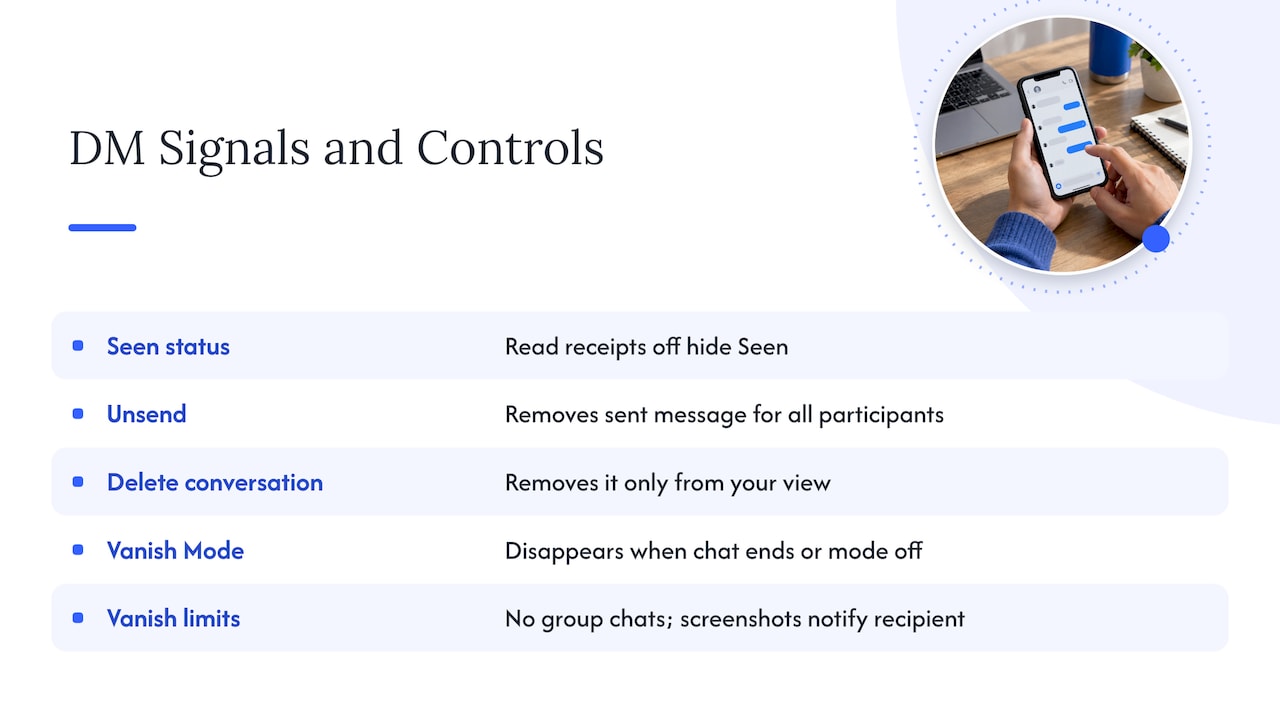
Seen status. In ordinary chats Instagram shows when a message has been opened. Read receipts can be switched off, which removes the Seen indicator. So a missing Seen label does not always mean the message went unread, and a Seen label does not oblige anyone to answer. A DM has no reply requirement: people respond when they are ready.
Unsend versus delete. These are not the same. Unsend removes a sent message from the chat for participants, whereas deleting an entire conversation only removes it from your own view. If you want something gone for the other person, unsend it, and do it quickly, because they may already have read it.
Vanish Mode. This is a temporary chat option. Messages disappear after the chat is left or the mode is turned off. It cannot be used in group chats, and Instagram notifies the other person if you screenshot a Vanish Mode message.
How private is a DM, really?
A DM is private in the sense that only the chat participants can see it. It is not private in the sense of being under your control once sent. Content in an ordinary thread can be saved or screenshotted by the person who receives it. Temporary modes add disappearance and screenshot alerts, but they do not make it impossible for a recipient to keep what you sent.
A few habits keep you safe:
- Do not send anything you would be uncomfortable seeing outside the conversation.
- Be wary of links and requests for codes, passwords or payments from people you do not know.
- Use message request controls and filters to keep unwanted contact out of view.
- Block and report accounts that harass you or try to scam you.
Creators and fans who value discretion should think about privacy at the platform level too. Our guides on the role of privacy in adult platforms і why fans seek anonymity cover how platform design affects what people feel comfortable sharing, and digital privacy for cam creators lists practical safeguards.
Why DMs matter for creators
For anyone building an audience, DMs are where followers turn into a relationship. A comment shows interest. A DM shows intent: a fan asking a question, requesting something specific or reaching out for a collaboration. Creators who answer promptly and personally tend to build more loyal audiences, and the inbox is also where many first conversations with brands start.
The weakness is that Instagram is built around free, public attention. A creator can pour hours into replying to messages, and none of that work is directly paid. Message volume grows with the audience, but income from the chats does not, unless the creator moves the conversation somewhere that supports paid interaction.
That is why many independent creators use social media for discovery and then guide fans to a place where private messages, subscriptions and tips are part of the product. If you are working on that growth side, our pieces on social media content marketing for creators і growing followers show how to build the audience that eventually fills your inbox.
Habits that make DMs work
- Reply with a name and a detail. A message that refers to something the person actually said reads as human.
- Set expectations. Say when you usually respond so fans are not left guessing.
- Use group threads sparingly. One to one feels personal. Groups feel like broadcasts.
- Keep a boundary list. Decide ahead of time which requests you will decline, and use filters to enforce it.
- Move high-value conversations to a place built for them. Casual chat can stay on Instagram, while ongoing paid interaction belongs on a platform designed for it.
Our perspective
We see the DM as the most valuable thing a creator has, and the most undervalued. Every message is a fan choosing to talk to you directly, yet on a free social app that attention is rarely rewarded beyond a like.
That is the idea behind Fanspicy. We built a paid social media and live cam platform where private messages, subscriptions, exclusive content, paid posts, live streams, bundles and tips all sit in one place, so the conversation fans want to have with you can become sustainable income. Our approach is designed around creators keeping a higher percentage of their earnings and owning their relationship with their audience.
Creators do not pay to join or use Fanspicy, and we have designed migration from other platforms to be easy, so your audience does not have to start from zero. We believe the creator economy works best when the people making the content are the ones who benefit most from the attention they earn.
If you already treat your inbox as the heart of your community, you are exactly who we built this for.
fan
Turning conversations into a business with Fanspicy
If you are a creator who already spends hours in your DMs, Fanspicy gives that effort a home. Fans can subscribe, unlock exclusive content, send tips and message you privately, and you can offer paid posts, live streams and bundles alongside it. You keep control of how you earn, and you can bring your audience with you from other platforms.
Ready to see how it works? Become a creator on Fanspicy and set up your page, or explore the platform as a fan. For a deeper look at the business side of private chat, read our complete guide to direct messaging monetization and our overview of what adult social media is.
ПОШИРЕНІ ЗАПИТАННЯ
What does DM mean on Instagram?
DM means direct message. It is a private Instagram conversation with one person or a group, and it does not appear on your profile or under any post. You can send text, photos, videos, GIFs, stickers and shared posts inside it.
How do I send a DM on Instagram?
In the app, tap the airplane icon, choose the new-message icon, select one or more recipients, type your message and tap Send. You can also open someone’s profile and tap Message. On a computer, open Messages on Instagram’s website and start a new conversation from there.
Can someone see my DM if I do not follow them?
Yes, but it arrives as a message request rather than in their main inbox. They can accept it, which moves the chat to their inbox, or delete it to decline. Until it is accepted, a request from someone they are not connected with can contain only text.
Does a DM mean the person has to reply?
No. A Seen label means the message was opened, but nobody has to answer, and some people turn read receipts off, which removes the label entirely. If you are waiting on a reply, a short, polite follow-up after a few days is a reasonable approach.
Are Instagram DMs really private?
Only the people in the chat can see them, but recipients can save or screenshot ordinary messages. Vanish Mode makes messages disappear and alerts you to screenshots, yet it is not a guarantee that nothing is kept. Share only what you are comfortable having outside the conversation.
Sources
- A guide to Instagram direct message (DM) for your business
- What Are Instagram Direct Messages? How DMs Work
- How to Direct Message on Instagram: Easy Guide
- How to Send and Receive DMs on Instagram From a Computer
- How to Reply to a DM on Instagram: Phone, Desktop
- What Is Instagram Direct? An Intro to the App’s Messaging
- How to Check Instagram Direct Messages and Message Requests
- Instagram DMs: how direct messages work
- How to Control Who Messages You on Instagram
- User Control: How to Shape Your Experience on Meta’s Platforms
- Meta teen messaging protections, 2024 court exhibit
- How to DM on Instagram in 5 Steps
- How to enable vanish mode in Instagram DMs