

Зміст
TL;DR:
- A structured content scheduling system helps creators plan, batch, and automate posts to maintain consistency and growth. It involves clear workflows, content pillars, and regular analytics reviews, supporting efficient scaling across platforms. Reserving 10-15% of content for reactive trends balances flexibility with strategic planning.
The content scheduling process is the method by which creators plan, organize, batch, and automate their content publishing to ensure regular, strategic, and efficient output. Without a defined system, creators default to reactive posting, which fragments their audience growth and burns creative energy on logistics instead of ideas. A structured scheduling workflow removes daily posting decisions and creates the consistent presence that platform algorithms reward. Batching content, maintaining a content calendar, and using automated scheduling tools are the three core practices that separate creators who grow steadily from those who stall. Industry best practices recommend reserving 10–15% of calendar space for reactive or trend-based content, which means the remaining 85–90% should be planned and scheduled in advance.
What does the content scheduling process actually require?
A reliable scheduling workflow starts with two decisions: what you will publish and where. Content pillars are the thematic categories that define your output. A paid social creator on Fanspicy, for example, might organize pillars around behind-the-scenes content, subscriber Q&As, promotional teasers, and lifestyle posts. Pillars prevent calendar creation from becoming a blank-page problem every week.

Audience analysis comes next. Knowing which platforms your followers engage with most determines where you invest scheduling effort. A creator splitting time across multiple platforms without this data wastes production time on low-return channels.
Core tools every scheduling workflow needs
Scheduling tools have evolved from single-platform schedulers into unified dashboards that centralize cross-platform coordination and analytics. When evaluating any tool, prioritize these four features:
- Multi-platform support: Post to all active channels from one interface without switching between native apps.
- Queue management: Pre-load a library of approved posts that publish automatically on a set cadence.
- Preview functionality: See exactly how a post will render on each platform before it goes live.
- Built-in analytics: Track performance data without exporting to a separate spreadsheet.
Beyond the scheduling tool itself, a content backlog is non-negotiable. A backlog is a running list of approved ideas, drafted captions, and ready-to-publish assets. It feeds your calendar during high-output weeks and prevents gaps when life interrupts your creation schedule.
Content calendar creation basics
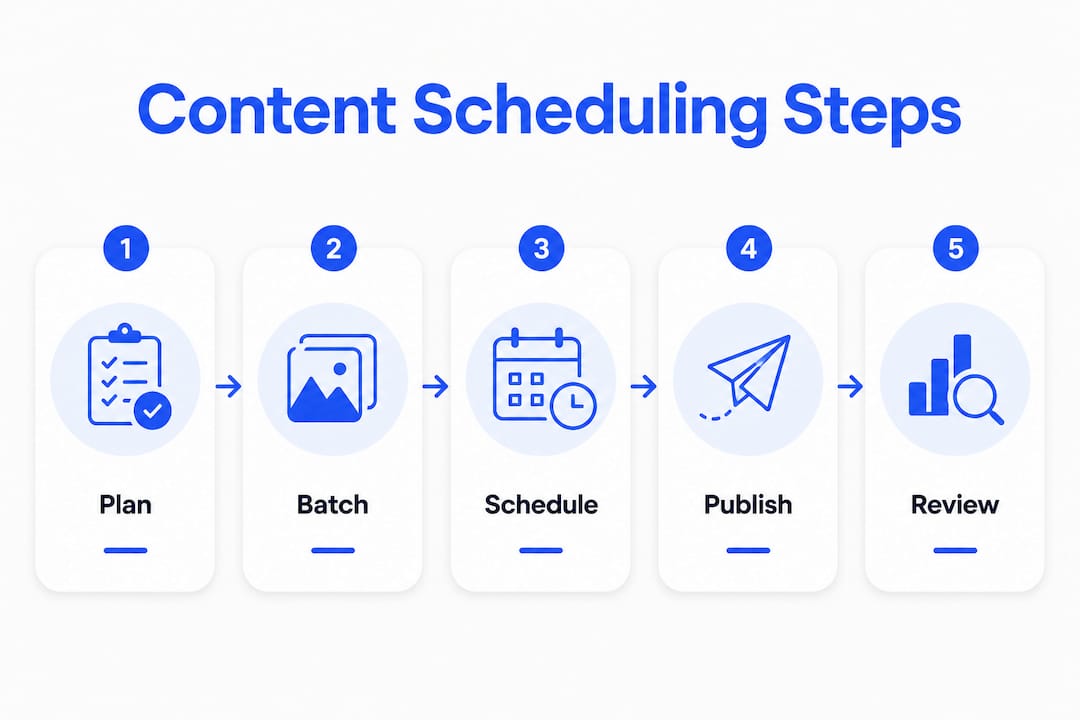
A content calendar tracks when content publishes. A content workflow defines how it gets made. Confusing the two is one of the most common inefficiencies creators face. Your calendar is a scheduling map. Your workflow is the production system behind it. Both are required, and neither replaces the other.
The simplest calendar format is a spreadsheet with columns for date, platform, content pillar, format, caption status, and asset status. More advanced creators use dedicated project management tools that connect calendar entries to production tasks and team assignments.
How does a weekly content batching workflow work?
Batching is the practice of creating multiple pieces of content in a single focused session rather than producing one post at a time. Effective batching allows creators to produce a full week’s worth of content in 2–3 hours, saving 15–20 hours monthly. That time compounds fast over a year.
The four-phase weekly workflow
A repeatable weekly workflow runs through four phases: plan, create, review, and schedule.
- Plan (Monday, 30 minutes). Review your content calendar for the coming week. Confirm all pillars are covered, check for trending topics to fill reactive slots, and flag any assets still needed.
- Create (Tuesday or Wednesday, 2–3 hours). Batch-produce all content for the week. Write captions, record video, edit images, and draft copy in one session. Group similar tasks together to reduce context switching.
- Review (Wednesday or Thursday, 30 minutes). Run a quality check against your content scheduling checklist. Verify captions, hashtags, links, and visual formatting for each platform. If you work with a team, this is the approval gate.
- Schedule (Thursday, 30 minutes). Load approved posts into your scheduling tool, assign optimal time slots, and confirm the queue. Your publishing timeline for the week is now locked.
Порада професіонала: Keep a 1-week buffer of approved, scheduled posts at all times. A minimum buffer absorbs illness, travel, or unexpected disruptions without breaking your publishing cadence.
AI-assisted scheduling tools have made the planning and creation phases faster. These tools suggest optimal posting times based on audience activity data, generate caption drafts for human editing, and flag gaps in your content mix. Posts that combine AI drafting with human editing outperform generic AI-generated content by 2.4x in engagement. The human layer is what makes the difference.
Scheduling is the final stage of a multi-step workflow. Bottlenecks occur when upstream steps like drafting and approval are unmanaged. A creator who schedules without a review phase will eventually publish errors at scale.
How do you optimize and troubleshoot your scheduling strategy?
A content scheduling workflow is not a set-and-forget system. Analytics review cycles comprising weekly, monthly, and quarterly check-ins enable data-driven adjustments that improve strategy over time. Each cycle serves a different purpose.
Weekly reviews catch immediate performance signals: which posts are getting early traction, which formats are underperforming, and whether your posting times align with audience activity peaks. Monthly reviews identify pattern-level trends across content pillars. Quarterly reviews are for structural decisions: adjusting pillar mix, changing posting frequency, or shifting platform priority.
Common mistakes that break scheduling workflows
- Over-automation without engagement. Scheduling posts is not the same as managing a channel. Creators who schedule and disappear miss the comment windows that algorithms use to measure content quality.
- Treating the calendar as the workflow. A calendar with no production system behind it creates last-minute rushes. The content calendar tracks when; the workflow defines how.
- Ignoring reactive content slots. A fully locked calendar with no flexibility misses trending moments. The 10–15% reactive buffer exists precisely for this reason.
- Skipping the approval step. Publishing without a review phase leads to version control issues and off-brand posts.
“Scheduling should remove daily posting decisions and create a consistent presence favored by platform algorithms. The goal is not to automate creativity but to automate logistics so creativity can focus on what matters.”
For creators focused on SEO, protocols like IndexNow allow you to notify search engines immediately when new content publishes, cutting indexing delays that scheduled publishing can sometimes introduce. This is particularly relevant for creators who publish written content or blog-style posts alongside social media.
Порада професіонала: Review your top three performing posts each week and identify one repeatable element. Apply that element to next week’s batch session to compound what already works.
How do you scale your scheduling as your platform mix grows?
Solo creators who expand to multiple platforms or increase posting frequency hit a scaling wall. The fix is structural, not just a matter of working harder. The content creation workflow that works for one platform and five posts per week breaks down at three platforms and twenty posts per week.
Scaling requires three adjustments:
- Add stage owners. Assign specific phases of the workflow to specific people. One person handles creation, another handles review, another handles scheduling. This prevents one person from becoming a bottleneck across all stages.
- Use a unified dashboard. Creators managing two or more platforms with 15 or more posts per week need a unified scheduling dashboard to avoid analytics fragmentation. Native platform tools do not communicate with each other, which creates blind spots in performance data.
- Build a repurposing system. A single long-form video can generate a short clip, a caption post, a quote graphic, and a story sequence. Repurposing multiplies output without multiplying creation time.
Adjusting your strategy as your audience grows
Audience growth changes what content works. Pillars that drove early growth may plateau as your audience matures. Quarterly analytics reviews should include a pillar audit: which themes are growing, which are flat, and which new topics your audience is requesting. Frequency adjustments follow the same logic. More posts do not always mean more growth. The right frequency is the one your production system can sustain at consistent quality.
Crisis response planning is the part of scaling most creators skip. A content gap during a platform outage or a personal emergency can break months of algorithmic momentum. The 1-week buffer and a documented crisis protocol protect against this. For creators on Fanspicy managing paid platform content, subscriber expectations make consistency even more critical than on free platforms.
Key Takeaways
A structured content scheduling process built on batching, a defined workflow, and regular analytics reviews is the most reliable path to consistent creator growth.
| Point | Details |
|---|---|
| Batch content weekly | Produce a full week of content in 2–3 focused hours to save 15–20 hours monthly. |
| Separate calendar from workflow | The calendar tracks when; the workflow defines how. Confusing them creates production gaps. |
| Reserve reactive slots | Keep 10–15% of your calendar open for trending or timely content. |
| Maintain a 1-week buffer | Pre-schedule at least one week of approved posts to absorb disruptions. |
| Review analytics in cycles | Run weekly, monthly, and quarterly reviews to make data-driven scheduling adjustments. |
Why scheduling changed how I think about content
Most creators treat scheduling as a logistics problem. I used to think the same way. The real shift came when I stopped thinking about scheduling as a task and started treating it as a decision-removal system. Every post I pre-schedule is a decision I do not have to make at 11 PM when my creative energy is gone.
The psychological effect is real. Decision fatigue is not a productivity myth. When you wake up knowing your content is already queued, your mental bandwidth goes toward ideas, not logistics. That is where the compounding effect starts. Audiences do not just respond to good content. They respond to consistent good content. The trust that builds from showing up on schedule every week is worth more than any single viral post.
What I have seen work consistently is a blended approach: core content scheduled two to three weeks ahead, with deliberate gaps left for reactive posts. Creators who lock every slot lose cultural relevance fast. Creators who leave too many gaps burn out filling them. The 10–15% reactive rule is not arbitrary. It is the balance point between structure and agility that actually holds up over time.
The tool you use matters less than the workflow behind it. I have seen creators build excellent systems with nothing more than a spreadsheet and a basic scheduler. I have also seen creators with expensive platforms fail because they never defined their upstream production steps. Pick tools that fit how you actually work, not tools that look impressive in a demo.
— fan
Fanspicy supports your content scheduling workflow
Fanspicy is built for creators who take their publishing process seriously. The platform supports multi-platform content management, giving creators the infrastructure to apply the batching and scheduling strategies covered in this guide without juggling disconnected tools.
Whether you are building your first календар контенту or scaling an existing workflow across paid social channels, Fanspicy gives you the scheduling and analytics foundation to do it efficiently. The platform’s built-in analytics connect directly to your publishing timeline, so every review cycle produces data you can act on. Visit Фанфікшн to see how the platform fits your workflow and start publishing on a schedule that actually holds.
ПОШИРЕНІ ЗАПИТАННЯ
What is the content scheduling process?
The content scheduling process is the system creators use to plan, batch, and automate content publication across platforms. It includes calendar creation, production workflows, approval steps, and scheduled publishing.
How much time does content batching actually save?
Batch-creation sessions of 2–3 hours weekly can cover a full week of content output, saving creators 15–20 hours per month compared to daily one-off production.
How often should I review my scheduling analytics?
Run weekly reviews for immediate performance signals, monthly reviews for trend patterns, and quarterly reviews for structural decisions like pillar mix and posting frequency.
What is the difference between a content calendar and a content workflow?
A content calendar tracks when content publishes. A content workflow defines how content gets made. Both are required; neither replaces the other.
How much calendar space should I leave for reactive content?
Industry standards recommend reserving 10–15% of your content calendar for reactive or trend-based posts. This keeps your schedule consistent while preserving flexibility for timely content.