The Creator API connects an eligible creator account to a server-side tool or CRM. Each key is bound to one creator; it is not a general administrator credential.
Before you start
Sign in to the account you want to use. Creator-only controls appear only for accounts with the relevant access. If you manage someone else’s account, confirm you are in the correct workspace before making a change. The pictures use fictional example data; your balances, names, available options and screen layout may differ.
Step by step
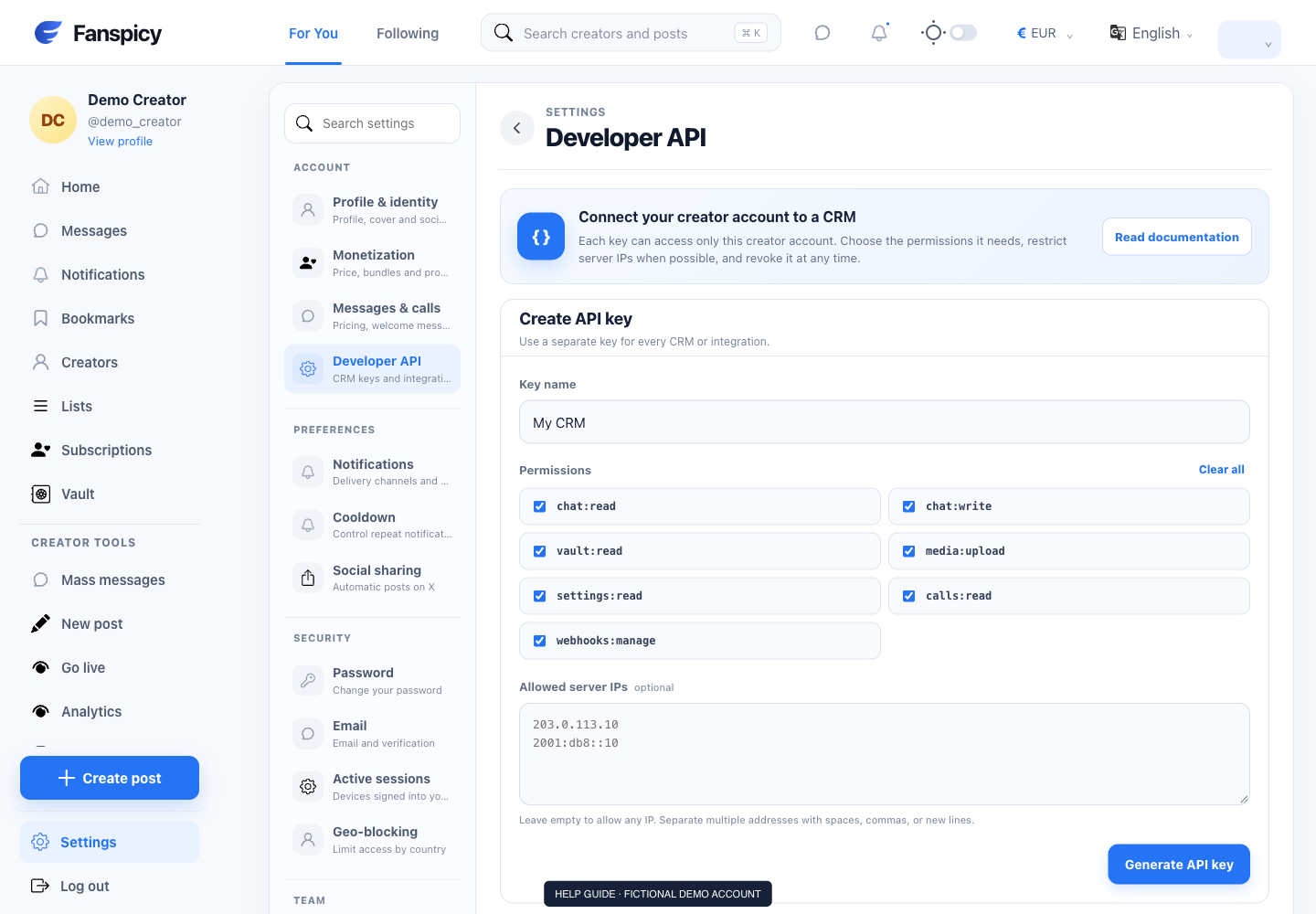
- Open Settings → Developer API from the creator account.
- Give the key a name identifying the integration.
- Select only the permissions the integration needs and set an IP allowlist when appropriate.
- Create the key and copy the full value immediately; the website displays it only once.
- Store the key securely on the integration’s server, never in public browser code or screenshots.
- Revoke a key when it is no longer needed and update any connected integration using it.
Check the result
Use the read-only GET /me endpoint to confirm the bound creator and scopes. The AI support assistant’s read-only access is separate from a CRM key that may allow writes.
If something is not working
If authentication fails, check whether the key was revoked or the creator account is eligible. Share request IDs and error codes with support, never the key itself.
When reporting a problem, include the page, approximate time, what you expected and what happened instead. A screenshot of the error can help. Hide private messages and payment details that are unrelated to the issue. Never send your password, verification code, recovery code or API secret.