

Зміст
Every piece of content worth publishing follows the same eight-step arc: ideation, research and validation, planning and briefing, production, editing and optimization, publishing and distribution, measurement, and finally updating or repurposing what already exists. Skip a step and you either waste production hours on an idea nobody wanted, or you publish something solid that nobody ever finds. Miss the last step and you’re rebuilding assets from scratch that you could have refreshed in an afternoon.
Here’s the checklist version you can screenshot or paste into a task manager right now:
- Ideate — Generate and score topic ideas against audience fit and business value.
- Research and validate — Confirm keyword opportunity, search intent, and competitive gaps.
- Plan and brief — Write a one-page brief and slot it into your editorial calendar.
- Produce — Draft, record, or design against the brief and outline.
- Edit and optimize — Run quality, accuracy, and on-page SEO checks before anything goes live.
- Publish and distribute — Post to owned channels first, then adapt for social and email.
- Measure and iterate — Track KPIs tied to the original goal and decide what to do next.
- Update and repurpose — Refresh underperformers and stretch strong pieces into new formats.
Most creators lose the most time at steps 5 and 6. Editing and SEO polish are the two stages where production workflows most often stall, and distribution gets rushed because it happens right after the “hard part” feels finished. Budget extra time there, not at the drafting stage where people usually expect the delay.
Key Takeaways
Content that performs consistently follows all eight steps in order, ideation, validation, briefing, production, editing, publishing, measuring, and repurposing, because skipping any single one either wastes production time or buries good work with no distribution plan.
| Point | Details |
|---|---|
| Validate before producing | Confirm keyword demand and audience fit before writing a single draft to avoid wasted production hours. |
| Brief every piece | Use a one-page brief with goal, format, and CTA so production has clear direction from day one. |
| Budget extra time for editing | Editing and SEO polish are the most common bottleneck in content workflows, so build in buffer days. |
| Match KPIs to goals | Track awareness, engagement, or conversion metrics separately, checking each on its own realistic cadence. |
| Explore platform fit for monetization | Fanspicy offers a subscription and live cam model for creators ready to turn a consistent content workflow into recurring revenue. |
Зміст
- What Are Content Creation Steps and Who Needs This Workflow?
- How Do You Generate and Prioritize Content Ideas?
- Why Does Every Idea Need Research and Validation First?
- How Do You Build a Content Brief and Schedule It?
- What Does Efficient Content Production Actually Look Like?
- What Should You Check Before Anything Gets Published?
- Where Should You Publish and How Do You Promote It?
- How Do You Know If Your Content Is Working?
- When Should You Update or Repurpose Existing Content?
- Who Handles Each Step, and What Does It Cost?
- What Templates Can You Copy Right Now?
- What Do Most Beginners Get Wrong About Content Creation?
- What Platform and Monetization Options Fit Your Content?
- Where Can You Learn More About Content Creation Workflows?
- Sources
What Are Content Creation Steps and Who Needs This Workflow?
Content creation is the process of turning an idea into a finished asset, a blog post, video, podcast episode, or social update, that delivers value to a specific audience and moves a business or personal goal forward. It’s not just writing or filming. It’s the entire chain from “what should we make?” to “did it work, and what do we do with it now?”
This particular content creation process applies across formats: short-form social posts, long-form blog articles, video scripts, podcast episodes, email newsletters, and infographics all move through the same eight gates, even though the work inside each gate looks different. A 90-second Reel needs a shot list instead of an outline; a 2,000-word guide needs keyword research instead of a trending-audio check. The skeleton stays constant.
You don’t always need the full version. A solo creator posting daily on one platform can compress steps 2 through 5 into a fast mental checklist: does this fit my audience, is the hook strong, is it clean enough to post? Marketing teams publishing for search traffic, email lists, and paid campaigns need the complete version, because a mistake at the research stage can waste a week of production time on a topic with no search demand and no audience appetite.
How Do You Generate and Prioritize Content Ideas?
Good ideas rarely come from staring at a blank content calendar. They come from listening to signals that already exist around your audience.
The most reliable idea sources include:
- Direct audience questions from comments, DMs, and community posts
- Support tickets or FAQs that reveal recurring confusion
- Search data showing what people are already typing into Google
- Social listening across the platforms your audience actually uses
- Trending topics and seasonal moments relevant to your niche
- Suggestions from subject-matter experts inside your team or industry
- Gaps found by scanning competitor content for what they missed or got wrong
- AI brainstorming tools used to generate volume, then filtered by a human
Once you have a list, score each idea against a short set of criteria instead of trusting your gut. A simple scorecard works: rate audience fit, SEO potential, business value, and production effort each on a 1 to 5 scale. An idea with high audience fit and high business value but heavy effort might still win, but now you’re choosing with information instead of momentum.
For solo brainstorming, block 20 minutes and write without editing, just get volume on the page. For team sessions, run a fast round where everyone submits three ideas silently before discussion starts. This stops the loudest voice in the room from anchoring the whole list before quieter, sharper ideas get a hearing.
Порада професіонала: Keep one running document as your idea backlog, not scattered notes across apps. When you sit down to plan next month’s calendar, you want twenty ideas waiting, not a blank page and a deadline.
Why Does Every Idea Need Research and Validation First?
An idea that sounds smart in a brainstorm can still be a bad bet without validation. This step exists to catch that before you spend hours producing something nobody searches for or nobody needs.
Audience validation means matching the idea to a real persona and a real intent. Ask what problem this actually solves and for whom. A blog post about “content marketing trends” means something different to a solo creator than to a marketing director managing a five-person team, and writing for the wrong one wastes the effort.
Keyword validation confirms there’s search demand worth chasing. Check for a primary keyword and its close variants, get a rough read on ranking difficulty, and compare it against what’s already ranking to make sure the intent matches. If the top results are all product comparison pages and your idea is a how-to guide, you’re solving a different problem than the market is searching for.
Competitive and gap analysis rounds it out. Look at what’s already ranking, note what those pages do well, and find the angle they missed, a more current example, better formatting, a data point they didn’t include, a use case they ignored.
| Validation Check | What You’re Confirming | Signal to Watch For |
|---|---|---|
| Audience fit | The idea matches a specific persona’s problem | Direct questions, comments, or support tickets referencing this exact issue |
| Keyword and intent | Real search demand exists and matches your format | Search volume trend and whether top results match your intended format |
| Competitive gap | Existing content leaves room for a better version | Missing data, outdated examples, or thin coverage on ranking pages |
| Business value | The idea supports a goal, not just traffic | Clear tie to awareness, lead generation, or retention objectives |
Skip this stage and you’re guessing. Run it, and you walk into production already knowing the piece has a home.
How Do You Build a Content Brief and Schedule It?
A brief turns a validated idea into something a writer, designer, or video editor can execute without guessing what you meant. Vague direction produces vague content, and vague content is what triggers three rounds of revisions.
A solid brief covers these fields:
- Target keyword and two or three related keywords
- Audience persona and where they sit in the funnel (awareness, consideration, decision)
- Primary goal (traffic, leads, engagement, sales) and the call to action tied to it
- Format and length (blog post at 1,500 words, 60-second video, 8-slide carousel)
- Subject-matter expert to consult or quote, if the topic needs one
- Must-have data points, statistics, or examples to include
- Visual needs (hero image, chart, screen recording, product shots)
- Target publication date
Format and channel should follow the goal, not the other way around. If the goal is search traffic, a long-form article usually outperforms a short social post. If the goal is quick engagement or brand visibility, a short video or carousel does more work than a 2,000-word article nobody will click into from a feed.
Once the brief is written, it needs a home in your editorial calendar. Track status (idea, in progress, in review, scheduled, published), owner, due date, and a short note on the promotion plan for each entry. Add a lightweight content inventory alongside the calendar, a running list of what’s already published, when it went live, and how it performed, so you’re not duplicating topics six months from now without realizing it.
What Does Efficient Content Production Actually Look Like?
Production is where the brief becomes a real asset, and the single biggest lever for speed here is a detailed outline. A loose outline invites scope creep during drafting; a specific one keeps the writer, host, or designer on track and cuts revision cycles significantly.

For long-form writing, an outline should map each H2 and H3, note the key point of each section, and flag where a statistic or example belongs before drafting starts. For video or podcast scripts, that means a beat sheet: hook, problem statement, three main points, call to action, with rough timing next to each.
A practical production checklist keeps nothing from falling through the cracks:
- Research notes compiled and linked to their sources
- First draft written or recorded against the outline
- Visuals sourced or created (screenshots, charts, thumbnails, b-roll)
- Captions or subtitles drafted for video and audio content
- Supporting assets saved (social snippets, email teaser copy)
- Files named consistently and source files preserved separately from exports
- Version control in place so edits don’t overwrite an earlier draft you might need
Порада професіонала: Name files with a consistent pattern, like “topic_format_version_date,” so an editor or designer picking up your work at 5 p.m. on a Friday doesn’t have to guess which file is current.
Visual asset handoffs break down more often than writing handoffs, mainly because designers and video editors need raw materials, not finished screenshots. Hand off layered files, uncompressed footage, and brand assets separately from the polished export so revisions don’t mean starting over.
What Should You Check Before Anything Gets Published?
Editing catches what production misses, and it’s one of the two stages where most content workflows lose the most time. Treat it as a distinct phase with its own checklist, not a quick read-through before you hit publish.
A pre-publish checklist should confirm:
- Readability matches the audience (no jargon dumped on a beginner-level reader)
- Brand voice stays consistent from headline to closing line
- Every fact, statistic, and quote is accurate and sourced
- Citations link to credible, current sources
- Images are properly licensed, sized, and compressed for load speed
- Captions and alt text are written for every image and video
- Basic accessibility checks pass (color contrast, heading hierarchy, transcript availability)
On-page SEO deserves its own pass, separate from the readability edit:
- Title tag includes the primary keyword and stays under roughly 60 characters
- Meta description is written to earn the click, not just describe the topic
- Headings follow a logical hierarchy (one H1, nested H2s and H3s)
- Internal links point to genuinely related content, not just any page you want traffic on
- Structured data or schema markup is added where the platform supports it
- Image alt text is descriptive and includes relevant keywords naturally
Editing and SEO polish are consistently flagged as the tightest bottleneck in the whole production workflow, so build buffer time here deliberately instead of assuming it will take “just a few minutes.” Schedule subject-matter-expert review and final approval on the calendar with a real deadline, not an open-ended “whenever they get to it,” because that’s usually where launch dates slip by a week or more.
Where Should You Publish and How Do You Promote It?
Publish to your owned channel first, your website, your email list, your podcast feed, before pushing to social platforms. Owned channels give you full attribution data and full control over the content long after a social post has scrolled out of anyone’s feed.
Each platform needs its own adaptation, not a copy-paste of the same text everywhere:
- Website: Full version with complete SEO optimization and internal links.
- Email: A shorter teaser with a clear subject line and one strong call to action back to the full piece.
- LinkedIn: A professional framing with a hook in the first line, since the platform truncates longer posts.
- X: A tight, punchy summary or a thread that breaks the core idea into digestible pieces.
- Інстаграм: Visual-first, with a carousel or Reel pulling out the most shareable point.
- TikTok: A native, fast-paced video built for the platform, not a repurposed ad.
- Ютуб: A longer-form video with a searchable title and a detailed description including keywords.
A simple 7-day launch timeline keeps promotion from fizzling after day one: publish on day 1, send the email teaser and post to LinkedIn and X on day 2, push Instagram and TikTok content by day 3 or 4, follow up with a reminder post around day 5 or 6, and check early performance data by day 7 to decide whether to boost with paid amplification. Small-budget promotion, boosting a single high-performing post or running a narrow retargeting campaign to warm traffic, often outperforms spreading a tiny budget across five platforms at once.
How Do You Know If Your Content Is Working?
Measurement only works if you tie it back to the goal set in the brief. Tracking pageviews on a piece meant to drive email signups tells you almost nothing useful.
Match your KPIs to the goal:
- Awareness goals: Track reach, impressions, and new audience growth, checked monthly since awareness metrics move slowly.
- Consideration goals: Track time on page, scroll depth, and content downloads, checked biweekly to catch engagement trends early.
- Conversion goals: Track click-through rate, form completions, and revenue attribution, checked weekly since conversion issues need faster fixes.
- Distribution reach: Cross-reference performance against overall platform activity; with worldwide social network usage still climbing year over year, a flat share of a growing audience can still mean rising real numbers.
Once the data comes in, run it through a simple diagnostic: strong traffic and strong conversion means keep and promote further; strong traffic with weak conversion means improve the call to action or offer; low traffic with strong conversion among the people who do find it means repurpose into a different format or channel; low traffic and low conversion after a fair testing window means retire it or fold its best ideas into something new.
This feedback loop closes the circle back to ideation. The pieces that underperform usually reveal a mismatch between what you assumed your audience wanted and what they actually searched for, which is exactly the kind of signal that should shape your next brainstorm.
When Should You Update or Repurpose Existing Content?
Publishing isn’t the finish line. Some of the best return on effort comes from extending a piece that already proved itself, not producing something new from zero.
Update a piece when you notice a performance drop in rankings or traffic, when new data or research makes your original numbers outdated, when a seasonal shift changes relevance, or when a product or service change means the content now contains inaccurate claims.
A repurpose matrix helps you see how far one solid asset can stretch: a long-form blog post can become a newsletter snippet, a short vertical video hitting the single best point, a carousel breaking the piece into five slides, or a segment in a podcast episode where you talk through the idea conversationally. One well-researched article can realistically fuel a week of smaller content across formats.
When you do update something, keep the checklist tight: refresh outdated statistics and examples, tighten the SEO elements based on current keyword data, add anything the competitive landscape has shifted toward since the original publish date, and re-check the call to action against your current goals. Measure success the same way you did the first time, comparing traffic and conversion in the weeks after the update against the weeks before it.
Who Handles Each Step, and What Does It Cost?
Content creation involves more roles than most solo creators expect, even when one person wears every hat.
| Role | Core Responsibility | Typically Involved At |
|---|---|---|
| Idea owner | Sources and scores topic ideas | Ideation and validation |
| Writer or creator | Drafts, records, or designs the asset | Production |
| Editor | Reviews for accuracy, voice, and clarity | Editing and optimization |
| Designer or video editor | Builds visuals, thumbnails, or edits footage | Production and editing |
| Subject-matter expert | Reviews for technical accuracy | Editing and final approval |
| Publisher | Formats and schedules the live post | Publishing |
| Promoter | Distributes across channels and tracks engagement | Publishing and measurement |
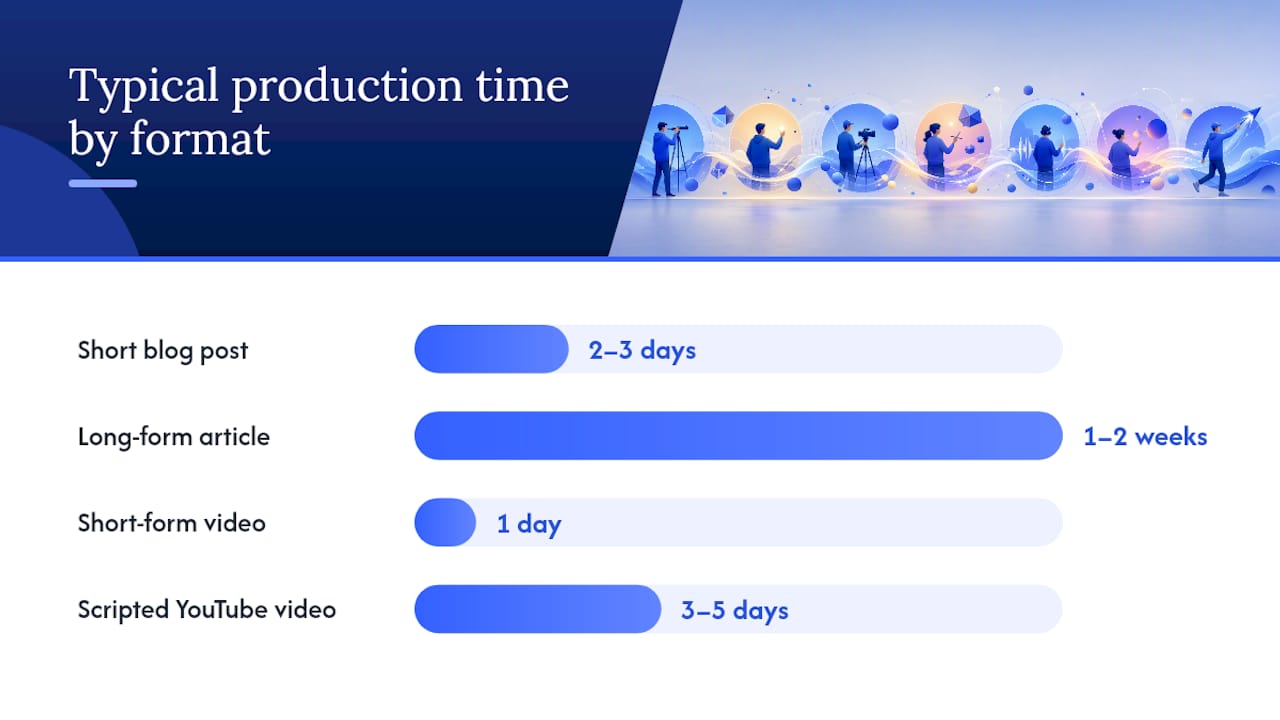
Timelines vary sharply by format. A short blog post might take two to three days from brief to publish for one experienced person working solo. A long-form article with original research and SME review often needs one to two weeks, mostly because review cycles add days you can’t compress. A short-form video can move fast, sometimes a single day, but a scripted, edited YouTube video usually needs three to five days once you count filming, editing, and captioning. Always build in buffer time for review, roughly 20 to 30% on top of your estimated production time, since review and editing stages are where workflows most commonly slip.
For a rough cost estimate, use a simple formula: total cost equals (hourly rate x hours per role) summed across every role involved, plus any tool or software costs. A single long-form article with a writer, an editor, and a freelance designer for one graphic might run something like 6 hours of writing, 2 hours of editing, and 1 hour of design work, priced against each contributor’s hourly rate, plus whatever your stock photo or design tool subscription costs that month.
What Templates Can You Copy Right Now?
The eight-step flow works as a simple gate system: Ideate → Validate → Brief → Produce → Edit → Publish → Measure → Update, with an approval checkpoint sitting right before production starts (confirming the brief is complete) and another right before publishing (confirming the edit and SEO checklist passed). Nothing should skip those two gates, even under deadline pressure, because that’s exactly where quality problems slip through unnoticed until after launch.
Here’s a brief template with fields you can paste directly into Notion, Google Docs, or your project management tool:
- Title/working headline:
- Target keyword + related keywords:
- Audience persona:
- Funnel stage:
- Primary goal:
- Format and target length:
- SME contact (if needed):
- Must-include data points:
- Visual assets needed:
- Call to action:
- Target publish date:
For your task manager, a single-column checklist keeps the whole workflow visible at a glance: Idea scored → Keyword validated → Brief written → Draft complete → Edited → SEO checked → SME approved → Published → Promoted → Measured (30-day check) → Update flagged if needed.
Порада професіонала: Build your editorial calendar with columns for status, owner, due date, and promotion plan, then add one more: “last updated,” even for brand-new content. That single column is what saves you from forgetting a piece exists two years from now.
What Do Most Beginners Get Wrong About Content Creation?
The five mistakes that show up most often aren’t about skill, they’re about sequencing. First, creators start producing before setting a clear goal, which means they can’t tell success from failure later because they never defined what either one looks like. Second, they skip validation entirely and trust instinct over search data, which is how a well-written piece ends up with zero search demand behind it. Third, they treat promotion as an afterthought, something to squeeze in after publishing rather than something planned before production even starts. Fourth, they never build a measurement habit, so content either gets forgotten the day after it goes live or gets judged on gut feeling instead of numbers. Fifth, they publish in bursts and then go quiet for weeks, which flattens whatever momentum an algorithm or an audience habit was starting to build.
What actually works looks less dramatic than most advice suggests. Run small experiments instead of overhauling your whole strategy every month, one new format, one new distribution channel, one new hook style at a time, so you can tell what actually moved the needle. Set a specific goal before you write a single word, not “grow my audience” but “get 50 email signups from this piece in 30 days.” And treat promotion as equal in weight to production. A mediocre piece that gets pushed hard across the right channels routinely outperforms a brilliant piece nobody sees.
Two habits speed up improvement faster than anything else. Review your last five pieces of content against your own diagnostic checklist before you plan the next five, because patterns show up in batches, not single posts. And keep a short log of what you tried in distribution, not just what you published, since the promotion tactics that work tend to repeat themselves once you spot them.
What Platform and Monetization Options Fit Your Content?
Once your content workflow is producing consistent output, the next decision is where that content actually lives and earns. Subscription platforms work well for creators building a loyal, recurring audience willing to pay monthly for ongoing access. Tipping models suit creators with high engagement but inconsistent output, since fans pay per piece rather than committing to a subscription. Paid social ads extend reach fast but require an ongoing budget with no guaranteed return. Direct sales, digital products, merchandise, or one-off downloads work best when you already have an audience but want a higher margin per transaction than platform-based models allow.
Before committing to any platform, check four things: fee structure and what percentage the platform takes from your revenue, payment reliability and how often payouts actually process on schedule, whether the platform’s existing audience matches the content you create, and how strict or unpredictable their moderation rules are for your content category.
Fanspicy is built as a paid social and live cam platform for creators who want subscription and direct-fan revenue without splitting attention across five disconnected tools. If subscription-based monetization fits the audience you’ve been building through this workflow, Fanspicy’s platform gives creators a direct path to recurring revenue with fan interaction built into the same space where content gets published. Explore Fanspicy to see how the platform fits into your publishing plan and start building your creator profile today.
Where Can You Learn More About Content Creation Workflows?
A handful of resources go deeper into specific pieces of this workflow if you want to build out your own process further.
- Orbit Media’s content creation process guide walks through a detailed flowchart covering ideation, original research, and content updates, useful if you want a checklist format to adapt directly.
- Jottler’s 7-stage production workflow breakdown digs into where teams typically lose time during editing and SEO polish, helpful for planning realistic timelines.
- Jarrod Harman’s content marketing guide covers pillar and cluster content structures for building topical authority, worth reading if your goal is long-term search visibility.
- Content Marketing Institute’s optimization guide focuses on editorial standards and measurement frameworks for larger content programs.
- Nick Skorykh’s step-by-step content marketing process includes practical calendar cadence and tooling suggestions like GA4 for tracking performance.
For creators working specifically within paid social and subscription platforms, Fanspicy’s own resource library covers platform-specific monetization models and secure payment practices worth reviewing once your content workflow is ready to scale into revenue.
Sources
- Statista — Number of worldwide social network users
- Orbit Media — Content creation process (flowchart and checklist)
- Jottler Blog — The 7-Stage Content Production Workflow That Ships
- Jarrod Harman — What is content creation in marketing: 2026 guide