

Índice
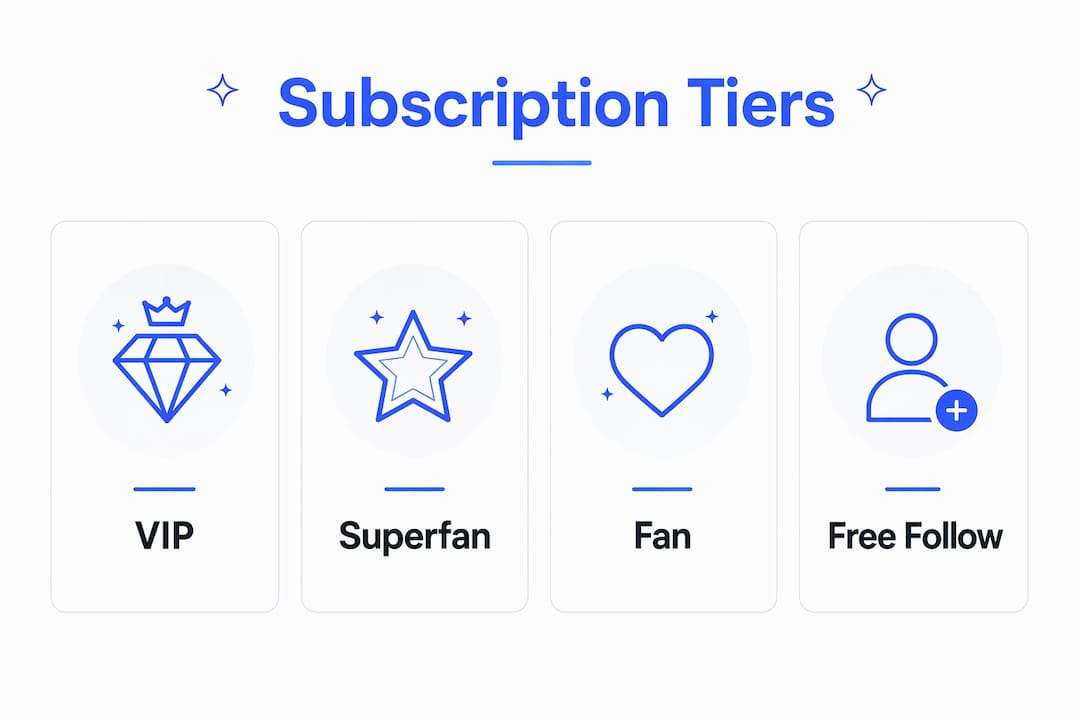
Fansly lets you build up to five subscription tiers that function as a monetization ladder, moving casual free followers toward paying fans and eventually toward high-value superfans. The platform supports multiple subscription tiers plus a free-follow option, with subscription pricing ranging from $5 to $499.99 per month. Creators keep roughly 80% of revenue, with Fansly taking 20%. If you’re just getting started, the fastest path to recurring revenue is simple: create one clear main tier priced for volume, add one VIP tier when you have the content to fill it, and use the free-follow funnel to warm up new fans before asking them to pay.
- Fansly supports multiple paid tiers plus a free-follow option
- Subscription prices cover a wide range suitable for different creator strategies
- Revenue is shared between creators and Fansly, with creators retaining the majority share
- Free follows act as a discovery funnel, not a placeholder
- Start with 1–3 tiers; add more only when demand is clear
Índice
- How to create and configure a subscription tier in the Fansly Creator Dashboard
- What to include in each tier: benefits, examples, and copy-ready blurbs
- Pricing strategy: anchoring, decoy effects, and example pricing matrices
- Promotions, discounts, and free follows: when and how to use Fansly promo tools
- Managing subscribers: billing, upgrades, and reducing churn
- Why tiered pricing and the free-follow funnel actually work
- Principais conclusões
- What the most successful creators actually do
- Fanspicy: a resource for creators building on subscription platforms
- Primary sources and further reading
How to create and configure a subscription tier in the Fansly Creator Dashboard
The path is straightforward: log into your Fansly account, open the Creator Dashboard, and navigate to Plans/Promos. From there, select Create New Subscription Tier ou Setup Tier to open the configuration panel.
Tier name and description
Name each tier something fans will understand instantly. “Fan,” “Superfan,” and “VIP” work better than abstract labels like “Bronze” or “Level 1.” The description field is prime real estate — use it to list exactly what subscribers get, not what you might post someday.
Price and billing interval
Set your price in whole dollars when possible ($10 reads cleaner than $9.99 on a subscription page). Fansly lets you offer multi-month discounts, so a subscriber who commits to three months can receive a percentage off — this is worth enabling on your main tier to reduce churn from month-to-month cancellations.

Subscriber limits
You can cap how many fans join a specific tier. This is particularly useful for VIP tiers where you offer custom content or direct messaging — a hard cap creates genuine scarcity and protects your time.
Free-follow preview
Toggle this on if you want non-subscribers to see a preview of your content. Free followers receive post notifications and can see public-facing teasers, which makes this setting a low-effort acquisition tool.
Dica profissional: Name your tiers from the fan’s perspective, not yours. “Get my daily posts + DM access” converts better than “Tier 2 — Premium.”
Editing an active tier’s price from the Creator Dashboard applies the new rate to ongoing subscriptions — so use temporary promos for short-term discounts rather than permanently dropping your price. Price changes are available anytime under Plans/Promos → Edit Subscription Tier.
Common setup mistakes to avoid:
- Overlapping benefits across tiers (fans won’t upgrade if Tier 1 already includes everything)
- Setting unsustainable custom content slots on entry tiers
- Skipping the description field entirely — blank descriptions kill conversions
What to include in each tier: benefits, examples, and copy-ready blurbs
Each tier needs a clear “job.” Entry tiers drive volume. Mid tiers deliver your core value. VIP tiers reward your most invested fans with access that feels genuinely exclusive. Without that clarity, subscribers have no reason to upgrade.
Here’s a practical mix-and-match menu of benefits to assign across your tiers:
- Exclusive posts: photos, videos, or written content not available publicly
- PPV discounts: percentage off pay-per-view unlocks (e.g., 20% off all locked posts)
- Prioritized DMs: guaranteed response within 24–48 hours
- Custom content slots: a set number of personalized requests per month
- Archive access: full back-catalog of past posts
- Live stream access: members-only streams or early entry
- Early access: new content 24–48 hours before lower tiers
- Merch discounts: percentage off physical or digital products
Copy-ready tier blurbs you can adapt:
- Entry: “Daily posts, behind-the-scenes content, and DM access — everything you need to stay close.”
- Main: “All entry perks plus my full content library, PPV discounts, and priority replies.”
- VIP: “Direct line to me: one custom request per month, early access to everything, and a spot in my inner circle.”
Dica profissional: Cap custom content slots explicitly in your tier description — “2 custom requests/month, first come first served.” Unlimited customs at any price point will burn you out fast.
Pricing strategy: anchoring, decoy effects, and example pricing matrices
The most effective pricing structures for Fansly creators follow one of three shapes. Understanding which fits your content style determines how you set your numbers.
Three proven monetization models:
- Low entry + PPV upsells: A low entry price tier with most premium content locked behind pay-per-view. Volume-focused; works well for creators with high posting frequency.
- Mid-tier as the main offer: A mid-range price tier with real included value (regular posts, DM access). Most subscribers land here; PPV is optional, not the primary revenue driver.
- High no-PPV or VIP model: A higher price tier where everything is included. Attracts fans who dislike surprise charges; works best for creators with a loyal, established base.
Anchoring is the mechanism that makes middle tiers convert. When you place a low entry tier, a mid main tier, and a higher VIP tier side by side, the $15 option looks like the obvious value. Label it “Best Value” explicitly — that single label can shift a meaningful share of new subscribers toward your highest-volume tier.
| Tier | Suggested Price Range | Core Benefits |
|---|---|---|
| Free Follow | a free tier | Public teasers, post notifications |
| Entry tier at a low monthly price | Regular posts, DM access | |
| Main tier at a mid-level monthly price | Full content feed, PPV discounts, priority DMs | |
| VIP tier at a high monthly price with premium perks | Custom content, archive access, 1:1 perks |
Dica profissional: Review your Tier 1 to Tier 2 conversion rate periodically. If few entry subscribers upgrade, either the price gap is too wide or the content difference isn’t visible enough.
A word on custom work: never price it below what your time is actually worth. A $10/month subscriber asking for a custom video at “no extra charge” is a revenue leak, not a loyalty win.
Promotions, discounts, and free follows: when and how to use Fansly promo tools
Promos and permanent price changes are not the same thing, and confusing them is one of the most common mistakes new creators make. Use temporary promos for acquisition and special discounts for re-engagement. Never lower your base price just because a launch promo performed well.
Common Fansly promo types and when to use them:
- Limited-time percentage discounts: 20–30% off for 48–72 hours; effective for launch weeks and holiday windows
- Multi-month discounts: reward commitment (e.g., 15% off a 3-month subscription); reduces monthly churn
- Gift links: send a free subscription to a specific fan; useful for influencer partnerships or contest prizes
- Free-follow funnels: let fans follow for free, see teasers, and convert organically over time
Use-case scenarios:
- Launch promo: 30% off your main tier for the first 72 hours to build early social proof
- Holiday sale: time-limited discount tied to a specific date (Valentine’s Day, Black Friday) with a clear end time
- Re-engagement offer: a private discount code sent to lapsed subscribers via DM
- Welcome discount: a short-term offer for new free followers who haven’t converted yet
You can find promotional tactics that work specifically for adult creators, including messaging templates and timing frameworks that keep promos feeling urgent without training fans to wait for sales.
Keep promo messaging time-bound and specific: “50% off ends Sunday at midnight” outperforms “special discount available now” every time.
Managing subscribers: billing, upgrades, and reducing churn
O Subscribers dashboard inside your Creator Hub shows each subscriber’s start date, current tier, and recurring billing status. Check it weekly, especially in the first 90 days, to spot patterns in cancellations and upgrade timing.
Upgrade and downgrade mechanics
When a subscriber upgrades, the new tier price takes effect at the next billing cycle. You can incentivize upgrades with a limited-time bonus — for example, a free custom post for anyone who moves from entry to main tier before a set date. Keep the offer specific and time-bound.
Operational checklist for post-launch
- Content cadence: post consistently at the frequency you promised in your tier description; inconsistency is the top churn driver
- DM management: set realistic response windows and stick to them; overpromising on response time creates refund requests
- Capacity limits: if your VIP tier is full, close it rather than letting quality slip
- Failed payments: Fansly handles retry logic automatically, but a subscriber whose payment fails will lose access; a brief, friendly DM (“Hey, looks like there was a billing issue — here’s how to update your card”) recovers more subscribers than silence
Dica profissional: When a fan asks why they were charged, the most effective single response is: “Subscriptions renew automatically on your billing date — you can manage or cancel anytime from your account settings.” Clear, calm, and it reduces escalations.
Why tiered pricing and the free-follow funnel actually work
Tiers increase conversion because they offer choice, and choice reduces the friction of a binary yes/no decision. A fan who won’t pay $20 might pay $8 — and once inside, they’re far more likely to upgrade than a cold visitor is to subscribe at the higher price.
Three psychological mechanisms drive this:
- Middle-option bias: when three options are presented, most people choose the middle one. Label it “Best Value” and it captures the largest share of new subscribers.
- Loss aversion on limited perks: capping VIP seats or custom slots makes those perks feel genuinely scarce. Fans who see “3 spots remaining” act faster than fans who see an open-ended offer.
- Trust-building via free follows: free followers who see consistent posting over two to four weeks convert to paid subscribers at a higher rate than cold traffic. The free-follow funnel is a patience play, not a giveaway.
Tiered access also creates a natural upsell path. A subscriber who joined at $8 and has been happy for 60 days is a warm prospect for your $20 tier — far warmer than someone who just discovered your profile. Fanspicy’s research on why fans pay for content reinforces that recurring subscribers are motivated by access and relationship, not just content volume.
A/B test to run in your first 90 days:
- Test: Run your main tier at two price points ($10 vs. $15) across two 30-day windows
- Metrics to track: new subscriber count, upgrade rate from entry tier, monthly churn rate
- Decision rule: if the higher-priced tier loses fewer subscribers relative to a lower price, keep the higher price — the revenue per subscriber gain outweighs the volume loss
Principais conclusões
Start with one clear main tier, price it using the anchoring framework, and use the free-follow funnel to warm up new fans before asking them to pay — then add tiers only when subscriber behavior tells you there’s demand.
| Point | Details |
|---|---|
| Tier limit and structure | Fansly supports up to 5 tiers; start with 1–3 clearly differentiated levels. |
| Revenue split | Creators keep roughly 80% of subscription revenue; factor this into your pricing floor. |
| Pricing framework | Entry at $5–$8, main at $8–$15 (labeled “Best Value”), VIP at $50+ with sustainable perks. |
| Promos vs. price changes | Use temporary promos for acquisition; edit base prices only when the market warrants it. |
| Fanspicy resources | Fanspicy publishes creator guides on tier strategy, pricing, and subscriber retention to support your setup. |
What the most successful creators actually do
The creators who build stable recurring revenue on Fansly share one trait: they keep their tier structure simple long after they could justify expanding it. Two or three tiers with a clear content promise at each level consistently outperforms five tiers with overlapping benefits and vague descriptions.
The real trade-off isn’t between tiers — it’s between time and exclusivity. Every custom content slot you add to a tier is time you’re committing. A VIP tier that promises personalized videos to 50 subscribers sounds like strong revenue until you’re producing 50 custom pieces a month. The creators who sustain VIP tiers cap seats aggressively, often at 10–20 spots, and treat those subscribers as a high-touch relationship rather than a content production line.
Sustainable VIP perks tend to be low-production but high-perceived-value: a monthly voice message, early access to new content, a direct DM thread. These feel personal without requiring hours of custom production per subscriber.
When a tier underperforms, sunset it cleanly. Move remaining subscribers to the closest equivalent tier with a brief explanation, and remove the option from your page. A dead tier with two subscribers signals neglect to every new visitor who sees it.
Fanspicy: a resource for creators building on subscription platforms
Fanspicy is a paid social media and live cam platform built for creators who want more than a single revenue stream. Beyond its own platform features, Fanspicy publishes practical creator guides covering monetization strategies, tier pricing frameworks, and subscriber retention tactics — the kind of operational detail that most platform help centers skip. If you’re setting up Fansly tiers for the first time or refining a structure that isn’t converting, Fanspicy’s creator insights hub is worth bookmarking. Head there now to explore guides built specifically for subscription-based creators.
Primary sources and further reading
The following sources informed this guide and are worth bookmarking for ongoing reference:
- Set Up Your Subscriptions — Fansly Creator Hub — the official dashboard walkthrough; best for setup steps and configuration options
- Changing Subscription Prices — Fansly Help Center — official documentation on editing active tiers and applying price changes
- Fansly Pricing Guide: What Creators Should Charge — InfluencerMade — sourced pricing ranges for entry, main, and VIP tiers
- Fansly Complete Guide 2026 — Aurifan — tier structure templates, posting cadence guidance, and anchoring strategy
- How Does Fansly Work? — FanChecked — platform overview covering free follows, tiers, and in-app discovery
- Fansly Review — FanChecked — revenue split details and platform comparison context
- Fansly Earnings Mastery — slobodskyi.com — three monetization model breakdowns (low entry/PPV, mid-tier, high no-PPV)
- Why Fans Pay for Content — Fanspicy — subscriber psychology and recurring revenue motivations
- Fansly Guide for Beginners — Aruna Talent Blog — three-tier framework with pricing adjustment guidance and conversion benchmarks