

Indice dei contenuti
TL;DR:
- Video streaming delivers video in small, adaptive segments over the internet, enabling viewers with different network speeds to access quality content. It relies on encoding, transcoding, manifest files, and CDNs to ensure smooth, reliable playback at scale. Understanding these technical elements helps content creators optimize streaming quality and avoid infrastructure issues.
Video streaming is the process of delivering video content in small, adaptive segments over the internet for immediate playback, without requiring a full file download first. Understanding video streaming how it works means understanding three core technologies: Adaptive Bitrate Streaming (ABS), manifest files using protocols like HLS and DASH, and Content Delivery Networks (CDNs). Together, these systems let a viewer on a slow mobile connection watch the same content as someone on fiber, each getting the best quality their network can support. For content creators and tech enthusiasts, knowing these mechanics is the difference between guessing why a stream fails and knowing exactly how to fix it.
How video streaming works: encoding, transcoding, and segmenting
Raw video files are enormous. A single minute of uncompressed 4K footage can exceed 10 gigabytes. Video encoding using codecs like H.264, H.265, and AV1 compresses that footage by removing redundant visual data between frames, making real-time delivery over standard internet connections possible. Without effective compression, high-definition streaming would be impractical at any scale.

Transcoding takes that compressed source file and creates multiple versions at different quality levels. This collection of versions is called a bitrate ladder. A typical bitrate ladder runs from 240p at the low end up to 4K at the top, with 6–10 quality levels in between. Each rung on that ladder serves a different network condition or device capability.
After transcoding, the video gets split into short, independent segments. Each segment is typically 2–6 seconds long. This segmentation is what makes adaptive delivery possible. The player can switch quality levels between segments without interrupting playback, because each segment is a self-contained file.
Key properties of codecs and segments:
- H.264 (AVC): Widest device compatibility, moderate compression efficiency
- H.265 (HEVC): Roughly twice the compression of H.264 at equal quality, higher processing demand
- AV1: Best compression efficiency, royalty-free, growing hardware support in 2026
- Segment length: 2–6 seconds balances switching speed against request overhead
- Segment independence: Each segment decodes without referencing previous segments, enabling CDN caching as standard web assets
Un consiglio da professionista: Choose H.265 or AV1 for new streaming workflows. The bandwidth savings are significant enough to reduce CDN costs and improve quality for viewers on constrained connections.
What are manifest files and how do HLS and DASH use them?
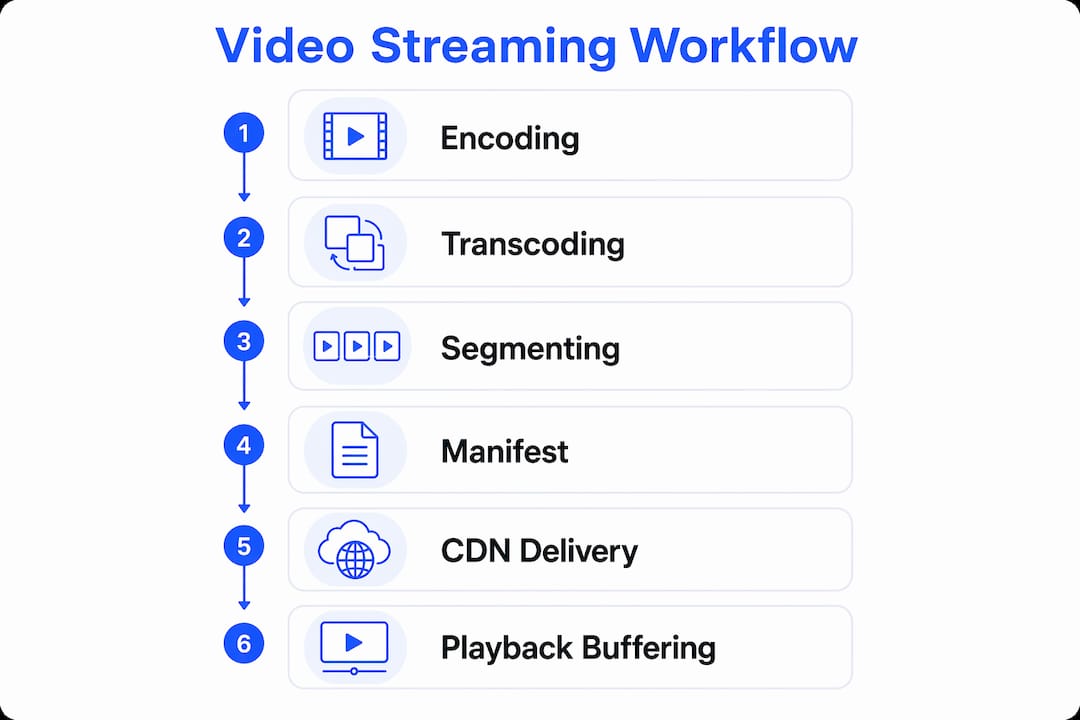
The manifest file is the starting point of every streaming session. Without it, the player has no idea where to find video data or what quality options exist. The manifest lists every available quality level and the URL for each corresponding segment. The player parses this file before requesting a single frame of video.
HLS uses a .m3u8 file. DASH uses a .mpd file. Both serve the same purpose but differ in structure and feature support. HLS was developed by Apple and has near-universal device support. DASH is an international standard with more flexible manifest structures, including support for advanced features like ad insertion through Period and AdaptationSet elements.
| Caratteristica | HLS | DASH |
|---|---|---|
| File format | .m3u8 playlist | .mpd manifest |
| Standardization | Apple proprietary | ISO international standard |
| Device support | Near-universal | Broad, growing |
| Ad insertion | Limited native support | Native via AdaptationSet |
| Latency (standard) | 6–30 seconds | 6–30 seconds |
| Low-latency variant | LL-HLS | CMAF with chunked transfer |
Both protocols operate over HTTP, which means they work with existing web infrastructure including standard caches, firewalls, and CDNs. This is a major reason both protocols scaled globally without requiring new network architecture.
Manifests are also hierarchical. A master manifest lists all quality levels. Each quality level points to its own child manifest, which lists the actual segment files. The player reads the master manifest first, selects a starting quality, then reads the child manifest to begin fetching segments.
Un consiglio da professionista: If you are building a live stream workflow, use LL-HLS or CMAF with chunked transfer encoding. Standard HLS and DASH latency of 6–30 seconds is too high for interactive content like live Q&A or real-time cam sessions.
How do CDNs make video streaming fast and reliable?
A CDN is a network of servers distributed across dozens or hundreds of geographic locations. CDNs cache video segments at these edge locations, so a viewer in Tokyo pulls data from a nearby server rather than from an origin server in New York. This reduces latency and removes the bandwidth burden from the origin.
The architecture matters because video streaming generates enormous request volumes. A single live stream with 100,000 concurrent viewers would overwhelm any single origin server. CDN Points of Presence (PoPs) absorb that load by serving cached segments locally. The origin only handles the initial upload and manifest generation.
Key CDN benefits for streaming:
- Reduced latency: Edge servers serve segments from the closest geographic location, cutting round-trip time.
- Origin offload: The origin server handles a fraction of total requests, reducing infrastructure cost.
- Scalabilità: Adding viewers does not linearly increase origin load, because most requests hit cached edge nodes.
- Fault tolerance: If one edge node fails, requests route to the next closest node automatically.
- Parallel delivery: Multiple segments can be fetched simultaneously from different edge nodes, speeding startup.
For content creators building a following on platforms like Fanspicy, CDN infrastructure is what separates a stream that holds 10,000 viewers from one that crashes at 500. Understanding how CDNs improve reliability helps creators choose platforms with the right infrastructure for their audience size.
How does the video player manage buffering and quality switching?
The video player is the most underappreciated component in the streaming stack. It does not passively receive video. It actively manages a buffer, monitors network conditions, and makes millisecond quality decisions to keep playback smooth. Most viewers never notice this process because it works correctly.
Players maintain a buffer of 5–30 seconds of pre-downloaded video. This buffer absorbs short network interruptions without causing a visible stall. The player continuously measures available bandwidth, CPU load, and buffer health to decide whether to request a higher or lower quality segment next.
Playback begins after the first segment downloads. The player does not wait for the full video. It prefetches several following segments in the background to hide network latency. This prefetch strategy is why a well-engineered player starts playing within a few seconds even for long-form content.
Factors the player monitors continuously:
- Buffer fill level: If the buffer drops below a threshold, the player immediately downgrades quality.
- Estimated bandwidth: Measured from recent segment download speeds, updated every few seconds.
- CPU load: High CPU usage on low-end devices can cause decoding delays, triggering quality drops.
- Segment download time: If a segment takes longer than expected, the player treats it as a bandwidth signal.
- Startup heuristics: Players often begin at a conservative quality level and ramp up once buffer health is confirmed.
Un consiglio da professionista: For live cam and real-time streaming, a shorter buffer target (5–8 seconds) reduces viewer latency but increases sensitivity to network fluctuations. Tune this setting based on your audience’s expected connection quality.
VOD vs. live streaming: what changes in the architecture?
Video on demand (VOD) and live streaming share the same core technologies but differ in how segments and manifests are managed. VOD uses static manifests and pre-cached segments. The entire video is encoded, segmented, and uploaded before any viewer presses play. CDNs cache these segments indefinitely because the files never change.
Live streaming works differently. The encoder generates new segments every few seconds and updates the manifest continuously. The manifest is short-lived, and CDNs must use short cache time-to-live (TTL) values to prevent viewers from receiving stale segment lists. Live streaming manifests require real-time updates every few seconds, which creates a constant tension between latency and stability.
| Property | VOD | Streaming in diretta |
|---|---|---|
| Manifest type | Static | Continuously updated |
| Segment availability | All pre-generated | Generated in real time |
| CDN cache TTL | Indefinite | Short (seconds) |
| Buffering strategy | Aggressive prefetch | Conservative, latency-aware |
| Latency target | Not applicable | 3–30 seconds depending on protocol |
| Chunked transcoding | Not used | Used for low-latency delivery |
Live streaming uses chunked transcoding and playlist blocking to push latency down to 3–5 seconds in low-latency configurations. Chunked transcoding delivers partial segments before they are fully encoded. Playlist blocking holds the player’s manifest request open until a new segment is ready, eliminating polling delays. For creators running real-time streaming sessions, these techniques are what make interactive content feel live rather than delayed.
Punti di forza
Video streaming delivers content through a chain of encoding, segmentation, manifest-guided delivery, CDN caching, and adaptive player logic, each layer depending on the one before it.
| Point | Details |
|---|---|
| Encoding creates the bitrate ladder | Codecs like H.264, H.265, and AV1 compress video into 6–10 quality levels for adaptive delivery. |
| Manifests control every session | HLS and DASH manifest files list segment URLs and quality options; no stream starts without them. |
| CDNs absorb viewer scale | Edge servers cache segments globally, preventing origin overload during high-traffic streams. |
| Players decide quality in real time | Buffer health, bandwidth, and CPU load drive millisecond segment-quality decisions the viewer never sees. |
| VOD and live need different caching | VOD segments cache indefinitely; live stream manifests require short TTLs to stay current. |
Why understanding the stack changes how you create
Most creators treat streaming as a black box. They hit “go live,” watch the viewer count, and blame the platform when quality drops. That approach leaves too much to chance.
Knowing that a player switches quality segment by segment means you understand why a brief network spike does not ruin a stream. It also means you know that encoding at too few bitrate rungs forces the player into larger quality jumps, which viewers notice. A well-configured bitrate ladder with tight rungs at the low end keeps the experience smooth even on weak connections.
The manifest structure also matters more than most creators realize. A misconfigured manifest, one with incorrect segment durations or missing quality levels, can cause players to stall or loop. Platforms that handle manifest generation automatically remove this risk, but creators who self-host need to validate their manifests before going live.
CDN choice is the most underrated decision in a creator’s technical setup. A platform with weak CDN coverage in your audience’s region will deliver poor quality regardless of how well you encode. Understanding how creators use infrastructure to reach global audiences helps you ask the right questions before committing to a platform.
The uncomfortable truth is that most streaming quality problems are infrastructure problems, not content problems. A creator with a great camera and poor CDN coverage will always lose to a creator with an average camera and strong delivery infrastructure.
— fan
Fanspicy: built for creators who take streaming seriously
Fanspicy is a paid social media and live cam platform built for adult content creators who need reliable, high-quality video delivery at scale. The platform handles encoding, CDN distribution, and adaptive playback so creators can focus on content rather than infrastructure.
Whether you are running live cam sessions or publishing on-demand content, Fanspicy provides the delivery infrastructure that keeps streams stable for large audiences. Creators looking to grow their reach and monetize content can start on Fanspicy and access a platform designed for the demands of professional video streaming in 2026.
FAQ
What is adaptive bitrate streaming?
Adaptive Bitrate Streaming (ABS) is a method that delivers video in short segments and automatically switches quality levels based on the viewer’s real-time network conditions. Players maintain a buffer of 5–30 seconds and select from 6–10 quality levels ranging from 240p to 4K.
How does a video player know which quality to play?
The player continuously monitors buffer health, available bandwidth, and CPU load, then selects the highest quality segment that the current network can deliver without causing a stall. These decisions happen in milliseconds and are invisible to the viewer.
What is the difference between HLS and DASH?
HLS uses a .m3u8 playlist file and was developed by Apple, giving it near-universal device support. DASH uses a .mpd manifest and is an ISO international standard with more flexible ad insertion and content splicing capabilities.
Why does live streaming have more latency than VOD?
Live streaming requires continuous manifest updates every few seconds and short CDN cache TTLs to keep content current. Low-latency techniques like chunked transcoding and playlist blocking can reduce this delay to 3–5 seconds, but standard live streams typically run 6–30 seconds behind real time.
What role does a CDN play in video streaming?
A CDN caches video segments at edge servers located close to viewers worldwide, reducing latency and offloading bandwidth from the origin server. This architecture is what allows a single stream to serve tens of thousands of concurrent viewers without degrading quality.