

Indice dei contenuti
TL;DR:
- Live streaming transmits audio and video in real time over the internet through six sequential stages, affecting quality and viewer experience. Adaptive bitrate streaming adjusts quality dynamically to prevent buffering, based on available bandwidth. Successful streams depend on good source quality, stable internet, proper equipment, and optimized latency and buffering controls.
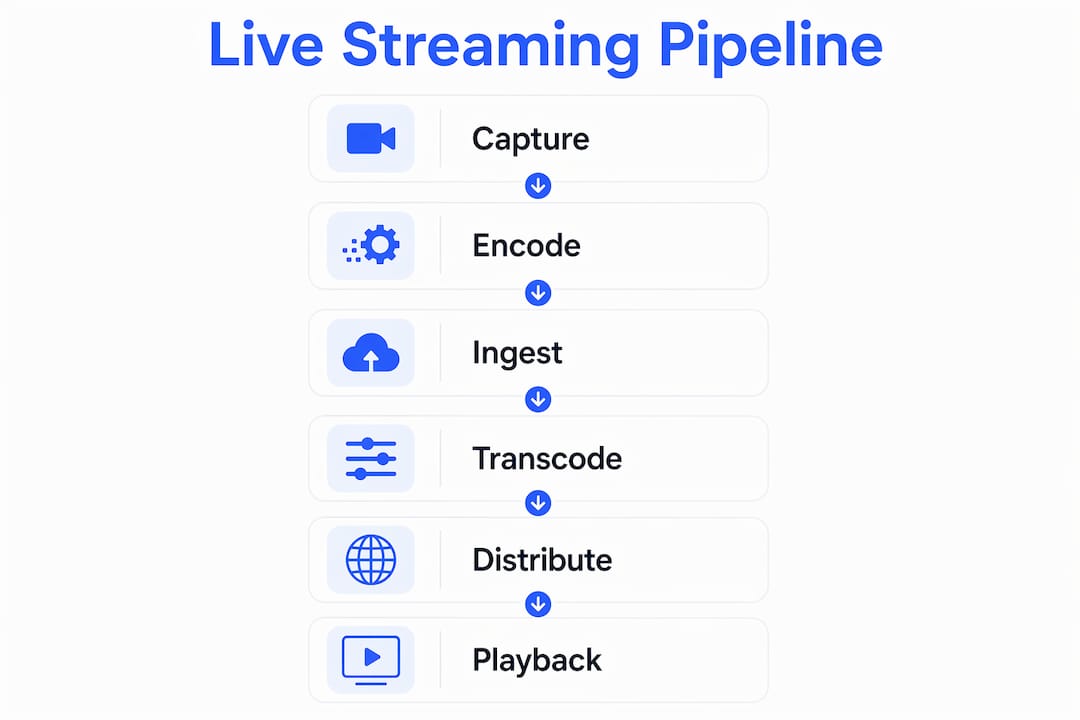
Live streaming is defined as the real-time transmission of audio and video over the internet, delivered to viewers as it is captured. Understanding how live streaming works matters whether you are broadcasting a gaming session, a fitness class, or adult content on a platform like Fanspicy. The process runs through six core stages: capture, encode, ingest, transcode, deliver, and playback. Each stage has a direct impact on quality, latency, and viewer experience. Get any one of them wrong, and your audience notices immediately.
How does live streaming work from start to finish?
Live streaming moves your content through a pipeline that begins the moment your camera records and ends when a viewer watches on their screen. Latency ranges from under 1 second to 30 seconds depending on the protocol and platform configuration. That range is not a flaw. It reflects deliberate trade-offs between speed, scale, and stability.
The six stages work in sequence:
- Capture. Your camera and microphone record raw audio and video. Source quality here sets the ceiling for everything downstream. A blurry, dark, or muffled capture cannot be corrected later.
- Encoding. Software or hardware compresses the raw data into a digital format viewers can receive. Common codecs include H.264 and H.265. Without encoding, raw video files would be too large to transmit in real time.
- Ingestion. The encoded stream travels from your device to a media server using a protocol such as RTMP, SRT, or WebRTC. Common ingest protocols each carry different trade-offs in latency and reliability.
- Transcoding. The server converts your single stream into multiple quality versions, from 1080p down to 360p. This step is what makes adaptive playback possible.
- Delivery. Content Delivery Networks, or CDNs, distribute those versions to edge servers located close to your viewers. CDNs cache segments near viewers to cut startup time and handle traffic spikes without crashing.
- Playback. The viewer’s player selects the best quality version, buffers a few seconds, decompresses the data, and displays the video.
Un consiglio da professionista: Think of this pipeline as a chain. Identify the weakest link first before spending money on upgrades elsewhere.
Why does adaptive bitrate streaming matter?
Adaptive Bitrate streaming, known as ABR, is the technology that prevents your viewers from staring at a buffering wheel. ABR segments video into 2–10 second chunks, allowing the viewer’s player to switch between quality levels in real time based on available bandwidth. A viewer on a fast fiber connection gets 1080p. A viewer on a weak mobile signal gets 360p. Both watch without interruption.
The standard bitrate ladder used by most platforms looks like this:
| Resolution | Typical Bitrate | Best for |
|---|---|---|
| 1080p | 4,000–6,000 kbps | Desktop, fast broadband |
| 720p | 2,500–4,000 kbps | Laptop, solid home Wi-Fi |
| 480p | 1,000–2,000 kbps | Mobile, average connection |
| 360p | 400–800 kbps | Weak signal, rural areas |
The two protocols that power ABR delivery are HLS (HTTP Live Streaming, developed by Apple) and DASH (Dynamic Adaptive Streaming over HTTP, an open standard). Both break video into small segments and use a manifest file to tell the player which versions are available. Transcoding into multiple renditions prevents pixelation and buffering by matching each viewer’s actual bandwidth at any given moment.
Un consiglio da professionista: If you self-host your stream, setting up a transcoding ladder manually is complex but non-negotiable. Skipping it means viewers on slow connections see a broken stream.
What equipment and setup optimize live streaming quality?
The right gear makes a measurable difference, but setup decisions matter just as much as the hardware you buy. The capture quality, or “truth layer,” is the foundation of your entire stream. Poor lighting, muddy audio, or a shaky camera cannot be corrected by any encoder or CDN downstream.
Start with these priorities:
- Lighting. A ring light or a two-point key and fill setup removes shadows and makes your image sharp. Viewers tolerate a lot, but a dark, grainy picture drives them away fast.
- Audio. A USB condenser microphone or an XLR mic with an audio interface outperforms any built-in laptop microphone. Bad audio is the number one reason viewers leave a stream.
- Camera. A dedicated webcam rated at 1080p or a mirrorless camera with a capture card delivers far better image quality than a built-in camera.
- Encoder. Software encoders like OBS Studio run on your CPU or GPU. Software encoding is CPU and GPU intensive, and running it on an underpowered machine causes dropped frames. Dedicated hardware encoders offload that work entirely, giving you a more stable output.
- Internet connection. The first-mile upload connection from your encoder to the ingest server is the most common failure point in any live stream. Use wired Ethernet instead of Wi-Fi whenever possible.
Un consiglio da professionista: Before going live, run a 10-minute test stream and watch the encoder stats. If your CPU usage exceeds 80% or you see dropped frames, lower your output resolution or bitrate before your audience shows up.
Common pitfalls to avoid include streaming over Wi-Fi from a crowded network, running too many background applications during encoding, and choosing an ingest server geographically far from your location. Each of these adds unnecessary instability to your stream.

How do latency and buffering affect your stream?
Latency is the delay between what happens in front of your camera and what your viewer sees on screen. Latency ranges from under 1 second with WebRTC to 5–30 seconds with standard HLS. That gap matters enormously when your content depends on real-time interaction, like live chat or Q&A.
Buffering is a separate issue. It happens when the viewer’s player runs out of pre-downloaded segments to display. Some buffering is intentional. Players pre-load a few seconds of video to absorb small network hiccups. The problem starts when the network cannot keep up with the incoming stream, forcing the player to pause and wait.
| Protocol | Typical Latency | Best use case |
|---|---|---|
| WebRTC | Under 1 second | Interactive video calls, real-time chat |
| SRT | 1–4 seconds | Unstable networks, remote broadcasts |
| RTMP | 3–10 seconds | Standard streaming to ingest servers |
| HLS | 5–30 seconds | Large-scale delivery, VOD-style streams |
Several factors drive latency up or down. Segment length is one of the biggest. Shorter HLS segments reduce latency but increase server load. CDN edge server location matters too. A viewer in Tokyo watching a stream ingested in New York adds travel time to every segment. Choosing a CDN with global edge coverage reduces that gap significantly.
The trade-off between low latency and scale is real. WebRTC achieves sub-second delivery but struggles to serve thousands of simultaneous viewers. HLS scales to millions but adds delay. Most creators land somewhere in the middle, using Low-Latency HLS or SRT depending on their platform and audience size.
Punti di forza
Live streaming works as a six-stage pipeline where capture quality, encoding power, protocol choice, and CDN reach each determine what your viewer ultimately sees and hears.
| Point | Details |
|---|---|
| Six-stage pipeline | Every stream runs through capture, encode, ingest, transcode, deliver, and playback in sequence. |
| Capture quality is the ceiling | Poor lighting or audio cannot be fixed downstream; invest in your source environment first. |
| ABR prevents buffering | Adaptive Bitrate streaming switches quality in real time so viewers on any connection watch without interruption. |
| Wired connection is non-negotiable | Ethernet beats Wi-Fi every time for upload stability; the first mile is the most common failure point. |
| Latency is a trade-off | WebRTC delivers under 1 second but limits scale; HLS scales to millions but adds 5–30 seconds of delay. |
What I have learned from watching creators get this wrong
The most common mistake I see creators make is spending money in the wrong order. They buy an expensive camera before they fix their lighting or their internet connection. A $1,500 mirrorless camera in a dark room with a shaky Wi-Fi signal produces a worse stream than a $100 webcam in a well-lit space with a wired Ethernet connection. The glass-to-glass pipeline concept changed how I think about this. Every stage from camera lens to viewer screen is connected. A bottleneck at any point degrades everything after it.
The second thing I have seen creators underestimate is the value of real-time interactivity in keeping an audience engaged. Chat, polls, and Q&A are not extras. They are what separates a live stream from a recorded video. Viewers who feel seen and heard stay longer and come back more often. The technology behind the stream matters, but connection is what monetizes it.
My honest advice: treat your first three months of streaming as a diagnostic phase. Stream consistently, watch your encoder stats, check your viewer drop-off points, and fix one variable at a time. You will learn more from that process than from any gear upgrade.
— fan
Live streaming on Fanspicy: built for creators who take quality seriously
Fanspicy is a paid social media and live cam platform built for creators who want to monetize their streams directly. The platform supports real-time interaction features including live chat, giving you the tools to build the kind of audience connection that drives recurring revenue.
If you are ready to put the technical knowledge from this article into practice, Fanspicy gives you a platform designed around creator earnings and viewer engagement. Whether you are just starting out or looking to grow an existing audience, explore Fanspicy to see how the platform supports your streaming setup from day one.
FAQ
What is live streaming in simple terms?
Live streaming is the real-time delivery of video and audio over the internet, where viewers watch content as it is captured rather than after it has been recorded and uploaded.
What protocols are used in live streaming?
The most common protocols are RTMP for sending streams to ingest servers, SRT for unstable network conditions, WebRTC for ultra-low latency, and HLS or DASH for delivering content to viewers at scale.
How does adaptive bitrate streaming reduce buffering?
Adaptive Bitrate streaming breaks video into short segments and lets the viewer’s player switch between quality levels in real time based on available bandwidth, so playback continues smoothly even when network speed drops.
What is the biggest cause of a bad live stream?
The first-mile upload connection is the most common failure point. A slow or unstable upload from your encoder to the ingest server causes dropped frames, buffering, and stream disconnections regardless of how good your camera is.
What is live streaming for adults on platforms like Fanspicy?
Live streaming for adults on platforms like Fanspicy follows the same technical pipeline as any live stream, with the addition of monetization tools, direct viewer interaction, and privacy controls designed specifically for paid content creators.