

Table of Contents
Video streaming works by compressing a video, cutting it into small pieces, and sending those pieces over the internet to your device, which plays them as they arrive instead of waiting for a complete file. Behind that one sentence sits a chain of steps: capture, encoding, a media server, a content delivery network, and a player that keeps adjusting quality to your connection. This guide walks through each step in plain language, explains why streams sometimes stall, and shows what changes when the video is live.
TL;DR
- Streaming is continuous delivery of compressed video from a server to a player, which starts playing before the whole video has arrived.
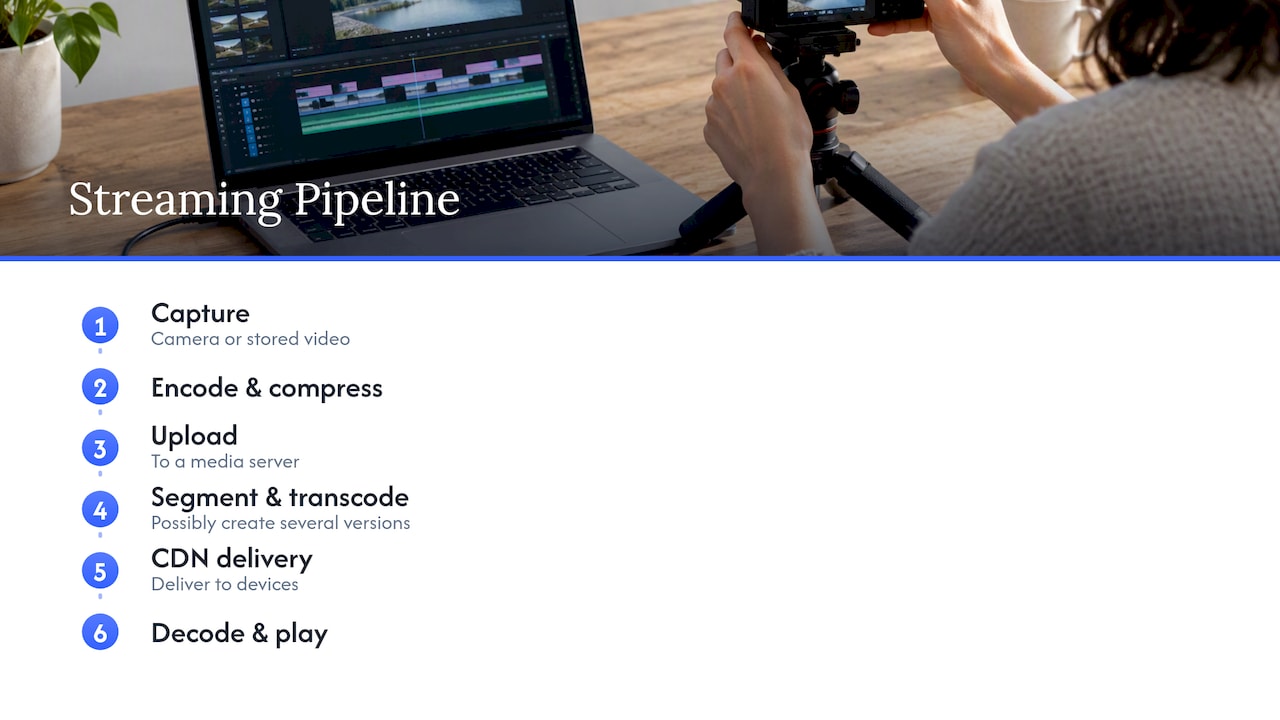
- The usual path is capture, encode, upload to a media server, segment and transcode into several qualities, deliver through a CDN, then decode and play.
- Adaptive bitrate lets the player switch quality based on your connection speed, and buffering happens when the buffer empties faster than it refills.
- Live streaming runs the whole pipeline in real time, so every stage adds delay, not just the network.
- Creators who understand the pipeline can set up streams that look better and stay stable for paying fans.
Table of Contents
- What video streaming actually is
- The journey of a stream, step by step
- Protocols: how the pieces travel
- Adaptive bitrate: why quality changes while you watch
- Why buffering happens
- On-demand vs. live: what changes
- What this means for creators who go live
- Our perspective: the technology is only half the product
- Put it into practice on Fanspicy
- FAQ
- Sources
What video streaming actually is
Streaming is the continuous transmission of compressed video from a server to a client, and the video plays as the data arrives. A downloaded file is different: it is loaded all at once and cannot be played while it is still downloading.
The BBC puts the everyday version of this simply: streaming plays a programme online straight away, while downloading saves it on your device for viewing later, offline. In practice that means a streamed video leaves little behind on your device, while a downloaded one stays until you delete it.
The practical gain is speed to first frame. You do not wait for a two-hour movie to transfer. You wait for the first few seconds, and the rest follows while you watch.
The journey of a stream, step by step
Researchers describe the full path as an end-to-end pipeline. It starts with camera capture or a stored video, which is encoded and compressed, uploaded to a media server, segmented and possibly transcoded into several versions, then delivered through a CDN to devices that decode and play it. Here is each stage in turn.
1. Capture or storage
Every stream starts as either a live camera feed or a file that already sits on a server. A phone camera, a webcam or a studio camera produces raw frames. Raw video is enormous, far too large to send over a normal home connection, which is why the next step exists.
2. Encoding and compression
An encoder uses a codec to shrink the video. Codecs apply spatial and temporal compression: spatial compression removes detail inside a single frame, and temporal compression avoids repeating what has not changed between frames. A talking head against a still background compresses very well. Fast action with a lot of movement is harder.
The trade-off is always the same. A higher bitrate keeps more detail and needs more bandwidth. A lower bitrate is lighter and easier to deliver but looks softer. Choosing the codec and bitrate is the first major quality decision in the chain.
3. Upload to a media server
The encoded video goes to a media server. For live video, RTMP is described as a common protocol for this upload leg, which is why many broadcasting apps ask you for a server address and a stream key. Stored video is simply uploaded once and kept.
4. Segmenting and transcoding
The server cuts the video into short chunks and usually creates several versions of each, from small and light to large and sharp. Those versions are often called renditions or representations. This is what makes it possible to serve a viewer on a weak mobile connection and another on fast fiber from the same source.
A small text file called a manifest ties it together. The manifest describes the available representations and chunk properties, so the player knows what to ask for next.
5. Delivery through a CDN
A content delivery network keeps copies of chunks on servers spread around the world. CDNs deliver video from edge servers to user devices with low latency and high quality of experience. Instead of every viewer pulling from one distant machine, each viewer pulls from a nearby one. That is how a single stream reaches thousands of people without collapsing the origin server.
6. Decoding and playback
The player on your phone, TV or browser does the last mile. AWS describes a streaming client as the part that presents the interface, requests media, decodes it, renders playback and can send playback data back. In a browser, the player interprets arriving packets as video or audio on a connected device.
Protocols: how the pieces travel
A protocol is the agreed set of rules for moving data between two points. A stream usually uses one protocol to get video in and another to get it out.
| Stage | Typical job | Common example |
|---|---|---|
| Ingest | Carry video from the encoder to the media server | RTMP |
| Delivery | Carry chunks from the CDN to the player | HLS, an HTTP-based adaptive protocol |
| Description | Tell the player what versions exist | Manifest file |
The same survey notes that RTMP is common for upload, while HLS is a prevalent HTTP adaptive delivery protocol. Delivery over HTTP caught on for a practical reason: it works with browsers and CDN HTTP caches, and can pass through common firewalls and network address translators. In other words, it reaches nearly any viewer without special network setup.
Adaptive bitrate: why quality changes while you watch
You have probably seen a video start soft and sharpen after a few seconds. That is adaptive bitrate streaming, often shortened to ABR. The player chooses among the available bitrates based on observed download speed and device capabilities.
The logic works like this:
- The player reads the manifest and picks a starting version, often a cautious one so playback begins quickly.
- It downloads a chunk and measures how fast it arrived.
- If the chunk came in fast, it requests a higher-quality version of the next chunk.
- If downloads slow down, it steps down to a lighter version to protect playback.
Because chunks are short, the switch is almost seamless. Researchers treat this as a central problem: ABR, CDN placement and quality-of-experience management matter because viewers have very different devices and changing network conditions.
Why buffering happens
The player keeps a buffer, a small store of video downloaded ahead of the current playback position. Stalling occurs when the buffer empties because delivery cannot fill it fast enough. Adaptive bitrate exists largely to prevent that moment by dropping quality before the buffer runs dry.
When buffering still happens, the cause usually sits in one of a few places. Bandwidth, latency, network congestion, Wi-Fi problems and device processing performance can all affect playback. A quick checklist for viewers:
- Move closer to the router or switch from Wi-Fi to a wired connection.
- Pause other heavy downloads or video calls on the same network.
- Pick a lower quality manually if the connection is poor.
- Close extra browser tabs and apps on an older device.
- Restart the router if every service is slow, not just one.
If only one service stalls while others run fine, the bottleneck is more likely on the provider’s side than in your home.
On-demand vs. live: what changes
On-demand streaming plays prerecorded media when a viewer presses play. Live streaming sends media while an event is in progress. That sounds like a small difference, but it changes the engineering.
With stored video, ingestion is decoupled from distribution because the content is stored before delivery, while live streaming requires the entire capture-to-playback pipeline to operate in real time. The server cannot prepare anything ahead. Encoding, segmenting, transcoding and delivery all happen while the broadcaster is still talking.
On-demand playback generally has less latency pressure than live, though startup time, steady quality and avoiding stalls still matter for both.
Where live delay comes from
The delay between what a broadcaster does and what a viewer sees is called glass-to-glass latency. It is measured from the real-world event to playback, and includes encoding, decoding, buffering and ingest to an intermediary such as a CDN, not just network travel time. That explains why a fast internet plan alone does not make a live stream instant: every stage adds a little.
A longer buffer makes playback steadier but adds delay. A shorter buffer feels more immediate but leaves less room for network hiccups. Interactive formats such as live chat, tipping and requests push providers to keep that balance tight, because fans expect a reaction in seconds, not half a minute.
What this means for creators who go live
Most viewers never think about any of this. Creators who broadcast do need to, because the first leg of the pipeline is theirs. A weak upload or a badly chosen encoder setting limits quality for every single viewer downstream, no matter how good the CDN is.
A few habits make the biggest difference:
- Test your upload speed and keep your bitrate comfortably below it, so the stream does not stutter when other devices use the network.
- Use a wired connection to the router when you can. Wi-Fi is a common cause of dropped frames.
- Light your scene well. Clean, evenly lit video compresses better, so the same bitrate looks sharper.
- Check audio first. Viewers forgive soft video faster than crackling sound.
- Do a private test run before a scheduled show to confirm your stream key, server and resolution work.
We cover the creator side in more depth in our guides on how live video streaming works for creators, live streaming best practices and a more technical deep dive into video streaming. If you want the full setup walk-through, see our complete live streaming guide.
Our perspective: the technology is only half the product
We see streaming from the creator’s side of the screen. The pipeline above is mostly invisible to fans, yet it shapes everything they experience: how fast a show starts, whether a private stream stays sharp, whether a tip lands while the creator is still reacting. For independent creators, reliable delivery is part of the product they sell.
That is why we think of a creator platform as more than a video player. Creators need several ways to earn from one audience: subscriptions, paid posts, private messages, live streams, bundles and tips. They also need to keep ownership of the relationship with their fans, and to move their existing content without starting over. A platform that lets creators keep a higher share of what they earn and own their audience gives them room to invest in better gear, better lighting and a better connection, which is exactly what improves the stream.
Our view is simple: when creators understand how their stream travels, they make better decisions, and fans get a better show. Technology should serve the community around it, not the other way around.
— fan
Put it into practice on Fanspicy
If you are a creator ready to use what you have just learned, Fanspicy gives you a place to run live streams, subscriptions and private messages in one profile, and to add exclusive content, paid posts and tips for fans who want more. Creators do not pay a fee to join or use the platform, and the platform takes a percentage commission per transaction. If you already publish elsewhere, you can bring your content with you and build on an audience you own.
Want to understand the business side of going live? Our pieces on live cam streaming and earning potential and live streaming growth are a good next step.
FAQ
What is the difference between streaming and downloading?
Streaming plays video as it arrives, so you can start watching within seconds and the file is not kept as a complete copy. Downloading transfers the whole file first, and it cannot be played while it is still downloading. Streaming suits instant viewing, while a download suits watching offline later.
Why does a video sometimes look blurry and then get sharper?
The player often starts with a lighter version of the video so playback begins fast, then moves up to a higher-quality version once it has measured your connection speed. This is adaptive bitrate streaming. If your connection slows later, the player can step quality back down to avoid stalling.
Why is a live stream delayed compared with the real event?
Live delay includes more than network travel. Encoding, ingest to a server or CDN, buffering and decoding each add time, and the total is called glass-to-glass latency. Providers shorten it by using smaller buffers, but a very short buffer leaves less protection against network problems.
What internet connection do I need to stream video?
It depends on the quality you choose, but the key factors are available bandwidth, a stable connection and a device that can decode the video smoothly. Wi-Fi problems and congestion on a shared network are common culprits. A wired connection and fewer competing devices usually help.
Sources
- What Is Video Streaming? Definition, Meaning and How It Works (TechTarget)
- What’s the difference between streaming and downloading? (BBC iPlayer Help)
- An End-to-End Pipeline Perspective on Video Streaming (ACM)
- A Contemporary Survey on Live Video Streaming (ACM)
- An End-to-End Pipeline Perspective on Video Streaming (arXiv)
- RFC 9317: Operational Considerations for Streaming Media
- What is streaming? (Cloudflare)
- Streaming architecture, Streaming Media Lens (AWS)