
Table des matières
To monetize YouTube, you join the YouTube Partner Program (YPP). That means meeting the subscriber and watch-time thresholds, linking an AdSense account, and then turning on the earning features you want in YouTube Studio. This guide walks through each step, explains how and when you get paid, and shows how to build income that does not depend on one platform’s ad rules.
TL;DR
- The ad-sharing tier of YPP asks for 1,000 subscribers plus either 4,000 qualified watch hours in the last 12 months or 10 million qualified Shorts views in the last 90 days.
- A lower tier for fan-funding tools such as memberships, Super Thanks and Shopping has been reported at 500 subscribers, 3 public uploads in 90 days, and 3,000 watch hours or 3 million Shorts views.
- You enable everything from YouTube Studio, on desktop or in the mobile app, and you can switch ads on or off per video.
- Payouts need a linked AdSense account, U.S. tax information and policy compliance, so set these up early.
- Ads are one stream among many. Creators who also sell subscriptions, paid posts and tips directly to fans own more of their income.
Table des matières
- What you need before you apply
- The two tiers: ad sharing and fan funding
- How to apply and turn monetization on
- Monetizing from your phone
- Monetizing individual videos and mid-roll ads
- Every way to earn on YouTube
- How much YouTube pays per 1,000 views
- Getting paid: thresholds, taxes and verification
- Policies that can switch your income off
- Why creators should not rely on one revenue source
- Build income beyond ads
- Start earning directly from your fans
- FAQ
- Sources
What you need before you apply
YouTube treats monetization as a program you qualify for, not a switch every channel gets. Before you open the application, check four things.
Subscribers and watch time. For revenue sharing on ads, YouTube asks for 1,000 subscribers and either 4,000 qualified public watch hours in the past 12 months or 10 million qualified public Shorts views in the past 90 days. Watch hours come from long-form videos, so a channel built mostly on Shorts follows the views route instead.
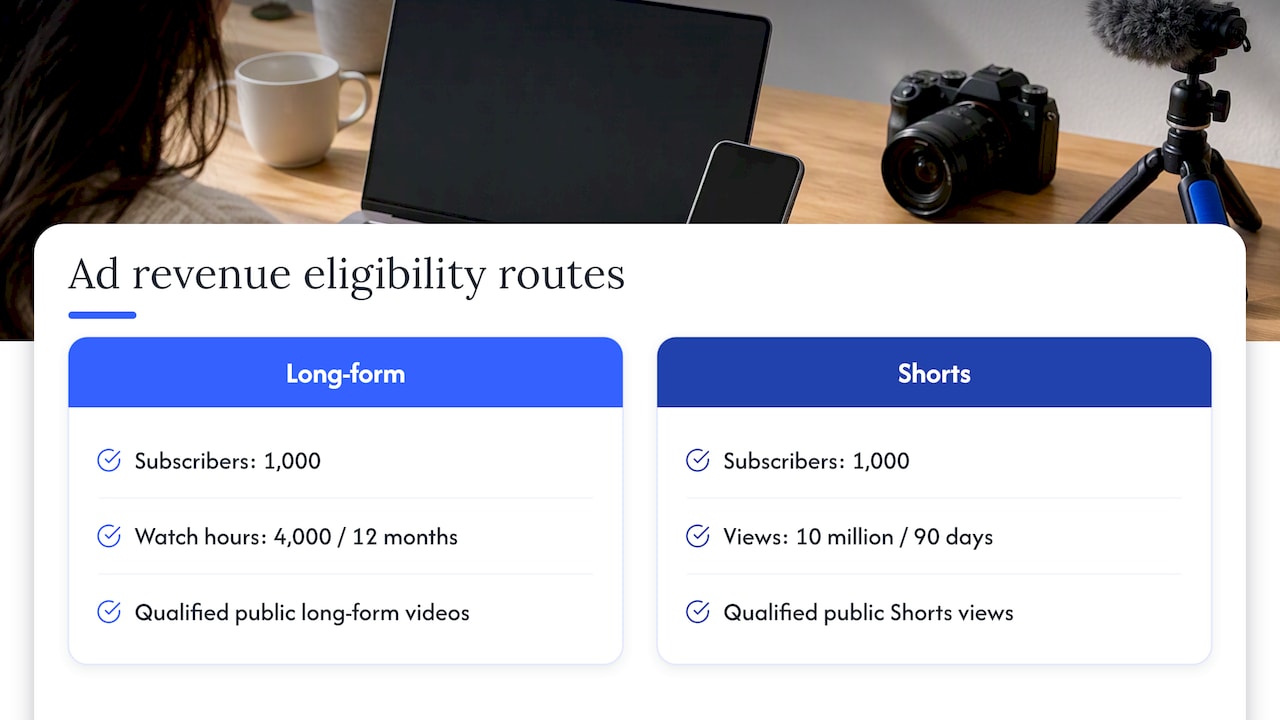
An AdSense account. The same official page says you need one active AdSense for YouTube account linked to your channel, or to be ready to set one up in YouTube Studio. This is the account that receives your money, so use accurate legal details.
Two-step verification and good standing. Applicants are expected to secure the channel with two-step verification and to have no active Community Guidelines strikes. Both are listed among the requirements on the official eligibility page, which is the place to confirm the current wording.
A supported location and original content. Monetization is not available in every country, and the content has to be your own. More on content rules in the policy section below.
Thresholds change. Existing partners have been told to review and accept updated program terms by January 31, 2027, to keep monetizing after February 1, 2027, and press coverage describes the bar for new applicants as rising. Always check the official eligibility page the day you apply.
The two tiers: ad sharing and fan funding
YouTube now separates what you can unlock into levels. According to Forbes’ report on the changes, a lower tier covers fan-funding tools such as Super Thanks, channel memberships and YouTube Shopping. It requires 500 subscribers, 3 public uploads in the last 90 days, and either 3,000 watch hours on long-form videos in the last 365 days or 3 million qualified Shorts views in the last 90 days.
The same coverage reads this as a strategic move: YouTube raises the price of admission to its core ad-revenue program while keeping the barrier lower for revenue that comes straight from fans. For a small channel, that is useful information. Your earliest income may come from people who love your work rather than from advertisers.
| Tier | Subscribers | Watch time or Shorts views | Unlocks |
|---|---|---|---|
| Fan funding (lower) | 500, plus 3 public uploads in 90 days | 3,000 long-form hours in 365 days, or 3 million Shorts views in 90 days | Super Thanks, memberships, Shopping |
| Ad sharing (full YPP) | 1,000 | 4,000 hours in 12 months, or 10 million Shorts views in 90 days | Ad revenue sharing and the full set of features |
These figures come from the sources above and can change, so treat the table as a planning aid and verify on YouTube’s own page before you apply.
How to apply and turn monetization on
YouTube’s own help pages describe the path through YouTube Studio. The flow is the same in spirit whether you start on desktop or on your phone.
- Open YouTube Studio and go to the Earn section. This is where YouTube shows your eligibility progress and the program modules.
- Apply when you meet a tier. If you are eligible, the Earn page lets you start the application and accept the base terms. If you are not yet eligible, it shows how close you are.
- Link or create your AdSense account. Follow the prompts to connect an existing account or open a new one from the same screen.
- Accept the optional modules. Each earning feature has its own terms, and you accept them one at a time so you only enable what fits your channel.
- Wait for the review. YouTube states that it reviews each applicant’s channel before admitting it to YPP, so expect a waiting period rather than instant approval.
- Choose how each video earns. Once accepted, decide which videos run ads and where.
If the review comes back negative, the reason is usually content that is too repetitive, reused from other sources, or outside the advertiser-friendly guidelines. Fix the issue, keep publishing original work, and reapply when YouTube allows it.
Monetizing from your phone
You do not need a computer. In the YouTube Studio app, you can accept optional monetization modules in the Earn tab and turn on ads for individual videos from the Content tab.
For an existing video on mobile:
- Open YouTube Studio and tap Content.
- Select the video.
- Tap the edit icon and open the monetization settings.
- Choose where ads should appear and save.
The mobile app and the desktop version show the same account, so a change made on one appears on the other. Installing the Studio app early also makes it easier to watch your eligibility progress on the go.
Monetizing individual videos and mid-roll ads
After you join YPP, monetization is not all-or-nothing. For a single video, you can turn monetization on in YouTube Studio, and for videos that are 8 minutes or longer you can also turn on mid-roll ads in that video’s monetization settings.
A few practical rules of thumb:
- Place mid-roll breaks at natural pauses. A break in the middle of a sentence frustrates viewers and can hurt retention.
- Go longer only when the content earns it. Stretching a video just to fit an ad break rarely pays off if viewers leave early.
- Turn ads off where they do not belong. A sponsored video that already carries a brand integration may be better without extra ad breaks.
Every way to earn on YouTube
Ads are the best-known option, but YouTube’s help center lists several. The available features include advertising revenue, Shopping (your own products or affiliate), YouTube Premium revenue, channel memberships, Super Chat, Super Stickers and Super Thanks.
| Earning method | How it pays | Best for |
|---|---|---|
| Advertising revenue | Share of ad revenue on your videos | Channels with steady views |
| YouTube Premium revenue | Share based on Premium members watching your content | Channels with loyal viewers |
| Channel memberships | Recurring fan payments for perks | Communities with regular uploads |
| Super Chat and Super Stickers | Paid messages during live streams | Streamers with live audiences |
| Super Thanks | One-time fan payment on a video | Videos that viewers want to reward |
| Shopping | Sales of your products or affiliate items | Creators with merch or product reviews |
YouTube also notes that some features have extra eligibility thresholds to satisfy legal requirements in different jurisdictions and to give reviewers enough context to verify compliance. If a feature does not appear in your Earn tab yet, that is the usual reason.
Outside the platform, many creators add sponsorships, affiliate links and their own products. Those sit beside YPP rather than inside it, and they are often the largest income source for mid-sized channels.
How much YouTube pays per 1,000 views
There is no fixed rate, and anyone who quotes one is guessing. Two metrics matter. RPM is a creator-focused figure for earnings per 1,000 views, while CPM is the cost per 1,000 ad impressions before YouTube’s revenue share.
The consequence is that RPM is typically lower than CPM, because it is calculated after YouTube’s share and counts all views, including those that did not show an ad. Your own RPM in YouTube Analytics is the number to plan around. It varies with audience location, topic, video length and season, so compare your own videos against each other rather than against a headline figure from someone else’s channel.
As for how many views you need to be paid, there is no view count that triggers a payment. What matters is qualifying for the program, then reaching the payment threshold in your balance.
Getting paid: thresholds, taxes and verification
Monetizing and receiving money are two steps, and the second has its own checklist.
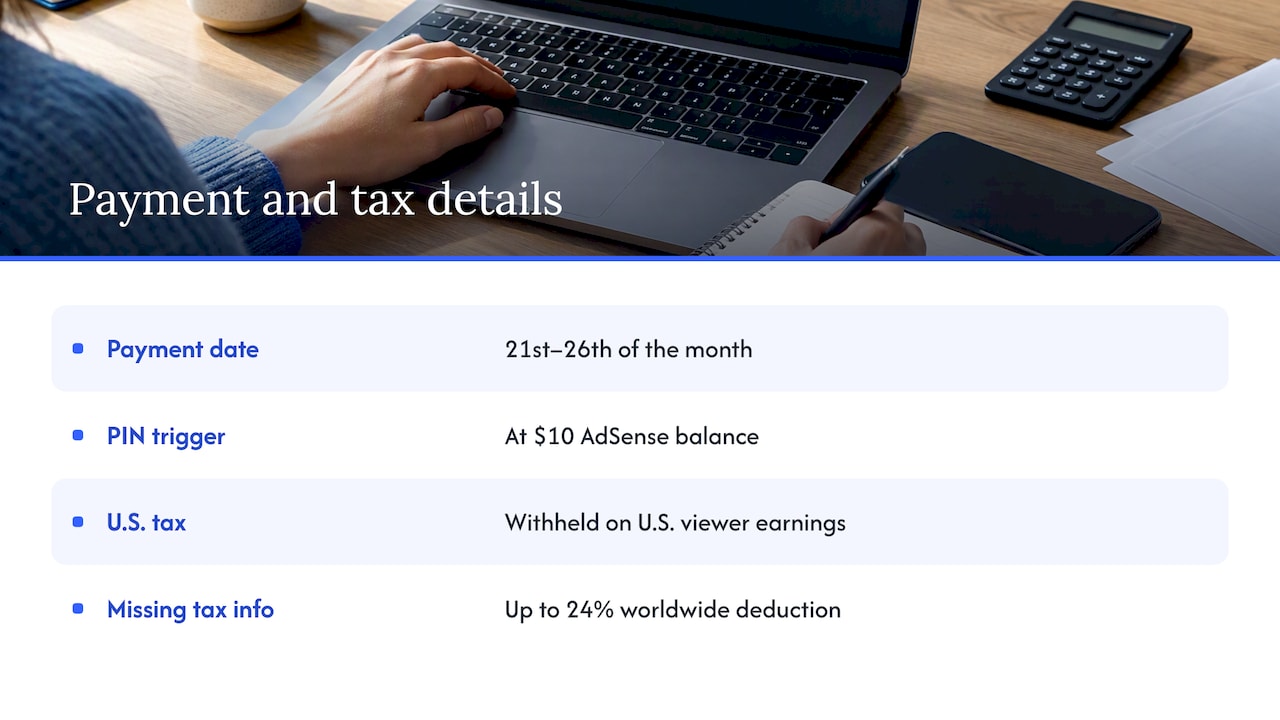
Payment timing. Finalized earnings are paid between the 21st and 26th of the month, provided your balance meets the payment threshold, there are no payment holds, your U.S. tax information is on file, monetization is not paused or suspended, and you follow YouTube’s monetization policies.
Address verification. For a new account, a PIN verification card is mailed once your AdSense balance reaches $10, and address verification is required to keep monetizing and receive payments. Watch your mail and do not lose the card.
Taxes. Google must withhold U.S. taxes on earnings from U.S. viewers, and failing to provide tax information may lead to a worldwide deduction of up to 24% of total earnings. Filling in the tax form in your account settings is the simplest way to avoid it. For your own tax obligations, talk to a qualified tax professional in your country.
Policies that can switch your income off
Earning is conditional on behavior. Channels must follow the channel monetization policies, the advertiser-friendly content guidelines, the Community Guidelines and the Terms of Service, and violations can lead to monetization being paused, suspended or removed. The same page says monetizing content must be original and authentic, avoiding mass-produced, repetitive or manipulative material.
In practice:
- Add your own commentary, editing or storytelling to any reused clips.
- Avoid templated videos that differ only in a title or a stock image.
- Read the advertiser-friendly guidelines before you publish on sensitive topics, because ad eligibility can be limited even when a video is allowed to stay up.
If your content is adult, edgy or otherwise outside what advertisers accept, YouTube ads will not be a dependable income. That is not a reason to stop creating. It is a reason to build revenue somewhere your content is welcome.
Why creators should not rely on one revenue source
Our perspective
We built Fanspicy around a simple belief of the creator economy: the audience you build should belong to you. A platform that pays through ads sets the rules, the thresholds and the timing, and changes them when its strategy changes. The recent shift toward higher bars for ad sharing is a good reminder of that.
That is why we focus on direct monetization. On Fanspicy, creators sell subscriptions, exclusive content, paid posts, private messages, live streams, bundles and receive tips. Fans pay creators directly, and creators do not pay fees to join or use the platform. Our revenue share model emphasizes letting creators keep a higher percentage of what they earn.
We also designed the platform for creators who already have an audience elsewhere. Our approach to content migration is meant to make moving over simple, so the time you invested in building a following is not wasted.
The strongest creator businesses we see combine reach with ownership: video platforms for discovery, and a direct fan relationship for dependable income. We think of that mix as the game-changer for sustainable monetization.
fan
Build income beyond ads
No matter how well a YouTube channel performs, ad income rises and falls with views, seasons and policy changes. A direct revenue layer smooths that out. Fans who already enjoy your videos are the people most likely to pay for more, such as behind-the-scenes posts, early access, personal messages or live sessions.
If you want to go deeper, these guides cover the mechanics:
- Seven proven revenue streams for creators shows how to stack income sources instead of relying on one.
- Subscription-based content and recurring revenue explains how monthly fan payments create predictable earnings.
- How to promote paid content covers sending your existing audience to your paid offers.
- Social media content marketing for creators shows how to use short clips and posts to drive that traffic.
A simple plan for the first 90 days
- Weeks 1 to 4: Publish consistently, check your eligibility progress in Studio, and secure your account with two-step verification.
- Weeks 5 to 8: Study which videos hold viewers longest and make more like them. Start a simple link in your channel description pointing to a place where fans can support you directly.
- Weeks 9 to 12: Apply as soon as you qualify, set up AdSense and tax details, and launch a paid fan offer so income does not wait on a review.
Start earning directly from your fans
If you want an income stream that does not depend on thresholds, Fanspicy is a paid social media and live platform where independent creators sell subscriptions, exclusive content, private messages, live streams, bundles and receive tips. If you are ready to open your page, become a model on Fanspicy, or explore the platform to see how creators present their offers.
Creators on Fanspicy keep ownership of their audience and choose how they earn, whether through recurring subscriptions, one-off paid posts or live sessions with tips. It works well alongside a video channel, because every viewer you attract elsewhere becomes a potential paying fan.
FAQ
How many views do you need on YouTube to be paid?
No view count triggers a payment by itself. You first qualify for the Partner Program, which for ad sharing means 1,000 subscribers plus 4,000 watch hours or 10 million Shorts views, and then your earnings must reach the payment threshold. Check the official eligibility page for current figures.
Can I monetize my YouTube channel on my phone?
Yes. In the YouTube Studio app you accept monetization modules from the Earn tab and turn on ads for individual videos from the Content tab. The steps mirror the desktop version, and both show the same account.
How much does YouTube pay per 1,000 views?
It depends on your audience, topic and video format, so there is no single number. Use the RPM in your YouTube Analytics, which shows earnings per 1,000 views after YouTube’s share, and compare it across your own videos.
Why was my monetization application rejected?
The most common causes are reused or repetitive content, policy violations or content that does not meet advertiser-friendly guidelines. Review the channel monetization policies, improve the originality of your videos and reapply when YouTube allows it.
Do I have to pay taxes to YouTube?
Google withholds U.S. taxes on earnings from U.S. viewers, and missing tax information can lead to a higher deduction of up to 24% of worldwide earnings. Submit your tax details in your account and ask a tax professional about your own situation.
Sources
- YouTube Partner Program overview and eligibility
- How to earn money on YouTube
- How to earn money on YouTube (program terms update)
- YouTube Doubles The Monetization Bar For New Creators, Forbes
- YouTube Policies Crafted for Openness, How YouTube Works
- Choose how you want to monetize, Android, YouTube Help
- Manage mid-roll ad breaks in long videos
- Understand ad revenue analytics
- YouTube partner earnings overview
- Set up an AdSense for YouTube account to get paid
- How to get paid on YouTube
- YouTube channel monetization policies