

Table of Contents
This article gives you a categorized library of ready-to-film TikTok ideas across nine formats, each with a hook example and a filming prompt you can shoot today. You’ll also get hook and caption formulas, batching shortcuts, a four-week posting schedule, and a 90-day plan for turning your best formats into paid income.
TL;DR:
- Creators should focus on building a rotation of repeatable TikTok formats, such as educational, entertainment, trend participation, or behind-the-scenes, to maintain consistency.
- Using effective hook templates like curiosity gaps, POVs, or direct benefits can significantly increase viewer retention within the first few seconds.
- Batch filming and editing multiple content pieces during a single session streamlines production, enabling a consistent posting schedule over four-week cycles.
- Tracking content performance and dropping underperforming formats within two weeks helps maintain engagement and refine your rotation for better results.
- Converting successful TikTok formats into monetized offerings on platforms like FanSpicy allows creators to generate income directly from their most engaging content.
Table of Contents
- Content Creation Ideas for TikTok: The Format Library
- Hook and Caption Formulas That Actually Hold Attention
- What Production Setup Do You Actually Need?
- How Do You Build a Repeatable Content Calendar?
- FanSpicy’s 90-Day Idea Implementation Plan
- Why Rotation Beats Chasing Every Trend
- Turn Your Best Format Into Recurring Income
- Sources
Content Creation Ideas for TikTok: The Format Library
The fastest way to beat creative block isn’t finding one viral idea. It’s building a rotation of repeatable formats you can plug new topics into every week. Categorized idea libraries work because they give you a hook, a structure, and a prompt to adapt, instead of forcing you to invent a concept from nothing each time you sit down to film.
Below are nine format categories that cover most of what performs on the app right now. Pick two or three that fit your niche and treat the rest as a backup list for slow weeks.
1. Educational and how-to content
Teaching something builds trust fast, and it’s one of the six repeatable content sources CreatorsJet recommends creators return to when they run out of fresh angles.
- Format: “3 things I wish I knew” — Hook: “Nobody told me this before I started.” Filming prompt: List three mistakes or lessons tied to your niche, film talking-head with text overlay per point. Caption idea: “Save this before you make the same mistake #learnontiktok”
- Format: Quick tutorial — Hook: “Here’s how to do [specific task] in under 60 seconds.” Filming prompt: Screen-record or overhead shot showing each step in real time. Caption idea: “Step-by-step, no fluff #tutorial”
- Format: Myth-busting — Hook: “Everyone believes this about [topic]. They’re wrong.” Filming prompt: State the myth, cut to you explaining the truth with a prop or visual aid. Caption idea: “The truth about [topic] #mythbusting”
A skincare creator adapts this into “3 ingredients that don’t do what the label says.” A fitness creator turns it into “The stretch you’re doing wrong.” Same skeleton, different niche.
2. Entertainment and comedy skits
Pure entertainment content earns rewatches, which the algorithm weighs heavily. You don’t need acting training, just a clear setup and payoff.
- Format: Relatable POV — Hook: “POV: you’re the only one who shows up on time.” Filming prompt: Act out the scenario solo using quick costume or setting changes. Caption idea: “Tell me this isn’t just me #POV”
- Format: Expectation vs. reality — Hook: “What I thought this job would be vs. what it actually is.” Filming prompt: Split-screen or jump-cut between the fantasy version and the real version. Caption idea: “The reality nobody warns you about”
3. Trend and challenge participation
Jumping on a trending sound or challenge format gives you a discoverability boost you don’t get from original content, because the algorithm already knows the audience for that sound. The key is adapting the trend to your niche instead of copying it word-for-word.
- Format: Trending sound remix — Hook: use the trending audio’s built-in hook, then reframe the visual for your niche. Filming prompt: Watch three top videos using the sound, note the timing of the punchline, then shoot your version with a niche-specific twist. Caption idea: “My version of the [trend name] challenge”
- Format: Duet reaction to a viral moment — Hook: “I have thoughts about this.” Filming prompt: Use TikTok’s duet feature to react live, keeping your reaction in the smaller frame reacting genuinely, not performing. Caption idea: “Had to duet this #duet”
4. Series and recurring content
A named, recurring series turns one-off viewers into return viewers because they know when to come back for the next episode. This is one of the most underused levers for consistency.
- Format: Weekly Q&A series — Hook: “Episode 4: answering your weirdest questions about [niche].” Filming prompt: Batch-collect questions from comments, film 3 to 5 answers in one sitting, number each episode. Caption idea: “New episode every Friday #series”
- Format: Ongoing challenge log — Hook: “Day 12 of trying [challenge] until it works.” Filming prompt: Same setup each day for continuity, quick update on progress. Caption idea: “Day 12 update #challengeaccepted”
5. Behind-the-scenes content
BTS content builds parasocial trust, which drives comment engagement and, eventually, willingness to pay for exclusive access. It’s also one of the easiest formats to batch because you’re filming what you’re already doing.
- Format: A day in the life — Hook: “Come spend a chaotic Tuesday with me.” Filming prompt: Capture 5 to 6 short clips throughout your actual day, edit into a fast-cut sequence. Caption idea: “A day in my life as a [role] #dayinthelife”
- Format: Setup or workspace tour — Hook: “This is everything I use to film content.” Filming prompt: Walk through your setup with quick cuts on each item, name-drop the function not the brand unless sponsored. Caption idea: “My whole setup, no secrets #setup”
6. Tests, reviews, and comparisons
Review and comparison content works because it answers a decision a viewer is already trying to make. Descript’s guide to TikTok formats points to clear payoff structure, meaning the viewer needs to know within the first few seconds what verdict they’re about to get.
- Format: First impressions test — Hook: “I tried this so you don’t have to.” Filming prompt: Film the unboxing or first use, react honestly, deliver a one-line verdict at the end. Caption idea: “Worth it or not? #firstimpressions”
- Format: Before and after — Hook: “This is what changed after 30 days.” Filming prompt: Split-screen the starting point against the current result, keep lighting and angle consistent for a fair comparison. Caption idea: “30 days later #transformation”
7. Community replies and comment-driven content
Answering your own comments in video form is one of the lowest-effort, highest-connection formats available, and TikTok surfaces these videos to people who already engaged with you once.
- Format: Comment reply video — Hook: “Someone asked me this and I need a full minute to answer.” Filming prompt: Use TikTok’s reply-to-comment feature, screenshot the comment on screen, answer directly to camera. Caption idea: “Answering the question you all asked”
- Format: Stitch a question or opinion — Hook: “I need to respond to this.” Filming prompt: Stitch the original clip, keep your response tight and specific, don’t ramble past 30 seconds. Caption idea: “Had to stitch this take #stitch”
8. Visual and ASMR-style content
Sensory content performs well for niches with a strong visual or auditory hook, from cooking to skincare to organizing. It also tends to get watched with the sound on, which helps completion rate.
- Format: Process ASMR — Hook: no verbal hook needed, open on the most satisfying visual moment first. Filming prompt: Shoot close-up macro footage of the process (mixing, cutting, packing), use natural sound only. Caption idea: “Oddly satisfying #ASMR”
- Format: Carousel breakdown — Hook: “Swipe to see the full before and after.” Filming prompt: Use TikTok’s photo carousel feature instead of video for a step-by-step visual story. Caption idea: “Swipe through #carousel”
Underused formats like carousels sometimes outperform standard video in niches where the audience prefers to control their own scroll pace, so it’s worth testing even if most of your competitors ignore the format.
9. Livestreams
Livestreaming builds the deepest connection of any format because it’s unscripted and real-time, and it’s also where a meaningful chunk of direct fan support and tipping happens.
- Format: Q&A livestream — Hook: promote it beforehand with “Going live tonight to answer everything.” Filming prompt: Prepare 5 talking points in case chat goes quiet, but let the conversation lead. Caption idea: “Live at 8pm, come hang out”
- Format: Behind-the-scenes livestream — Hook: “Come watch me film today’s video.” Filming prompt: Stream your actual production process, narrate decisions out loud. Caption idea: “Watch me work #livestream”
Pro Tip: Keep a running note in your phone titled “idea graveyard” where you dump half-formed thoughts the moment they hit you. Half of what ends up in your best month of content started as a three-word fragment typed during a commute.
Hook and Caption Formulas That Actually Hold Attention
The first two seconds decide whether someone keeps watching or scrolls past. Descript’s research on top-performing formats points to a fast hook paired with a clear payoff as the single biggest lever creators control, more than production quality or trending sounds.
Here are seven hook templates you can drop into almost any format from the list above:
- Curiosity gap: “The one thing nobody tells you about [topic].” Works best for educational and myth-busting content.
- POV: “POV: you just found out [surprising fact].” Ideal for comedy and relatable skits.
- Cliffhanger: “Wait until you see what happened next.” Pairs well with before/after and transformation content.
- Direct benefit: “This will save you 10 minutes every morning.” Best for tutorials and quick tips.
- Before/after: “This is what 30 days of [action] actually looks like.” Strong for reviews and challenge series.
- Challenge framing: “I tried [challenge] so you don’t have to.” Fits reviews, trend participation, and series content.
- Direct question: “Have you ever wondered why [thing] happens?” Works for educational hooks and comment-reply videos.
For captions, keep the formula simple: one line that restates the hook in different words, followed by a one-sentence call to action. “Save this for later,” “Tag someone who needs this,” and “Comment your answer below” each drive a different engagement signal, so rotate them rather than defaulting to the same one every post.
Text-on-video overlays matter more than most creators assume. Captioning improves watch time for viewers scrolling with sound off, and it also helps deaf and hard-of-hearing viewers follow along, which widens your real audience beyond what your follower count suggests.
Pro Tip: Match your hook type to the trending sound’s own rhythm. If the sound has a beat drop at second three, time your visual payoff to land right on it. That alignment is what makes a video feel “made for” the sound instead of just using it.
What Production Setup Do You Actually Need?
You don’t need a studio. You need three things done consistently: light on your face, a steady frame, and clean audio. Here’s the minimum checklist for vertical video that looks intentional:
- Lighting: Face a window or a $20 ring light, never shoot with a bright light source behind you.
- Framing: Keep your eyes in the top third of the frame and leave headroom so text overlays don’t cover your face.
- Stability: Use a phone tripod or prop your phone against something solid. Handheld shake reads as low effort even when the content is good.
For editing, phone-based quick-edit apps with built-in caption generation and trending sound libraries cut your post-production time dramatically compared to editing on a computer. Set your phone’s camera to record in 4K if storage allows, since it gives you more room to crop and reframe later without losing quality.
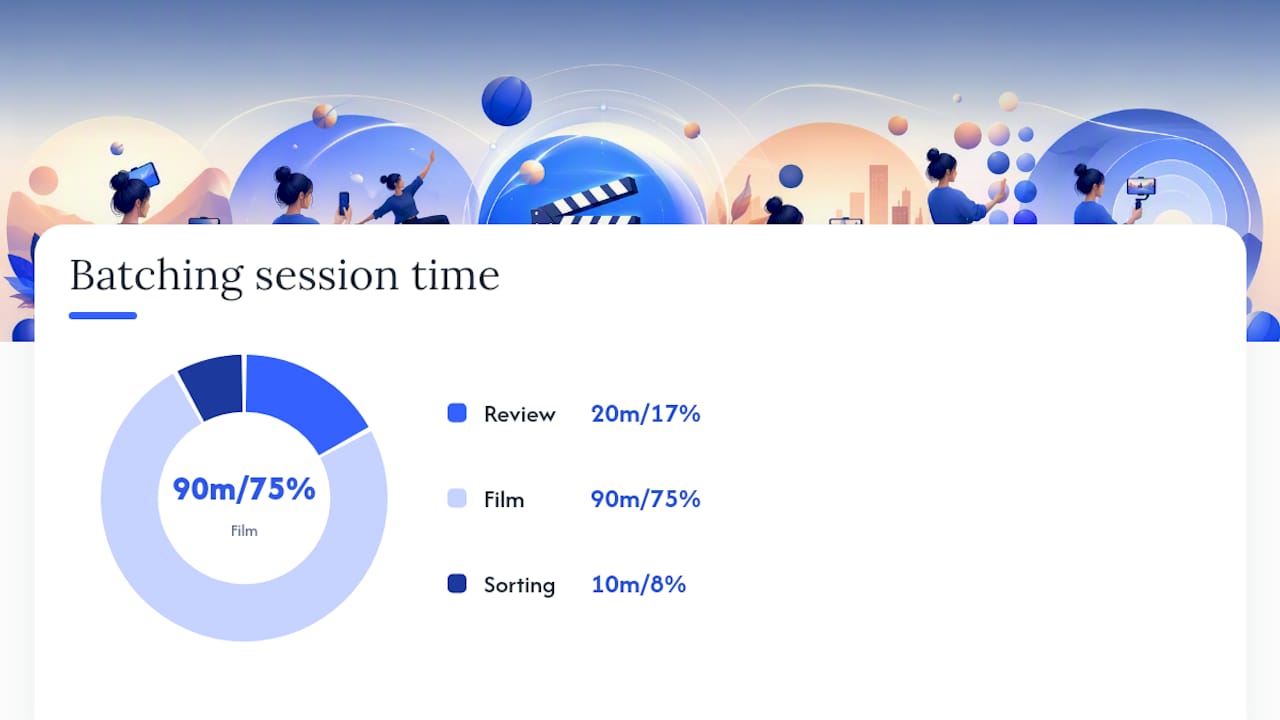
Batching is where the real time savings show up. Creators who batch 5 to 10 ideas per filming session cut their time-per-published-video dramatically compared to filming one video at a time, because lighting, wardrobe, and setup only happen once. Block two hours: 20 minutes to review your shot list, 90 minutes to film everything back-to-back, and the rest for quick sorting.
On audio, use trending sounds when you want discoverability and original audio when you want a signature identity, like a catchphrase or recurring intro line. Most consistent creators use a mix, roughly balancing trend-driven reach with brand-building originality.
How Do You Build a Repeatable Content Calendar?
Turning a big idea list into consistent output comes down to a three-step batching rhythm you repeat weekly.
- Plan (30 minutes): Pick five ideas from your format library, write the hook and caption for each before you film anything.
- Film (90 to 120 minutes): Shoot all five in one sitting using the same lighting setup, changing only wardrobe or location cues between clips.
- Edit (60 minutes): Batch-edit using templates you reuse week to week, so you’re not rebuilding caption styles or transitions from scratch each time.
One filming session should produce more than one post. A single 10-minute cooking demo can become a full recipe video, a 15-second hook-only teaser, a carousel of the finished dish, and a comment-reply follow-up answering “what pan is that.” Aim for 3 to 5 pieces of content from every filming block.
A simple four-week rota keeps your feed from feeling one-note:
- Week 1: Two educational posts, one trend participation, one BTS clip.
- Week 2: One series episode, one review/comparison, one community reply, one livestream.
- Week 3: Two entertainment skits, one ASMR/visual post, one educational post.
- Week 4: One series episode, one trend remix, one before/after, one livestream.
Track completion rate, average watch time, and comment rate weekly. If a format consistently beats your account average on all three, that’s your signal to scale it and cut something else from the rotation.
FanSpicy’s 90-Day Idea Implementation Plan
Turning ideas into income needs structure, not just volume. FanSpicy recommends a three-phase approach:
Days 1 to 30 (discovery): Pick one niche focus, test 20 ideas across your top three formats, and track which tags and posting times consistently drive interaction.
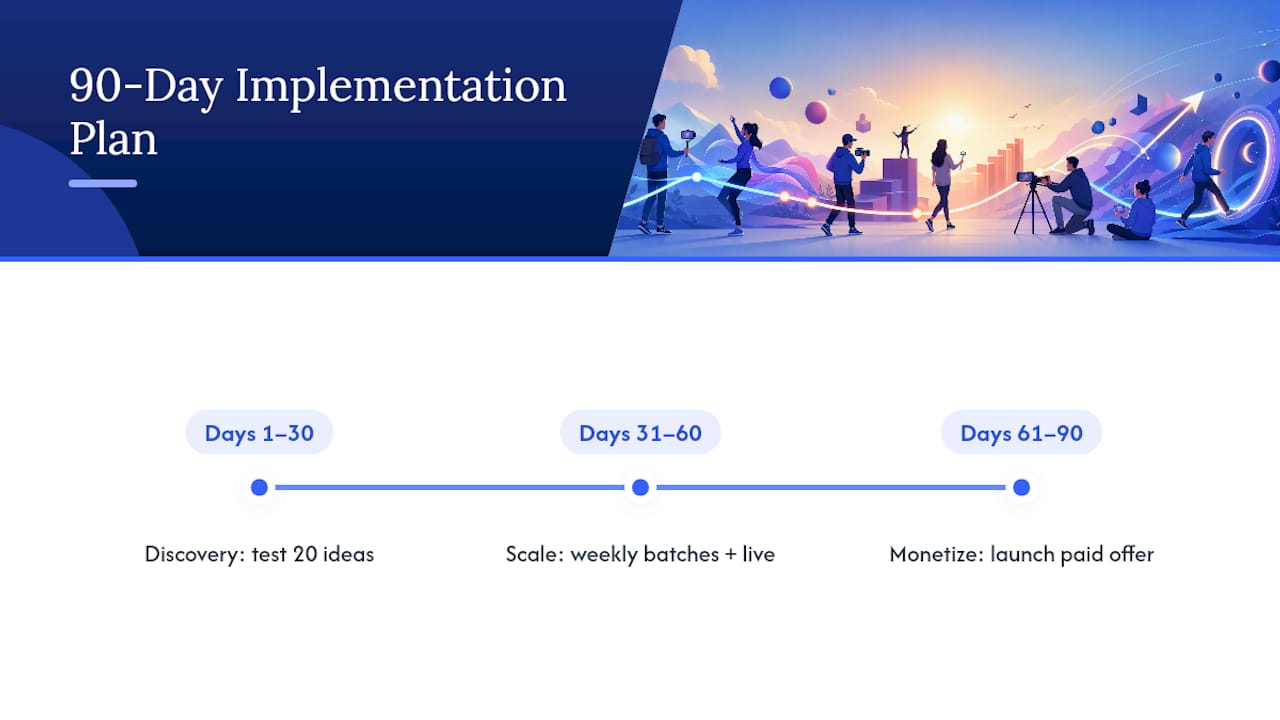
Days 31 to 60 (scale): Double down on your top three performing formats, batch-produce them weekly, and add a regular livestream slot.
Days 61 to 90 (monetize): Launch one paid offer, subscriptions, a bundle, or a paid live session, and promote it through the formats that already proved they convert attention into watch time. FanSpicy’s own content creation process guide walks through building that pipeline once you reach this stage.
Why Rotation Beats Chasing Every Trend
Chasing every trend burns you out fast, and it teaches your audience nothing about who you are. The creators who last mix quick trend wins with a signature series that only they could make.
Test fast, watch your own completion rate and comment rate over your gut feeling, and drop what doesn’t work within two weeks rather than forcing it. Share what’s working for you in the comments. The format that fixed your consistency might be exactly what another creator needs to hear next.
— fan
Turn Your Best Format Into Recurring Income
Once you know which formats your audience actually watches to the end, the next question is how to get paid for that attention instead of giving it all away for free. FanSpicy is built for exactly that transition: a platform where subscriptions, exclusive content, bundles, tips, and live streams all live under one account, so the format that won you views on TikTok can become the format that earns you a paycheck.
That means your Q&A livestream idea from the format library above can become a paid live session on FanSpicy. Your recurring series can become a subscriber-only bonus episode. Your best-performing BTS content can anchor a paid bundle for fans who want more. Ready to see how the pieces fit together? Visit the FanSpicy landing page to explore the tools and grab the 90-day worksheet to plan your first monetized drop.
Sources
- How to Find Content Ideas for TikTok – FanPageKarma Insights
- TikTok Video Ideas Library – Tikomate
- TikTok Content Ideas for Creators | CreatorsJet
- TikTok Video Ideas for Creativity – Descript