

Оглавление
Post several times a week on Instagram, TikTok, and LinkedIn, once or twice daily on Facebook, and multiple times per day on X, then adjust once you have data. That baseline comes from Buffer’s frequency research and the 70-20-10 content mix rule, and this guide gives you three copy-paste schedule blueprints plus a full 4-week plan built around them.
TL;DR:
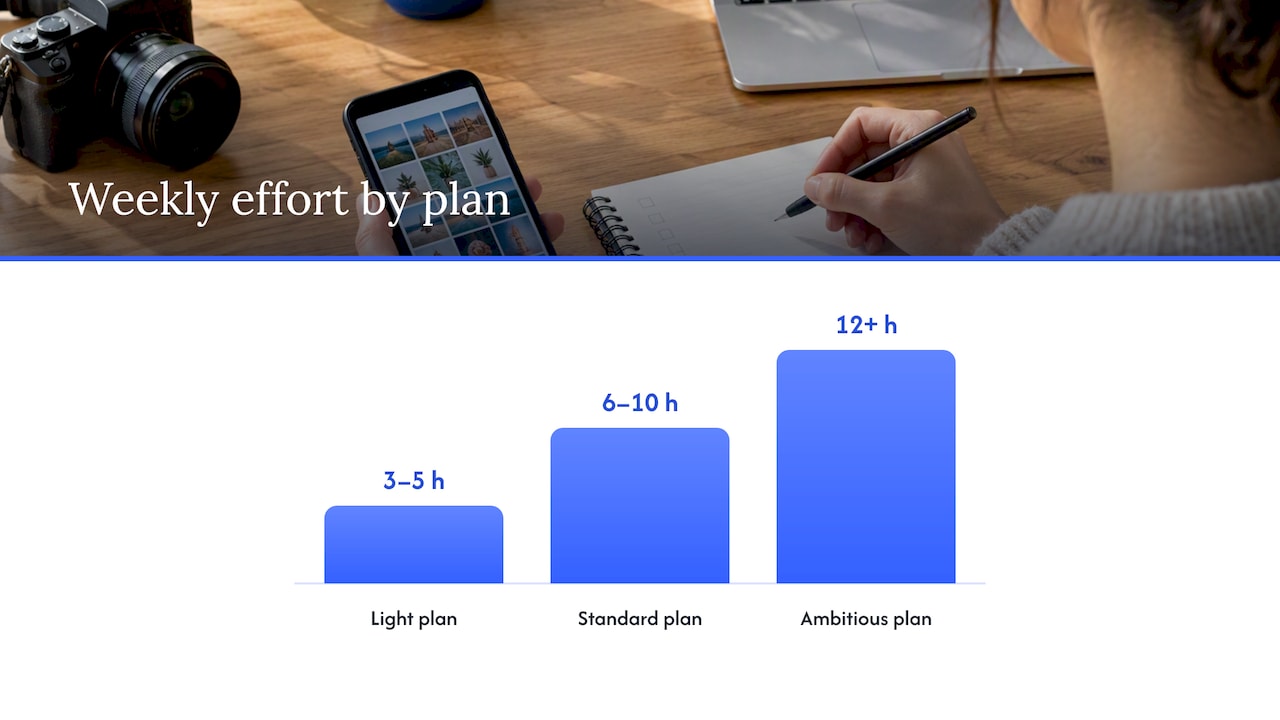
- A light schedule needs 3 to 5 hours weekly; standard growth requires 6 to 10, while near daily publishing takes 12 or more.
- Benchmarks suggest three to five posts weekly on Instagram, TikTok, and LinkedIn, one to two daily on Facebook, and three to four on X.
- Treat Tuesday and Wednesday daytime slots, especially 11 a.m. to 6 p.m., as hypotheses; track reach and engagement for four to six weeks before adjusting.
- Keep roughly 70% value content, 20% community building, and 10% promotion while leaving 20% to 30% of calendar capacity open for timely posts.
- Subscription calendars can devote 15% to 20% to promotion, but should space offers between value posts and tease exclusive releases a day or two beforehand.
Оглавление
- Why a social media content calendar pays off
- Quick schedule options: light, standard, and ambitious cadences you can copy
- Curated post ideas organized by pillar and by platform
- Platform-sized scheduling rules: frequency and best-time windows
- How to build and maintain a social media calendar
- Batching and workflow tips to sustain the schedule
- Worked 4-week sample plan you can copy
- Templates and recommended tools
- How to tailor a schedule for subscription and exclusive content models
- Integrating promotional posts without overwhelming followers
- Combining engagement content with monetization posts
- Metrics and tools to track scheduled post performance
- A scheduling habit that actually changed my output
- A different way to turn scheduled content into income
- ЧАСТО ЗАДАВАЕМЫЕ ВОПРОСЫ
- Sources
Why a social media content calendar pays off
A calendar turns content from a daily scramble into a repeatable system. Consistency beats volume almost every time: Buffer’s data shows that moving from one post a week to two to five posts a week is the real turning point for reach on LinkedIn, and pushing past that sweet spot tends to produce diminishing returns rather than bigger gains. Sustainable cadence, not maximum output, is what keeps an account growing without burning out the person running it.
A written plan also changes how you work day to day. Instead of opening an app and wondering what to post, you sit down once a week or once a month and batch. That single shift cuts last-minute scrambling, makes repurposing a habit instead of an afterthought, and gives you a record you can actually review.
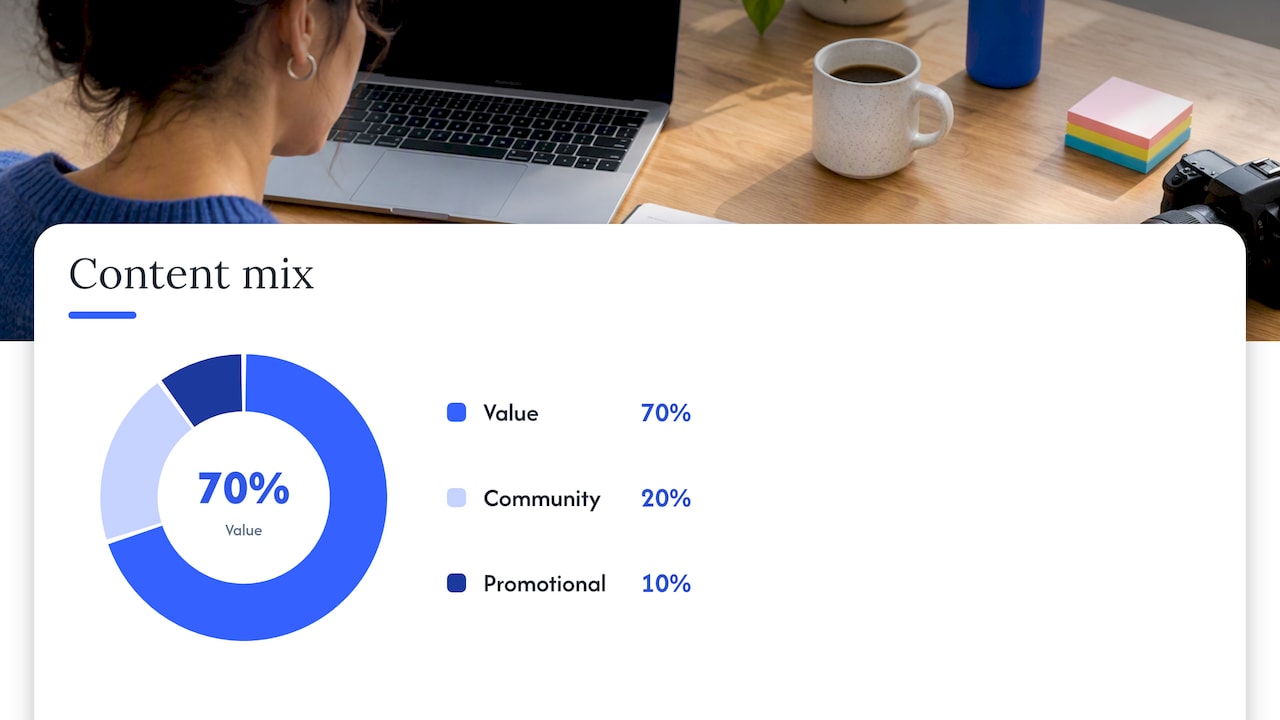
A calendar forces balance too. Without one, promotional posts creep up because they are the easiest to think of on short notice. The 70-20-10 rule keeps that in check: 70% value-driven content, 20% community-building, 10% promotional. Mapping that ratio onto a weekly grid is the fastest way to catch an unbalanced feed before it goes live.
Here is what a working calendar gives you that a memory-based approach cannot:
- A visible mix of content types so promotion never crowds out value
- A batching rhythm that turns four hours a week into a month of posts
- A record you can audit for what actually worked
- A shared reference for teams so nobody duplicates or skips a slot
Совет профессионала: Color-code your calendar by content pillar before you fill in dates. Gaps and overloads jump out instantly.
Quick schedule options: light, standard, and ambitious cadences you can copy
Pick the cadence that matches your actual capacity this month, not the one you wish you had time for. Each option below is copy-paste ready.
- Light plan (3 to 5 hours a week): Built for solo creators or side-project accounts. Post 3 times a week on your main platform, repurpose each post into one story or short, and skip daily posting on secondary platforms entirely.
- Standard plan (6 to 10 hours a week): The recommended baseline for accounts actively trying to grow. Three main-feed posts a week per platform, daily stories or shorts, and one weekly live or interactive post.
- Ambitious plan (12+ hours a week, or a small team): Near-daily presence across formats, with reserved reactive slots held open for trends or timely replies.
A light-week slot grid might look like this: Monday value post, Wednesday story recap, Friday community post, nothing else scheduled, with the rest of your time spent engaging in comments.
A standard-week grid adds more texture:
- Monday: value or teach post on your main feed
- Tuesday: story or short repurposed from Monday’s asset
- Wednesday: community or behind-the-scenes post
- Thursday: short-form video on TikTok or Reels
- Friday: proof or testimonial-style post
- Weekend: one light, low-effort story or poll
The ambitious plan keeps all of that and layers in a second daily touchpoint, usually a story, short, or live session, plus one slot each week left open and unlabeled. That open slot is intentional: it is where you drop a trend reaction or a timely reply instead of forcing the calendar to predict the news cycle. Buffer’s benchmark data puts Facebook at 1 to 2 posts a day and X at 3 to 4 posts a day for accounts running near-daily schedules, so the ambitious tier is really the standard tier with those two platforms pushed to their upper range.
Effort estimates scale roughly in a straight line: light is a few hours spread across the week, standard asks for one real batching session plus daily five-minute check-ins, and ambitious needs either a dedicated block of time most days or a second person helping with scheduling and replies.
Curated post ideas organized by pillar and by platform
Running out of ideas is the single fastest way to break a posting streak. Organizing ideas by pillar, the 70-20-10 categories expanded into five working buckets (Teach, Show, Prove, Join, Sell), means you can fill any open calendar slot in under a minute.
Teach (educational value content)
- Share one tip that took you months to learn, written as a single caption.
- Break a common misconception in your niche into a before/after comparison.
- Answer the question you get asked most in your DMs as a short video.
- Turn a how-to into a numbered carousel for Instagram or LinkedIn.
- Record a 30-second TikTok explaining one tool or technique you rely on.
Show (behind-the-scenes and process)
- Film a day-in-the-life clip that shows your actual workflow, not a highlight reel.
- Post a raw, unedited photo next to the finished, edited version.
- Share a short clip of a mistake and what you changed afterward.
- Do a quick studio, desk, or workspace tour.
- Post a time-lapse of something you make or build.
Prove (credibility and social proof)
- Share a specific result or outcome, written in your own words.
- Repost a genuine compliment or message you received, with permission.
- Walk through one small win from the past week.
- Compare where you started to where you are now, with concrete detail.
- Explain the reasoning behind a decision that paid off.
Join (community and engagement)
- Ask a direct, specific question your audience can answer in one line.
- Run a simple poll about a choice relevant to your niche.
- Invite followers to share their own version of something you posted.
- Respond publicly to a recurring comment or question.
- Post a fill-in-the-blank caption that invites replies.
Sell (promotional content, kept to roughly 10% of slots)
- Announce a new offer with one clear reason to act.
- Share a countdown post for a limited-time release.
- Post a short testimonial paired with a direct link.
- Highlight one specific benefit of what you offer, not a general pitch.
- Remind your audience of something you offer that they may have missed.
Platform-adapted prompts
Instagram caption hooks work best when they open with tension: “I almost didn’t post this, but…” or “Nobody tells you this part…” pull people into the caption before they scroll past. TikTok hooks need to land in the first two seconds on screen, so lead with the payoff (“Here’s what changed everything for me”) rather than a slow setup. LinkedIn post frames reward structure: open with a specific claim, back it with one concrete example, close with a question that invites discussion rather than a generic call to engage.
A few ready-to-copy starter lines you can drop into any slot:
- “Here’s something I wish someone told me when I started…”
- “I tried [X] for 30 days. Here’s what actually happened.”
- “The biggest mistake I see in [niche] is…”
- “You asked, so here’s the honest answer…”
Each idea above fits a rough effort tier. Quick ideas (a poll, a quote repost, a one-line caption) take under 15 minutes. Medium ideas (a carousel, a short video, a comparison photo) take 30 to 60 minutes. Involved ideas (a day-in-the-life edit, a testimonial video, a multi-slide teach post) take an hour or more but repurpose well across three to five formats once you build them, which makes them worth the time if you are filling a standard or ambitious cadence.
Platform-sized scheduling rules: frequency and best-time windows
Frequency benchmarks only work as a starting point, not a rule to follow blindly. Buffer’s 2026 guidance recommends 3 to 5 posts a week on Instagram, TikTok, and LinkedIn, while Facebook performs best around 1 to 2 posts a day and X tends to need 3 to 4 posts a day to stay visible in a fast-moving feed. These ranges come from aggregate data across many accounts, so your own numbers will likely sit somewhere inside them rather than at the exact midpoint.
Timing follows a similar pattern. Sprout Social’s analysis points to mid-week daytime windows, especially Tuesdays and Wednesdays between 11 a.m. and 6 p.m. local time, as the broadest sweet spot across platforms, with Buffer identifying 9 a.m. on Tuesdays as a particularly strong single slot. Sundays consistently show the lowest engagement across most platforms.
These benchmarks only become useful once you test them against your own audience for a run of 4 to 6 weeks, tracking reach and engagement for each time slot you try. That window is long enough to smooth out one-off spikes or dips while still giving you a clear answer before the next content cycle starts.
A few other things worth building into your schedule:
- Treat the 70-20-10 mix as a scheduling filter, not just a content rule: if a week’s slots do not roughly match that ratio, swap one before it goes live.
- Reserve 20 to 30% of your calendar capacity unscheduled so you can react to trends without disrupting the plan.
- Re-test your timing whenever a platform changes its algorithm or your audience shifts significantly.
How to build and maintain a social media calendar
A calendar only works if it has the right fields and a repeatable process behind it. At minimum, track: date, time, platform, caption or copy, asset or file link, destination link, content pillar, status (draft, approved, scheduled, posted), and tags for repurposing.
The process itself breaks into seven steps:
- Стратегия: decide your pillars, your posting cadence, and your 70-20-10 split for the month.
- Plan: block out which pillar goes on which day across the weeks ahead.
- Brainstorm: pull ideas from your idea bank and assign them to open slots.
- Create: batch-produce the assets, captions, and edits in one sitting where possible.
- Schedule: load everything into your scheduler with the right time and platform.
- Engage: reply to comments and messages as posts go live, not days later.
- Review: check what worked and feed that back into next month’s plan.
Reviews happen on two clocks. A weekly quick check takes five minutes: did everything post on time, is anything underperforming badly enough to pull down or boost with a reply. A deeper monthly or 90-day audit is where the real decisions happen. One practical workflow recommends treating the calendar as a living document, auditing every 90 days to retire ideas that consistently underperform and double down on the formats that work.
Watch engagement rate, reach, saves or shares, and click-throughs on any linked post. Those four numbers tell you more about what to repeat than follower count ever will.
Совет профессионала: Keep a “graveyard” tab in your calendar sheet for posts that flopped. Reviewing it every 90 days stops you from repeating the same mistake.
Batching and workflow tips to sustain the schedule
The calendar is the plan. Batching is what makes the plan survive a busy week. A sample weekly workflow looks like this: one session to create everything, five minutes a day to reply and engage, and one short session at the end of the week to review what landed.
Running three tools together removes most of the friction: a content bank (even a simple folder structure) to store raw assets, a scheduler to queue posts at the right time, and an analytics view to check what is working. None of those need to be complicated or expensive to do their job.
A few habits that keep the system running without constant attention:
- Name files and folders by pillar and date so repurposing takes seconds instead of a search.
- Batch one week or one month of captions in a single sitting rather than writing them the night before.
- Set a standing approval check for teams, even a 10-minute daily glance, so nothing sits stuck in draft.
- Keep a shared tag system (teach, show, prove, join, sell) so anyone on the team can see the mix at a glance.
Small teams run into the most friction at the handoff between creation and approval. A simple fix is a fixed daily window, even 15 minutes, where whoever approves content actually looks at the queue instead of letting it pile up until the week’s posts are already late.
Worked 4-week sample plan you can copy
This is a standard-cadence month: three main-feed posts a week per platform, daily stories or shorts, and one reserved reactive slot each week.
- Week 1: Monday teach post, Wednesday show post, Friday prove post, one reactive slot held open, daily stories recapping each main post.
- Week 2: Monday join post (a poll or question), Wednesday teach post, Friday sell post, same reactive slot and story rhythm.
- Week 3: Repeat the Week 1 pattern with new content, but repurpose one core asset (a single video or photo set) into a carousel, a short clip, and two caption variants.
- Week 4: Mix pillars based on what performed best in Weeks 1 to 3, and leave two reactive slots open heading into the next month’s planning session.
Repurposing one core asset, say a single filmed session, into 3 to 5 platform-ready posts is the fastest way to fill a standard-cadence month without creating from scratch every day: trim it into a short clip, pull three stills for a carousel, write two caption variants, and schedule each across the week instead of posting the same thing everywhere at once. Expect this cadence to take roughly 6 to 10 hours a week once batching is in place.
Templates and recommended tools
A simple spreadsheet template covers almost every scheduler on the market. Set up columns for date, time, platform, pillar, caption, asset link, destination link, status, and tags, then export as CSV when your scheduler supports bulk import.
Three tool types do the real work:
- A calendar view (a spreadsheet or dedicated planning tool) to see the whole month at a glance.
- A scheduler to queue and auto-publish posts at the times you have tested.
- An analytics tool to pull the numbers you review weekly and audit every 90 days.
Label reactive or trend slots clearly in the template, something like “OPEN: reactive,” so nobody accidentally fills them during planning and so you remember to check them before each posting window.
How to tailor a schedule for subscription and exclusive content models
A calendar built around subscriptions needs its own rhythm, because the goal is not just engagement, it is converting viewers into paying subscribers and keeping them subscribed.
The practical shift is in sequencing. Free, high-value content (your Teach and Show posts) should consistently lead a potential subscriber toward a clear next step, a preview, a teaser, or a direct mention of what exclusive content looks like, rather than treating promotion as a separate, occasional category. Scheduling a short teaser clip or preview image a day or two before a bigger piece of exclusive content goes live gives free followers a reason to subscribe before, not after, the content drops.
Recurring slots work well here: a weekly “preview day” where you tease upcoming exclusive content, and a monthly “subscriber spotlight” or thank-you post that reinforces why people stay subscribed. If you are building out a calendar specifically for a platform like this, our guidance on content marketing for creators walks through pillar choices that fit a subscription-driven account more closely than a general-purpose brand calendar.
Integrating promotional posts without overwhelming followers
The fastest way to lose followers on a monetization-heavy account is to let every post feel like a pitch. The fix is spacing, not avoidance: schedule promotional posts (paid content announcements, live stream reminders, tip prompts) so they never land back to back, and always follow a promotional slot with at least one or two value or community posts before the next one.
A simple rule that works across most calendars: for every promotional post, schedule two to three non-promotional posts around it. A live stream reminder on Monday pairs well with a behind-the-scenes post on Tuesday and a community question on Wednesday, so the promotional note feels like one part of a varied feed rather than the whole feed.
Timing matters too. A tip prompt or paid-content mention placed right after a high-engagement post, one that already has comments and shares building, tends to land better than one posted cold with no context around it. Our examples of promotional content show a few ways to frame these posts so they read as genuinely useful rather than repetitive.
Combining engagement content with monetization posts
The accounts that convert best treat engagement and monetization as one sequence instead of two separate content types. A question post that invites replies (“What do you want to see more of this week?”) can be scheduled the day before a paid-content drop, and the replies themselves become material for the caption or preview you post next.
A live stream announcement works the same way: pair it with a short poll earlier in the week asking what the stream should cover, then reference those answers directly when you promote the stream itself. That turns a cold promotional post into a callback the audience already feels involved in.
Tip prompts land softest when they are tied to a specific, recent moment, a comment someone left, a milestone you hit, a piece of content that performed unusually well, rather than a standalone ask dropped into an otherwise unrelated feed. Our list of content creation ideas includes several formats built specifically around this kind of pairing.
Metrics and tools to track scheduled post performance
For a monetization-focused calendar, the metrics that matter most are the ones that connect a post to a conversion, not just a view. Track click-through rate on any link tied to a subscription or paid-content post, engagement rate on the free content leading up to it, and the ratio of new subscribers or tips that follow within a day or two of a promotional post going live.
Most scheduling tools pair with a basic analytics dashboard that can show you which day and pillar combination drives the most link clicks, which is the clearest signal for where to place your next promotional slot. Reviewing that weekly, alongside the broader 90-day audit described earlier in this guide, keeps the promotional cadence tuned to what your specific audience responds to rather than a generic benchmark. Our strategies for promoting paid content go deeper into which metrics to prioritize once you have a few months of posting data to work from.
A scheduling habit that actually changed my output
I started batching captions a full week ahead instead of writing them the morning of, and the difference showed up almost immediately in how consistent my posting felt, not just in any single number. The schedule stopped feeling like a chore because the hardest part, deciding what to say, was already done before the week began.
If you try one thing this week, make it that: write next week’s captions in one sitting, even roughly, before Monday arrives.
— fan
A different way to turn scheduled content into income
Everything above helps you post consistently. What you post, and where, is a separate decision, and for creators building toward subscriptions, paid posts, or live streams, a platform built around that model can carry more weight than a general feed ever will.
На сайте Фанспики, creators schedule exactly the kind of promotional posts covered in this guide, teasers for exclusive content, subscription drive announcements, live stream reminders, tip prompts, inside a space built for that purpose rather than bolted onto a general-purpose feed. Creators keep a higher share of what they earn, have control over their audience, and can migrate content from other platforms without starting over.
- Schedule teaser posts that point directly to subscriptions, paid posts, or live streams.
- Keep promotional cadence steady without needing a separate platform for monetized content.
- Bring existing content and audience over with a straightforward migration process.
If that sounds like the missing piece in your calendar, our sign-up page for creators walks through what hosting paid content and live streams actually looks like day to day.
ЧАСТО ЗАДАВАЕМЫЕ ВОПРОСЫ
How many times a week should I post on social media?
A sustainable baseline is 3 to 5 posts a week on Instagram, TikTok, and LinkedIn, with Facebook performing best at 1 to 2 posts a day and X needing 3 to 4 posts a day to stay visible. Going beyond those ranges tends to produce diminishing returns rather than faster growth.
What is the best time to post on social media?
Mid-week daytime windows, especially Tuesdays and Wednesdays between 11 a.m. and 6 p.m. local time, work as a broad starting point across most platforms. Treat that as a hypothesis to test against your own analytics for 4 to 6 weeks rather than a fixed rule.
What is the 70-20-10 rule for social media content?
The 70-20-10 rule splits a calendar into 70% value-driven content, 20% community-building content, and 10% promotional content. It works well as a filter you check before publishing a week’s slots to catch an unbalanced mix early.
How do I keep a content calendar consistent without burning out?
Batch creation in one weekly or monthly session instead of posting in real time, and build a repurposing habit so one asset becomes several posts across platforms. A quick weekly check plus a deeper 90-day audit keeps the system honest without demanding daily attention.
Can I use the same schedule for a subscription-based platform?
The same pillar structure and batching habits apply, but promotional slots for paid content, live streams, or tips typically need a larger share of the calendar, often 15 to 20%, and should be spaced between value and community posts so the feed never feels like a constant pitch.
Sources
- How Often to Post on Social Media in 2026 — Data-Backed Guide
- Best times to post on social media
- Using the 70-20-10 rule in marketing