

Índice
The fastest proven ways to monetize a website are display advertising through Google AdSense, affiliate marketing via programs like Amazon Associates, selling digital products or online courses, launching a membership or subscription, and offering services or consulting directly from your site. Which one fits your situation right now depends on your traffic volume, your audience’s intent, and how quickly you need revenue.
Here’s a quick goal-based map to get you oriented:
- Need money fast with minimal traffic? Sell a service or paid consultation. You can convert even a handful of qualified visitors into paying clients within days.
- Have content that ranks and gets clicks? Affiliate marketing through Amazon Associates or a niche network is the lowest-friction path to passive income.
- Want high margins and automated delivery? Digital products and courses are build-once, sell-many assets that scale without proportional effort.
- Building a community around your niche? A membership or subscription model, managed through Stripe or PayPal, creates predictable recurring revenue.
- Running a high-traffic content site? Display ads through Google AdSense or a programmatic network turn page views into consistent, if modest, income.
Fanspicy, a creator-focused subscription and tipping platform, is one example of how the membership model has evolved for digital creators specifically. The broader principle holds across every niche: pick the method that matches your current reality, make it reliable, then layer in a second stream.
Principais conclusões
The most effective approach to monetizing a website is to pick one method matched to your current traffic and audience intent, make it generate consistent income, then add a second complementary stream at the 90-day mark.
| Point | Details |
|---|---|
| Start with one stream | Pick the method that fits your traffic now; diversify only after the first stream is reliable. |
| Services pay fastest | Low-traffic sites earn quickest through services or consulting, not ads or affiliates. |
| US display RPM reality | At $4.59–$6.15 RPM, you need roughly 80,000–110,000 monthly pageviews to earn $500/month from ads. |
| Trust before monetization | Audience-first content builds the trust that makes every monetization method convert better. |
| Fanspicy for creators | Fanspicy offers subscription tiers, tipping, and live cam in one platform built for creator-economy revenue. |
Índice
- How to monetize your website: a quick comparison of methods
- How does display advertising actually work on your site?
- Affiliate marketing: programs to join and content that converts
- Selling digital products and online courses: how to launch and price them
- Memberships and subscriptions: how to structure tiers and retain members
- Sponsored posts and brand deals: how to price and disclose them
- Selling services and consulting from your website
- Donations, tips, and micro-payments: when they work and how to set them up
- Selling physical products: store options and fulfillment trade-offs
- Flipping websites: how to build, grow, and sell sites for profit
- How to collect payments: processors, fees, and US-specific setup
- How long until you earn, and what are realistic revenue ranges?
- How do you choose the right monetization mix for your site?
- Your 30–90 day starter checklist to begin monetizing this week
- Creator-focused monetization: audience-first tactics that actually work
- The single most important monetization decision you’ll make
- Fanspicy: a platform built for creators who monetize subscriptions and tips
- Sources
How to monetize your website: a quick comparison of methods
Not every monetization method suits every site. Traffic volume, visitor intent, and how much time you can invest all shape which approach is realistic right now. The table below uses qualitative labels so you can scan quickly and skip the methods that don’t fit.
| Method | Best for | Setup effort | Startup cost | Revenue model | Time to meaningful income | UX impact | Scalability |
|---|---|---|---|---|---|---|---|
| Display ads | High-traffic content sites | Baixa | Nenhum | CPM/RPM | Months (volume-dependent) | Moderate (ad clutter risk) | High with traffic growth |
| Affiliate marketing | Review, guide, and comparison sites | Low–Medium | Nenhum | CPA / revenue share | Weeks–months | Low if done well | Alta |
| Digital products/courses | Any niche with an engaged audience | Medium–High | Baixa | Flat fee / tiered | Weeks after launch | Nenhum | Very high |
| Memberships/subscriptions | Community or creator-driven sites | Médio | Baixa | Recurring flat fee | Months to scale | Baixa | Alta |
| Sponsored content | Sites with engaged, defined audiences | Médio | Nenhum | Flat fee per post | Weeks once pitched | Low–moderate | Moderado |
| Services/consulting | Low-traffic expert sites | Baixa | Nenhum | Hourly / package / retainer | Days–weeks | Nenhum | Limited (time-bound) |
| Physical products | Brand or product-focused sites | Alta | Medium–High | Margin on sale | Months | Nenhum | High with logistics |
A practical rule from publisher-focused guides: start with one reliable revenue stream, make it predictable, then add one or two complementary methods. Jumping to five streams at once usually means none of them get the attention they need to work.
The most common winning combination for content sites is affiliate marketing as the primary stream, with display ads as a passive secondary layer once traffic crosses a meaningful threshold. For creator-focused sites, subscriptions paired with digital products or tipping tend to outperform ads at every traffic level.
How does display advertising actually work on your site?
Display advertising is the most recognizable form of website monetization: you place ad code on your pages, an ad network fills those slots with relevant ads, and you earn based on impressions (CPM) or clicks (CPC). Google AdSense is the standard starting point for most publishers because it’s free to join, handles ad serving automatically, and works across almost every content category.
The mechanics matter more than most beginners realize. Every time a page loads, an auction runs in milliseconds to determine which advertiser’s ad appears. Your earnings per 1,000 pageviews, called your RPM (Revenue Per Mille), depend on your niche, your audience’s geography, and the time of year. Finance, insurance, and legal content consistently commands higher RPMs than entertainment or general lifestyle content.
How to set up AdSense and optimize it:
- Apply at Ads and verify your site meets Google’s content policies.
- Place the AdSense auto-ads snippet in your site’s
<head>tag, or use manual ad units for more control. - Prioritize above-the-fold placements and in-content ad units, which typically outperform sidebar ads.
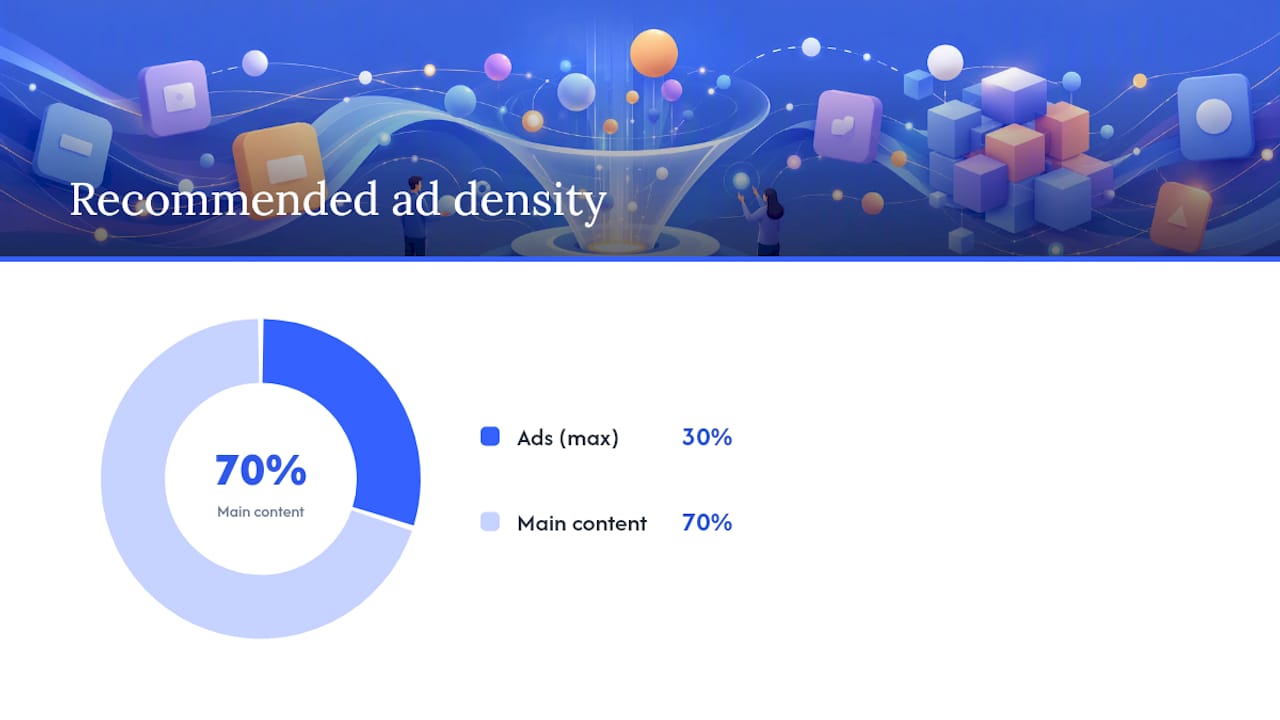
- Keep ad density reasonable. Google’s own guidelines suggest ads should not exceed 30% of page content.
- Check your mobile layout. More than half of web traffic is mobile, and poorly sized ad units hurt both UX and earnings.
- Review your AdSense performance reports weekly for the first 60 days and cut underperforming placements.
Once your traffic grows, the gap between a basic AdSense setup and a fully optimized programmatic stack can be significant. Header bidding and multiple demand sources are the two highest-impact technical upgrades available to publishers, allowing multiple ad buyers to compete simultaneously rather than in a sequential waterfall. That competition tends to push CPMs higher.
Pros of display ads: passive income, no product to create, scales with traffic.
Contras: requires substantial traffic to generate meaningful revenue, can degrade user experience if overused, and CPMs fluctuate with advertiser budgets seasonally.
Affiliate marketing: programs to join and content that converts
Affiliate marketing works by embedding trackable links in your content. When a reader clicks and completes a qualifying action (usually a purchase), you earn a commission. The program pays you; the reader pays nothing extra. It’s one of the most scalable website income strategies available because the same article can generate commissions for years.
Amazon Associates is the most accessible starting point.
Affiliate marketing converts best in high-intent content: product reviews, head-to-head comparisons, “best of” roundups, and buying guides. A reader searching “best project management software for freelancers” is much closer to a purchase decision than someone reading a general productivity article.
Disclosure is not optional. The FTC requires US publishers to clearly disclose material connections to brands they recommend. A simple, visible statement at the top of any post containing affiliate links, such as “This post contains affiliate links. If you purchase through them, I may earn a commission at no extra cost to you,” satisfies the requirement and, counterintuitively, tends to increase trust rather than reduce it.
Dica profissional: Deep-link directly to the specific product page rather than the brand’s homepage. Readers who land on a product page convert at a significantly higher rate than those who land on a homepage and have to search.
Tracking matters from day one. Use UTM parameters or your affiliate network’s built-in link tracking to identify which articles, placements, and anchor texts drive the most conversions. Most networks provide a dashboard; supplement it with Google Analytics 4 event tracking for a complete picture.
Selling digital products and online courses: how to launch and price them
Digital products are among the highest-margin assets a website owner can create. Once built and automated, the marginal cost of each additional sale is essentially zero beyond payment processing fees. Digital products scale because they are build-once, sell-many assets with automated delivery, which makes them one of the most capital-efficient ways to earn from websites.
Common digital product types:
- Ebooks and PDF guides (low effort to create, good for list building)
- Templates (spreadsheets, Notion dashboards, Canva designs, code snippets)
- Mini-courses (3–5 video modules, typically $27–$97)
- Full online courses ($197–$997+ depending on depth and audience)
- Swipe files, prompt libraries, and toolkits
- Hybrid membership + course bundles
How to launch your first digital product in order:
- Validate the idea before building. Survey your email list or post a poll in your community. If 10–20% of respondents say they’d pay for it, build it.
- Choose a delivery method. For simple files, Gumroad or Payhip handle payment and delivery with minimal setup. For courses, platforms like Teachable or Thinkific provide structured hosting, quizzes, and certificates.
- Price based on transformation, not hours. A template that saves a buyer five hours per week is worth more than $9. Start at a price that feels slightly high to you, then test.
- Build a simple landing page with a clear headline, three to five bullet points on what the buyer gets, and a single call to action.
- Set up an email welcome sequence (three to five emails) that delivers the product, explains how to use it, and introduces your next offer.
- Drive initial traffic through your existing audience: email list, social posts, and a dedicated blog post that ranks for the problem your product solves.
For promotion beyond launch day, paid content promotion strategies and evergreen SEO are the two most reliable long-term channels. An article that ranks for “best [niche] templates” and links to your product page can generate sales indefinitely.
Memberships and subscriptions: how to structure tiers and retain members
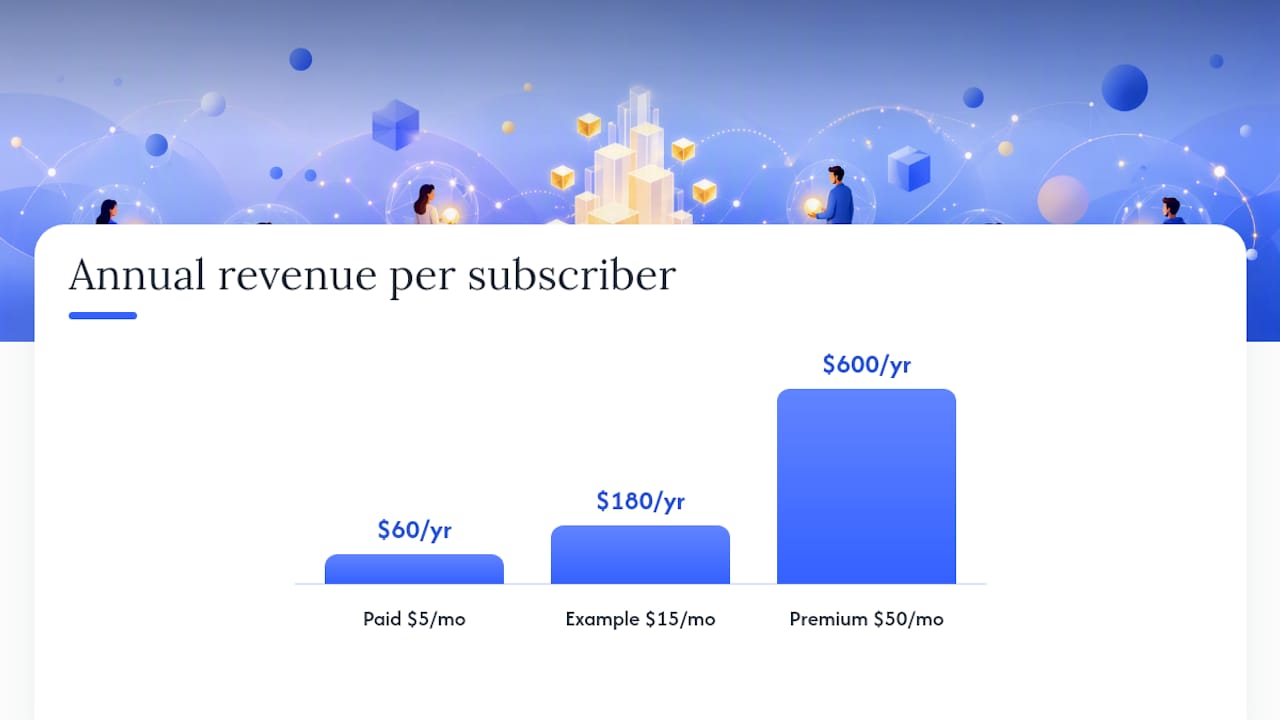
Memberships are described by Shopify as the gold standard for predictable, recurring revenue — and for good reason. A subscriber who pays $15 per month is worth $180 per year before you write a single new piece of content. The challenge is that memberships require sustained delivery to retain members, which makes them more operationally demanding than one-time product sales.
Paywall models and when each fits:
- Hard paywall: all premium content requires a subscription. Works best when your content has no free equivalent (proprietary data, exclusive community, live access).
- Metered paywall: readers get a set number of free articles per month before hitting a paywall. The New York Times model. Works for high-volume content publishers.
- Freemium: a free tier with meaningful value, a paid tier with premium access. The most common model for creator-driven sites because it lets potential members experience your work before committing.
What to put in each tier:
- Free tier: your best public content, email newsletter, and community access (read-only or limited posting).
- Paid tier ($5–$25/month): exclusive posts, early access, downloadable resources, and direct community interaction.
- Premium tier ($50–$100+/month): live Q&A sessions, one-on-one access, private group, or co-creation opportunities.
For billing and subscription management, Stripe is the most developer-friendly option and supports recurring billing, trials, and proration natively. PayPal’s subscription API is a solid alternative for audiences who prefer it. For non-technical setups, platforms like Memberful or Patreon handle the billing layer entirely.
Dica profissional: The single biggest driver of membership churn is the feeling that nothing new is happening. A simple drip content calendar, even one new exclusive post per week, dramatically reduces cancellation rates in the first 90 days.
Retention tactics that work: a private community (Discord or a forum), monthly live events, and a clear “what’s coming next” roadmap shared with members. For creator-specific subscription models and retention mechanics, subscription-based recurring revenue guides offer practical frameworks that apply across niches.
Sponsored posts and brand deals: how to price and disclose them
Sponsored content is a direct deal between you and a brand: they pay you a flat fee to create a post, video, or newsletter feature that promotes their product or service. Unlike affiliate marketing, you get paid regardless of whether readers convert. That makes it attractive for publishers with engaged audiences, even if those audiences are relatively small.
The key distinction from affiliate marketing is control. With sponsorships, you negotiate the brief, the deliverables, and the price upfront. The brand gets exposure; you get a predictable payment.
What to include in your media kit:
- Monthly unique visitors and pageviews (screenshot from Google Analytics)
- Email list size and average open rate
- Social following and engagement rate
- Audience demographics (age, location, income if available)
- Past brand partnerships and results
- Pricing tiers (sponsored post, newsletter mention, social amplification)
- Sample content that shows your editorial voice
Brands care most about audience fit and engagement rate, not raw traffic numbers. A site with 10,000 highly engaged readers in a specific niche often commands higher rates than a general site with 100,000 passive visitors.
Pricing guidelines: a common rule of thumb for sponsored blog posts is $100 per 10,000 monthly pageviews, though niche authority and engagement can push that significantly higher. Newsletter sponsorships often price on a CPM basis ($20–$50 per 1,000 subscribers for niche audiences).
Dica profissional: Always negotiate a content approval clause that gives you final say on edits. Brands sometimes request changes that would make the post sound promotional rather than editorial, which erodes reader trust faster than any disclosure.
FTC disclosure requirements apply to sponsored content exactly as they do to affiliate links. Label sponsored posts clearly, both in the post itself and in any social promotion. “Sponsored,” “Paid partnership,” or “Advertisement” all satisfy the requirement. Burying the disclosure at the bottom of a 2,000-word post does not.
Selling services and consulting from your website
Services are the fastest route to revenue for any website, regardless of traffic. You don’t need 10,000 monthly visitors to sell a consulting package. You need one well-written services page, a clear offer, and a way for interested visitors to contact you or book a call.
Services convert with low traffic because the buyer-to-seller ratio is different: a single client paying $500 for a project generates more revenue than 100,000 ad impressions. That math makes services the obvious first monetization move for new or niche sites.
Service offer structures that work:
- Hourly consulting: simple to set up, easy to price. Best for early-stage sites where you’re still learning what clients need.
- Packaged services: a defined scope with a fixed price (e.g., “Website SEO audit: $350, delivered in 5 business days”). Easier to sell than open-ended hourly work.
- Retainer agreements: monthly recurring revenue for ongoing work. Harder to sell initially but creates the most predictable income.
- Paid calls or strategy sessions: 30–60 minute calls at $75–$300+. Low overhead, high conversion from warm audiences.
Tools to set up a service business from your site:
- Calendly or Acuity Scheduling for booking calls without email back-and-forth
- Stripe or PayPal for invoicing and payment collection
- A simple intake form (Typeform or Google Forms) to qualify leads before calls
- A short case study or results section on your services page to build credibility
The fastest way to get your first client is to email your existing audience directly with a specific offer. “I’m taking on two new clients this month for [specific service]. Here’s what’s included and how to apply.” That specificity converts far better than a generic “hire me” page.
Donations, tips, and micro-payments: when they work and how to set them up
Donations and tips work best for creator-driven sites where the audience has a genuine relationship with the person behind the content. A reader who has followed your work for two years and found real value in it will tip. A first-time visitor from a Google search almost never will.
Platforms to accept tips and donations:
- Stripe: the most flexible option. You can embed a custom tip button directly on your site using Stripe’s payment links or Checkout.
- PayPal.me: a shareable link that lets supporters send any amount. Zero setup friction.
- Ko-fi: purpose-built for creator tips and one-time support. Free tier available; takes no platform cut on tips (Stripe fees still apply).
- Buy Me a Coffee: similar to Ko-fi, with a clean UX and optional membership tiers.
For microtransaction models, pay-per-post or metered content access can work for publishers with a loyal base. Microtransaction mechanics for creator revenue cover the implementation details, including how to set price floors and reduce friction at checkout.
UX placement tips that increase donation conversion:
- Place a tip button at the end of your most-read posts, not just in the sidebar.
- Use specific language: “If this saved you an hour, consider buying me a coffee” outperforms generic “support my work.”
- Show a running total or a recent supporter list to create social proof.
US creators who receive tips or donations need to report that income. Tips are taxable income regardless of the platform used. If you receive more than $600 from a single platform in a year, you’ll typically receive a 1099-K. Keep records from day one and consult a tax professional if your donation income grows meaningfully.
Selling physical products: store options and fulfillment trade-offs
Physical products add complexity that digital products don’t: inventory, shipping, returns, and customer service. But for sites with a strong brand identity or a product-specific niche, the margin and customer lifetime value can justify that overhead.
Platform options and what they’re best for:
- Shopify: the most capable standalone ecommerce platform for physical goods. Handles inventory, shipping integrations, and payments natively. Monthly fees start at $39/month (as of current pricing). Best for sites where ecommerce is the primary revenue model.
- Wix ecommerce: a solid option if your site is already built on Wix. Lower ceiling than Shopify for complex catalogs, but faster to set up for small product lines.
- WooCommerce: a WordPress plugin that turns any WordPress site into a store. Free to install, but hosting, payment gateway fees, and plugin costs add up. Best for sites already on WordPress that want full control.
Fulfillment models:
- In-house fulfillment: you pack and ship orders yourself. Lowest cost per unit but time-intensive. Viable for low order volumes.
- Third-party logistics (3PL): you send inventory to a warehouse; they pick, pack, and ship. Scales well but requires minimum order volumes and setup fees.
- Dropshipping: the supplier ships directly to your customer. No inventory risk, but lower margins and less control over quality and delivery times.
Before committing to physical products, calculate your landed margin: product cost plus shipping plus payment processing fees plus returns reserve.
Flipping websites: how to build, grow, and sell sites for profit
Website flipping is the practice of building or buying a site, growing its traffic and revenue, and selling it for a multiple of its monthly earnings. It’s a legitimate asset-building strategy, and for operators who understand SEO and monetization, it can generate returns that dwarf traditional investments.
A site earning $1,000 per month in net profit could sell for $30,000–$40,000 if the earnings are consistent and the traffic sources are clean.
What buyers look for:
- At least 12 months of consistent revenue history
- Traffic from organic search (not dependent on a single paid campaign)
- Diversified monetization (ads + affiliates, or products + affiliates)
- Clean Google Analytics data with no unexplained traffic spikes
- Documented processes for content creation, link building, and monetization management
- No active Google penalties or manual actions
Checklist to prepare a site for sale:
- Verify all affiliate and ad accounts are in good standing and transferable
- Export and document all traffic and revenue data for the past 24 months
- Create an operations document (SOP) covering content workflow, keyword research process, and monetization setup
- Clean up any thin content, broken links, or technical SEO issues
- Set a realistic asking price based on a 30–40x monthly net profit multiple
Realistic timeline: most buyers want to see 12–24 months of stable earnings before paying a premium multiple. Building a site to sell is a 12–36 month project, not a 90-day flip.
How to collect payments: processors, fees, and US-specific setup
Every monetization method eventually requires a way to collect money. The two processors that cover the vast majority of use cases for US-based site owners are Stripe and PayPal.
Stripe is the default choice for most technical setups. It charges 2.9% + $0.30 per successful card transaction, supports recurring billing natively, and integrates with virtually every platform via API or pre-built plugins. Payouts to US bank accounts typically arrive within 2 business days. Stripe is particularly strong for subscriptions, digital product sales, and service invoicing.
PayPal remains essential for audiences who prefer it, and it’s often the only payment method some international buyers will use. PayPal’s subscription API handles recurring billing, though the developer experience is less polished than Stripe’s.
For secure payment integration steps specific to creator platforms, the implementation checklist covers webhook setup, refund handling, and compliance basics in detail.
Implementation steps:
- Create and verify your Stripe or PayPal business account with your EIN or SSN.
- Connect your processor to your platform (Shopify, WooCommerce, Memberful, or a custom checkout).
- Test a real transaction before going live. Use Stripe’s test mode or PayPal’s sandbox environment.
- Set up webhook notifications for payment events (successful charge, failed payment, subscription cancellation).
- For subscriptions, configure dunning logic: automated retry attempts and email notifications for failed payments reduce involuntary churn significantly.
US tax and compliance basics: Stripe and PayPal will issue a 1099-K if your account processes more than $5,000 in a calendar year (the IRS threshold as of 2024 reporting). Keep records of all transactions and consult a tax professional for your specific business structure. PCI compliance is handled by Stripe and PayPal at the processor level; you are responsible for not storing raw card data on your own servers.
How long until you earn, and what are realistic revenue ranges?
The honest answer is that timeline varies enormously by method, and most guides understate how long it takes to reach meaningful income from passive streams.
Approximate timelines by method:
- Services/consulting: days to weeks. If you have an existing audience or professional network, a single email can generate your first client.
- Affiliate marketing: weeks to months. You need content that ranks and gets traffic before commissions accumulate. Most new affiliate sites see their first meaningful month ($100–$500) at the 3–6 month mark.
- Digital products: weeks after launch if you have an existing audience; months if you’re building from scratch and relying on SEO.
- Memberships: months to scale. Getting to 50–100 paying members typically takes 6–12 months of consistent content and community building.
- Display ads: months. Typical US display RPM ranges from roughly $4.59 to $6.15 per 1,000 pageviews for general content sites. At $5 RPM, you need 20,000 monthly pageviews to earn $100/month from ads alone.
browsers), and your email list size. A 5,000-subscriber email list is worth more to your revenue than 50,000 monthly pageviews without a list.
How do you choose the right monetization mix for your site?
The right mix depends on where you are right now, not where you want to be in two years. A decision framework based on traffic, intent, and resources prevents the common mistake of chasing high-ceiling methods before the foundation is in place.
- Assess your traffic volume. Under 5,000 monthly visitors: services, consulting, or digital products to a small email list. 5,000–50,000 visitors: affiliate marketing and digital products, with ads as a secondary layer. Over 50,000 visitors: ads become meaningful; add programmatic optimization and direct sponsorships.
- Identify your audience’s intent. Informational intent (how-to, educational) converts well for affiliates and digital products. Transactional intent (best X, buy X) is ideal for affiliates and ecommerce. Community intent (forums, creator content) suits memberships and tipping.
- Audit your time and technical skill. Display ads require the least ongoing effort once set up. Digital products require upfront creation but minimal ongoing work. Services require the most time per dollar but pay immediately.
- Check brand fit. Ads on a premium brand site can undermine perceived quality. Sponsored content on a trust-driven health site requires careful vetting. Memberships require a consistent content cadence you can sustain.
- Pick one primary stream and commit. The audience-first approach to monetization consistently outperforms the spray-and-pray approach. One stream done well beats five streams done poorly.
- Add a complementary second stream at 90 days. Once your primary stream generates consistent income, layer in one method that serves the same audience differently (e.g., affiliate links in the same articles that drive your email list to a paid product).
Your 30–90 day starter checklist to begin monetizing this week
This checklist is ordered by priority. Complete each step before moving to the next.
- Day 1–3: Pick your primary monetization method based on the decision framework above. Write it down with a specific revenue target for 90 days.
- Day 1–3: Install Google Analytics 4 if you haven’t already. You cannot optimize what you don’t measure. Set up a conversion event for your primary monetization action (click, purchase, sign-up).
- Day 4–7: Set up your payment infrastructure. Create a Stripe account and verify it. Add a PayPal business account as a backup. Test a $1 transaction.
- Day 4–14: Build your MVP monetization. For services: write a services page and add a Calendly booking link. For affiliates: identify your top 5 articles by traffic and add relevant affiliate links with proper disclosures. For digital products: outline your first product and set a launch date within 30 days.
- Day 15–30: Drive initial traffic to your offer. Email your list. Post on the social channels where your audience already follows you. Publish one SEO-targeted article that directly supports your monetization offer.
- Day 30: Measure and cut. Review your conversion data. If something isn’t converting, change one variable (headline, placement, price, CTA) and test for another 30 days before abandoning it.
- Day 31–60: Add your email capture. If you don’t have an email list, start one now. A simple lead magnet (a free checklist, template, or mini-guide) converts site visitors into subscribers you can market to repeatedly.
- Day 61–90: Add your second monetization stream. Once your primary stream has generated at least one payment, introduce a complementary method. Run a small A/B test on ad placements, launch a second affiliate campaign, or open a waitlist for a membership.
Quick tools to get started: Google Analytics 4 (free), Stripe (free to create, pay-per-transaction), Mailchimp or ConvertKit for email capture, Gumroad for digital product delivery, Calendly for service bookings.
Creator-focused monetization: audience-first tactics that actually work
For creators and niche publishers, the most common monetization mistake is introducing revenue streams before the audience trusts the creator enough to pay. Prioritizing valuable content and trust before aggressive selling consistently produces more sustainable revenue than launching a paywall on a site with three months of content.
The creator economy has produced a clear playbook for moving from zero to hybrid revenue. The pattern looks like this: build a free content base that demonstrates expertise, grow an email list or community, launch a low-ticket offer to validate willingness to pay, then layer in subscriptions, higher-ticket products, or tipping once the audience relationship is established.
The most durable creator businesses are built on trust, not traffic. A creator with 2,000 loyal subscribers who open every email and engage with every post will consistently out-earn a creator with 200,000 passive followers who never click. Depth of relationship is the real monetization asset.
Creator quick wins that don’t alienate your audience:
- Bundled offers: package two or three existing free resources into a paid bundle. Buyers perceive more value; you create nothing new.
- Paid Q&A or AMAs: charge a small fee ($5–$15) for access to a live or async Q&A session. Low overhead, high perceived value.
- Microtransactions: let readers pay for individual premium posts or unlock specific content without committing to a full subscription.
- Affiliate recommendations within content: recommend tools you actually use. Authenticity is the conversion driver, not link placement.
For creators building toward a hybrid model, examples of monetization methods for creators e media marketing ideas for adult creators both offer concrete tactics for expanding revenue without compromising the audience relationship.
Dica profissional: Post a “what I use and recommend” resource page on your site. It takes two hours to build, requires no new content, and can generate affiliate commissions passively from every new visitor who finds it.
Content cadence matters more than content volume for retention. One high-quality exclusive post per week outperforms five mediocre ones. Creators who maintain a consistent schedule, even a modest one, retain members and subscribers at significantly higher rates than those who publish in bursts.
The single most important monetization decision you’ll make
Most site owners spend too much time researching monetization methods and too little time committing to one. The research is useful; the indecision is expensive.
The highest-impact action for most website owners is not finding the perfect method. It’s picking the method that fits your current traffic and audience, setting a specific revenue target, and running it for 90 days without switching. Predictability comes from repetition and iteration, not from finding the optimal strategy on day one.
The one thing to do today: open Google Analytics, identify your three most-visited pages, and ask yourself what a visitor to each of those pages is trying to accomplish. The answer to that question tells you exactly which monetization method belongs there.
Fanspicy: a platform built for creators who monetize subscriptions and tips
If you’re a content creator building recurring revenue through subscriptions, tipping, or exclusive content, the platform you choose shapes your earning potential as much as your content strategy does.
Fanspicy is a creator-focused platform built specifically for subscription-based monetization, live cam, and tipping, with a clean interface designed for discoverability and direct fan engagement. Unlike general-purpose website builders, Fanspicy handles payment processing, subscription tier management, and age verification compliance in one place, so creators spend less time on infrastructure and more time creating. The platform’s revenue share model is designed to be competitive within the creator economy, and payouts are structured for predictability. If you’re ready to move from a DIY monetization setup to a platform purpose-built for creator revenue, explore Fanspicy and see how it fits your content model.
Sources
- Website monetization: 10 Profitable Ways to Monetize Your Website
- How to Monetize a Website: Complete Guide | Clickio
- How to Monetize a Website – Mailchimp
- Website Monetization: 10 Smart Strategies To Make Money – Shopify
- How to Monetize a Website: 13 Strategies to Generate Revenue