

Indice dei contenuti
The most effective way to keep an audience engaged is to combine active participation with varied delivery and planned attention resets roughly every 8 to 10 minutes. A poll, a short story, or a deliberate pause each works as a reset point. The rest of this guide breaks down exactly how to execute each move, from your opening line to your closing ritual.
TL;DR:
- Interactive participation should be planned every 8 to 10 minutes with simple actions like polls or quick audience responses to maintain focus.
- Short, provocative openings and storytelling with specific details effectively capture attention and build emotional connection.
- Use deliberate movement, vocal variations, and well-timed pauses to keep energy high and show confidence throughout the presentation.
- Simplify slides to focus on one idea per slide with large fonts, and transform data into relatable stories to prevent visual distractions.
- Prioritize designing a structured interaction schedule before refining delivery or slide design to sustain engagement longer than charisma alone.
Indice dei contenuti
- How Do You Engage an Audience From the First Minute?
- How Do You Craft an Opening That Makes Them Invest?
- How Should You Structure and Pace a Talk to Hold Attention?
- What Delivery Habits Keep Focus on You?
- How Should You Design Slides That Support Attention Instead of Competing for It?
- What Interactive Techniques Actually Work in the Room?
- How Do You Handle Q&A and Close So It Sticks?
- How Do Creators Keep Live Audiences Engaged in Real Time?
- How Do You Recover When a Presentation Gets Disrupted?
- How Does Storytelling Keep an Audience Engaged Longer?
- When Is Humor Worth the Risk in a Presentation?
- How Do You Read the Room and Adjust Mid-Talk?
- How Do You Manage Nervousness Without Losing Confidence?
- What Should You Actually Prioritize First?
- Sources
How Do You Engage an Audience From the First Minute?
Before you write a single slide, figure out three things: what the audience wants from the next hour, what they stand to gain or lose by paying attention, and what’s competing for their focus (phones, deadlines, a boring room). A few quick questions to the organizer, or even a hand raise at the start, tells you more than any assumption you’d otherwise build the talk around.
Set the contract in your first 30 to 60 seconds. Say something like, “This isn’t a lecture. I’ll ask for your input three times, and I want you to leave with one thing you can use tomorrow.” That single sentence changes how people listen for the next hour.
Before you open your laptop, run through this:
- What outcome does the audience actually want from this session?
- What do they already know, so you don’t waste time re-explaining it?
- What’s the room’s biggest distraction risk (phones, fatigue, competing priorities)?
- How will you signal, out loud, that this will be interactive?
How Do You Craft an Opening That Makes Them Invest?
Skip the agenda slide. It’s the fastest way to lose a room before you’ve said anything worth hearing. Open instead with something that forces a reaction, whether that’s curiosity, recognition, or mild discomfort.
- Ask a provocative question. “How many of you have sat through a presentation you don’t remember a single slide from?” Hands go up. You’ve got the room.
- Tell a one-line story. A single sentence with tension works better than a full anecdote here. Save the full story for later.
- Drop a striking number. Half of viewers lose focus on a single screen in under a minute, according to Climb the Ladder’s research on presentation engagement. Say that out loud, and watch people sit up.
- Run an instant poll. “Raise a hand if you’ve presented to more than 50 people this year.” Now they’re participating before you’ve shown a single slide.
Whichever opener you choose, promise something concrete: a takeaway, a skill, or an answer they came for. Then follow through.
How Should You Structure and Pace a Talk to Hold Attention?
Attention decays fast. Research on screen-based focus shows it can drop to under a minute for close to half of observations, which is why Climb the Ladder recommends breaking presentations into short interactive segments and planning participation every 5 to 10 minutes. Treat that window as a hard ceiling, not a suggestion.
Build each segment as a mini-arc: set up the idea, deliver the content, then invite a quick action, whether that’s a poll, a one-word answer shouted out, or a turn-and-talk with a neighbor. The action is what resets the clock.
- Open each segment with a question or a stat, not a topic label.
- Deliver the core content in under 10 minutes, uninterrupted.
- Close with a short interactive checkpoint before moving on.
- Use that checkpoint as your transition into the next segment, not a separate interruption.
Un consiglio da professionista: Write your checkpoints into your outline before you write your slides. If you design the interaction after the content, you’ll always cut it when you run short on time.
What Delivery Habits Keep Focus on You?
Vocal monotone kills a room faster than bad content. Vary your pace, pitch, and volume deliberately, and don’t be afraid of silence. Well-timed, intentional pauses actually encourage listeners to nod, murmur agreement, and process what you just said, according to Forbes’ reporting on hooking an audience. A pause isn’t dead air. It’s the moment your point lands.
Movement matters too, but only when it’s deliberate. Stepping toward the audience signals intimacy or urgency; stepping back signals reflection or a transition point, per Climb the Ladder’s guidance. Pacing aimlessly does the opposite of both.
- Hold eye contact with one person for about 3 seconds before shifting to another part of the room.
- Use pauses after your key points, not just before them.
- Match gestures to your point size: small gestures for details, wider ones for big ideas.
- Move forward to emphasize, step back to transition.
Three seconds of eye contact per person is enough to make someone feel individually addressed rather than glanced over, which is a small habit that changes how a room feels about you within the first two minutes.
How Should You Design Slides That Support Attention Instead of Competing for It?
A slide with six bullet points and a paragraph of text is a screen your audience will read instead of listening to you. One idea per slide, in a font large enough to read from the back row, forces you to say the nuance out loud instead of hiding it in text.
Turn numbers into stories your audience can picture.
- Put one idea, image, or number per slide, nothing more.
- Use large, high-contrast fonts readable from the back of the room.
- Translate data into a human comparison instead of a raw statistic.
- Place your QR code or poll link on an early slide, not buried at the end, so phones come out on your terms instead of a distraction’s.
What Interactive Techniques Actually Work in the Room?
Engagement research consistently points to the same conclusion: grabbing and holding focus requires active techniques, not passive delivery. Harvard Business Review frames it as questions, provocative statements, and built-in participation points, and a peer-reviewed review in SAGE Journals backs this up. It identifies five audience engagement techniques (polling, discussion, recitation, imagination, and reflection) that work across both live rooms and virtual calls when they come with clear instructions.
Match the technique to the room size and format:
- Live polls work best for groups over 20, where hand raises are hard to gauge visually.
- Anonymous Q&A tools lower the barrier for people who won’t ask out loud, especially in virtual sessions where breakout rooms and anonymous submission increase participation.
- Turn-and-talk suits smaller, in-person groups where a 60 second neighbor conversation beats a silent room.
- Low-tech options like hand signals or shouting a one-word answer work when you have zero tech setup and need something instant.
If you ask people to close their eyes and imagine something, tell them explicitly when to open them again. The SAGE review flags this as a common failure point, since an unspecified ending creates an awkward silence that undoes the exercise’s momentum.
Un consiglio da professionista: Never stack more than two interaction types back to back. A poll followed immediately by a turn-and-talk followed by a Q&A reads as chaos, not engagement.
How Do You Handle Q&A and Close So It Sticks?
Timebox your Q&A and say so out loud: “We’ve got 8 minutes for questions.” If you’re running a larger session, let the room upvote submitted questions so the ones that matter most surface first instead of whoever raises a hand fastest.
Your closing ritual matters more than most speakers give it credit for. Run one final poll: “Which idea are you actually going to use this week?” Follow it with a one-line takeaway prompt, something the audience writes down or says out loud to a neighbor.
- Timebox Q&A and announce the limit at the start.
- Use upvoting for written or submitted questions in larger rooms.
- Close with a poll or prompt that locks in one specific action.
- Offer a resource link or email capture as the bridge from attention to follow-up.
How Do Creators Keep Live Audiences Engaged in Real Time?
The tactics that work on stage show up constantly in live streaming, where a creator’s income depends on holding attention minute to minute. On live streaming platforms, creators use polls to decide what happens next, deliberate pauses to let a moment build, and direct prompts (a question in chat, a call to react) to reset attention exactly the way a stage speaker would between segments.
The underlying mechanic is identical: give the audience a small action to take, and their focus resets. Presenters preparing a talk can borrow directly from interactive content formats live cam creators use or study why interactive features boost engagement and retention for more detail on the mechanics behind the habit.
How Do You Recover When a Presentation Gets Disrupted?
A phone rings. Someone walks in late. A slide won’t advance. None of it derails a talk unless you let the moment stretch. The fix is almost always speed, not cleverness: acknowledge it in one sentence, and move on.
If a technical failure hits (a dead projector, a frozen laptop), narrate through it rather than going silent. Silence while you fumble with a cable reads as lost control. A quick line like, “While this reboots, let me ask you something,” buys you time and keeps the room’s attention on you instead of the broken screen.
Heckling or a disruptive question is different. Don’t argue or dismiss it. Acknowledge the point briefly, offer to follow up after the session, and redirect to your next segment. Most rooms will side with a speaker who stays composed over one who gets defensive.
Latecomers and side conversations rarely need a direct callout. A brief pause, eye contact toward the source, or a slight volume increase usually resolves it without singling anyone out. Calling someone out publicly tends to embarrass the room more than the offender.
The one distraction worth planning for in advance is dead air from a failed interactive element, a poll that won’t load, a QR code nobody scans. Have a backup ready: a hand-raise version of the same question. If your interaction depends entirely on working tech, you don’t have a backup plan, you have a single point of failure.
How Does Storytelling Keep an Audience Engaged Longer?
A well-placed story does something a bullet point never will: it gives the audience something to picture, and pictures stick longer than statements. The trick isn’t storytelling ability. It’s placement and length.
Short works better than long. A single sentence of tension during your opener beats a three-minute anecdote nobody asked for. Save the fuller story for the middle of your talk, right where attention is most likely to dip, and let it double as your reset point for that segment.
Structure every story the same way: a specific person, a specific stake, and a resolution that ties directly back to your point. Vague stories (“a client once told me…”) land softer than specific ones (“Maria, three weeks before her product launch, realized…”). Specificity is what makes a story feel real instead of illustrative.
Don’t explain the moral. If you tell a good story and then spend thirty seconds explaining what it means, you’ve undercut the story’s own work. Let the audience connect the dots; the pause after a story lands harder than any explanation you could add.
One caution: match the story’s tone to the room. A somber anecdote in a lighthearted session, or a joke-heavy story in a serious one, breaks the emotional thread you’ve spent the whole talk building. Read the room’s energy before you decide which story to tell, not after.
When Is Humor Worth the Risk in a Presentation?
Humor works when it’s specific to the room and low risk if it falls flat. It fails when it depends on the audience laughing to justify the joke’s existence.
The safest humor in a presentation is self-deprecating and small: a wry comment about your own nerves, a light joke about the format, or a one-liner about something everyone in the room just experienced together (a fire alarm, a delayed start, bad coffee). It costs nothing if it doesn’t land, and it builds warmth if it does.
Avoid humor that punches at anyone in the room, even lightly. What reads as friendly ribbing to you can land as exclusion to someone else, and you have no way to gauge that in real time.
Timing matters more than material. A joke right after a serious point can undercut it. A joke during a lull, right where attention would otherwise dip, does real work by resetting focus the same way a poll or pause would. Treat humor as another attention reset tool, not a personality trait you perform.
If a joke doesn’t land, don’t apologize for it or explain it. Move on in the same breath. Lingering on a dead joke does more damage than the silence itself ever would.
How Do You Read the Room and Adjust Mid-Talk?
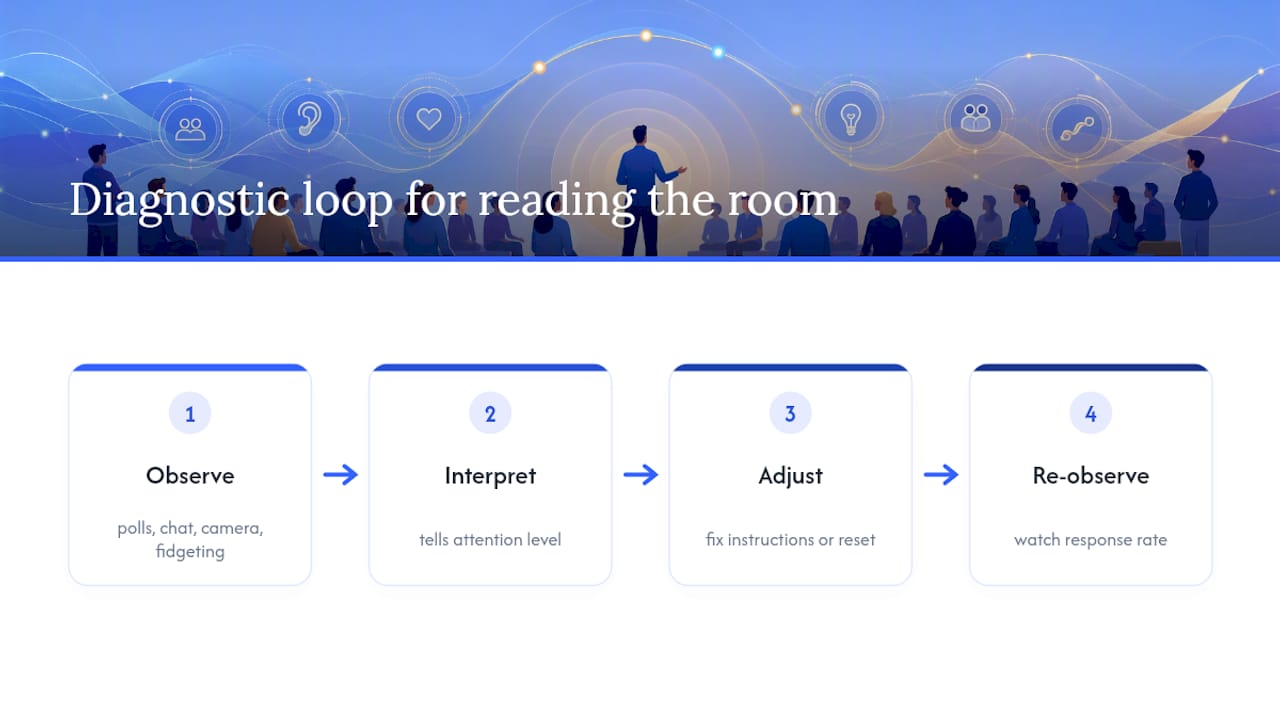
Audience feedback isn’t just applause or laughter. It’s fidgeting, phone checks, eye contact (or the lack of it), and how quickly people respond when you ask a question. Reading these signals in real time is what separates a talk that recovers from a rough patch and one that spirals.
Watch for early warning signs during your first interactive checkpoint. If a poll gets a weak response or your turn-and-talk produces silence instead of chatter, that’s data. It usually means your instructions were unclear, not that the audience is disengaged. Fix the instruction, not the technique.
If energy drops mid-segment, don’t wait for your next scheduled checkpoint. Insert an unplanned reset: a quick question, a stand-up-and-stretch moment, or simply asking, “Is this landing, or should I go faster?” Direct feedback, asked plainly, almost always gets an honest answer.
Virtual sessions give you different signals: chat activity, camera engagement, and how many people respond to a poll versus how many are logged in. A poll response rate that drops off partway through a session tells you exactly where you lost the room, which is more useful than any applause meter.
The core skill here is treating every interactive moment as a diagnostic, not just an engagement tactic. A poll tells you what people think. It also tells you whether they’re still with you.
How Do You Manage Nervousness Without Losing Confidence?
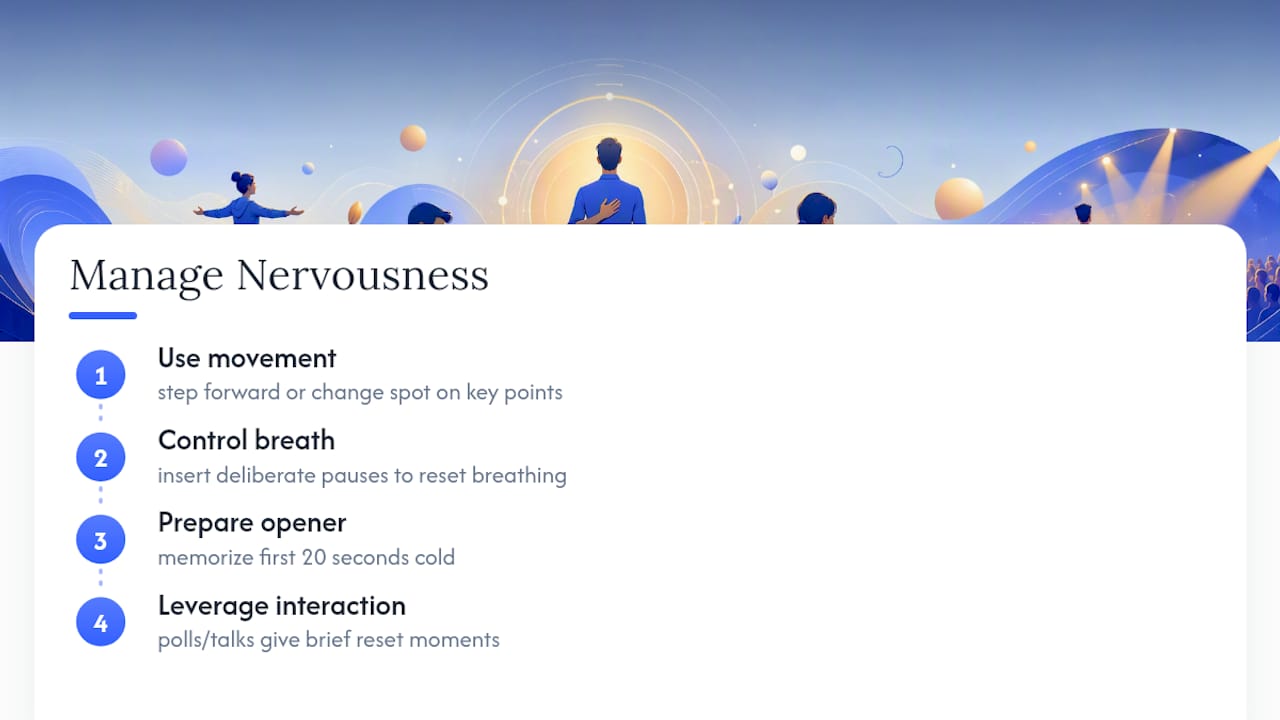
Nerves and low energy read almost identically to an audience: a flat voice, minimal movement, avoided eye contact. The good news is that the same techniques that keep an audience engaged also mask and reduce your own nervous energy, because they force you into action instead of overthinking.
Movement helps first. Stepping forward on a key point or moving to a new spot for a new segment gives your nervous energy somewhere to go instead of turning into stiffness or pacing.
Breath control matters more than most speakers plan for. A pause you insert deliberately for emphasis also happens to be the exact moment your breathing resets, which is a useful excuse to build pauses into your talk even before you need them for pacing reasons.
Preparation for your opening line matters disproportionately. If you have your first 20 seconds memorized cold, the adrenaline spike that hits right before you start speaking has nowhere to derail you. Once you’re past the opener, most speakers report their nerves drop fast, since the interactive elements built into your structure now carry part of the cognitive load for you.
Treat your interactive checkpoints as built-in recovery moments too. While the audience is answering a poll or talking to a neighbor, you get a few seconds to breathe, check your notes, and reset before the next segment. That’s a hidden benefit of the same pacing structure you built for their attention, not just yours.
What Should You Actually Prioritize First?
Most presentation advice buries the one thing that matters most under a pile of delivery tips: voice coaching, slide design, body language. All of it helps. None of it compensates for a talk with no planned interaction. If you fix one thing before your next presentation, fix your structure, not your delivery.
The conventional wisdom oversells charisma and undersells timing. A naturally engaging speaker with no interactive checkpoints will still lose a room after 15 uninterrupted minutes. A mediocre speaker who asks for a hand raise every 8 minutes will hold that same room longer. The mechanism isn’t charm. It’s attention resets, on a schedule.
Prioritize in this order: build your interaction schedule first, write your opener second, polish delivery last. Most people do the reverse and wonder why a good opening line couldn’t save a talk that had nothing planned for minute 12. Start with the clock, not the content.
— fan
Sources
- How To Give A Talk That Will Hook Your Audience — Forbes
- 3 Ways to Keep Your Audience Focused During a Presentation — HBR
- How to engage your audience in a presentation — Climb the Ladder
- Audience engagement techniques in oral presentations — SAGE Journals