
Table of Contents
A payment withdrawal is the step where money you have earned on a platform moves from your available balance to a bank account, wallet or other payout method you control. The process is nearly the same everywhere: you check your balance, add a verified payout method, request an amount, confirm it, and wait for review and transfer. What changes from one platform to another is the minimum, the fee, the timing and how much of your income reaches that balance in the first place. That last part is why creators on subscription platforms look closely at revenue share before they look at anything else, and why we built Fanspicy as a paid social media and live cam platform where creators do not pay to join or use it and earn from subscriptions, paid posts, private messages, live streams, bundles and tips.
This guide walks through the withdrawal process step by step, explains the terms you will meet, and shows how to avoid the usual delays.
TL;DR
- A withdrawal moves your available, unreserved balance to a payout method you have saved and verified. It is not a refund and not a chargeback.
- The usual sequence: verify identity, add a payout method, check the minimum, request an amount, confirm, then track the status in your history.
- Minimums, fees and timing differ by method. One major marketplace lists a $1 minimum for PayPal and a $20 minimum for bank transfer, so always read the method’s own terms before you choose.
- Most rejected requests come down to incomplete or incorrect payout details. Fix the detail, then request again.
- Your take-home depends on the platform’s commission per transaction, so compare revenue share as well as payout speed.
Table of Contents
- What a withdrawal actually is
- The withdrawal process step by step
- What to do when a withdrawal is pending, delayed or rejected
- Choosing a payout method that fits how you earn
- Why the withdrawal is only half of the story
- Moving over from another platform
- Where Fanspicy fits
- Our perspective
- FAQ
- Sources
What a withdrawal actually is
People use “withdraw payment” in several ways, so it helps to separate them.
A withdrawal (payout) retrieves money that is already yours. One payments provider’s documentation defines it as retrieving unused prefunded assets to a registered bank account or crypto wallet, and notes that only available, unreserved balance can be taken out. For a creator, that means earnings that have cleared and are not held for any reason.
A refund is different. A refund returns all or part of an original payment to the person who made it. According to a major bank’s payments developer documentation, a withdrawal describes money moving for a reason other than a refund, while a refund must reference the original payment and cannot exceed its value.
A payment return is a third thing: a downstream institution reverses a completed payment. The same Ripple documentation explains that a return credits the provider’s balance rather than automatically going back to your bank or wallet.
If you are a creator, the term you care about is the first one. If you are a fan who paid for a subscription or a tip and wants the money back, you are asking about a refund, which is a separate request.
The withdrawal process step by step
Platforms word the screens differently, but the flow is consistent. As a concrete reference, one large marketplace’s help center describes this path: open the earnings page, choose to withdraw your balance, select a method, enter an amount if you want a partial withdrawal, confirm, and enter a phone verification code. Your withdrawal history then appears on the same page. Here is the full routine, with what to watch at each stage.
1. Confirm your balance is available
Your dashboard may show several numbers: total earned, pending and available. Only the available figure can be withdrawn. Money from a recent subscription, tip or paid message can sit in a pending state first, so a withdrawal request for your full lifetime earnings will not work.
Where it goes wrong: creators plan a rent payment around a balance that includes pending income. Plan around the available number only.
2. Complete identity verification
Platforms need to know who they are paying. Requirements can depend on who the recipient is, their country, the payout method and the size of the transaction, and checks may confirm an individual’s identity or a business’s details. Expect to supply your legal name, date of birth and a government ID, and to match the name on your payout account to the name on your profile verification.
Age rules apply too. The marketplace help center above states that you must be at least 18 to withdraw, and each withdrawal method can carry location restrictions. On an adult-content platform, creators must be adults in any case, so verification is the first gate, not an afterthought.
Where it goes wrong: a nickname on a bank account, a typo in a legal name, or an expired ID. Any mismatch is the most common reason a first withdrawal stalls.
3. Add and save a payout method
Common options are bank transfer, a digital wallet and, on some platforms, other regional methods. One creator-payout help page lists bank transfer, PayPal and UPI and notes that the bank details required vary by country. That is typical: a US account usually needs a routing number and account number, while an international account may need an IBAN or SWIFT code.
Where it goes wrong: pasting digits with a stray space, choosing a savings account that does not accept the transfer type, or entering a business account under a personal name.
4. Check the minimum, the fee and the timing
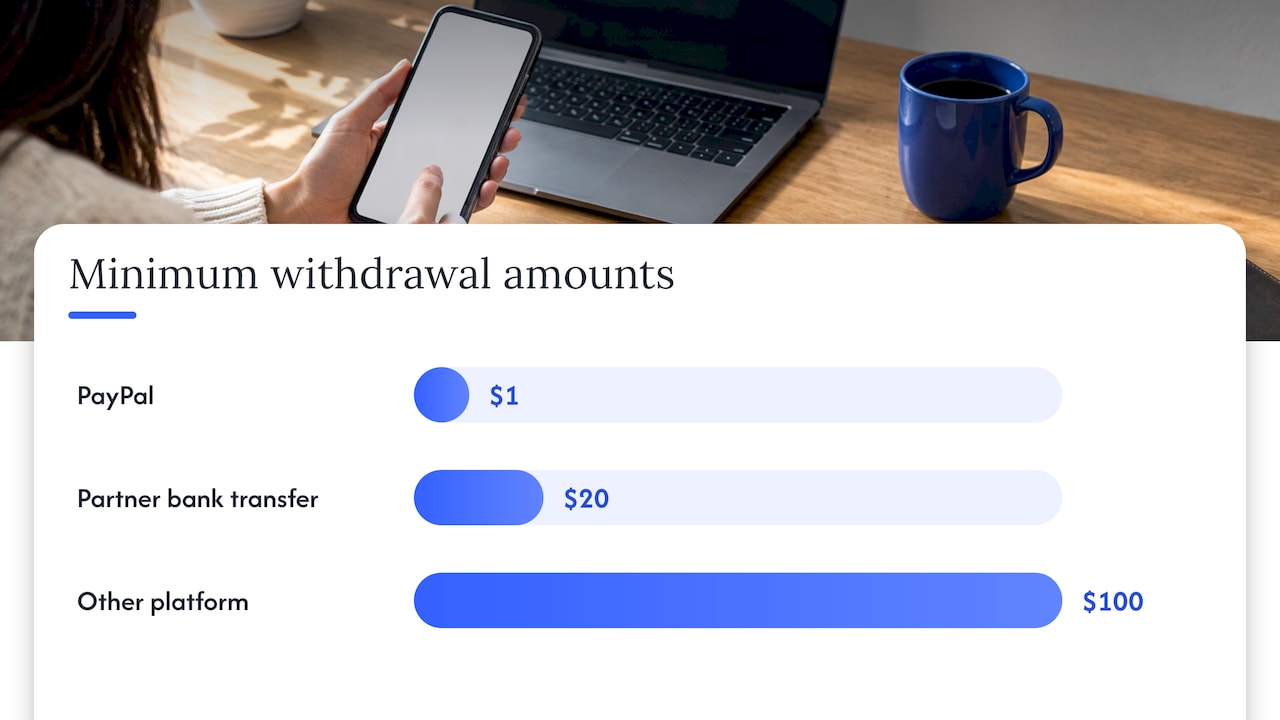
These three numbers decide which method suits you. The same marketplace help center, as retrieved on November 19, 2026, lists PayPal at a $1 minimum, no fee and a 24-hour transfer time, while a bank transfer through a payment partner carries a $20 minimum, a $1 fee, and 1 to 3 business days in local currency or 5 to 7 business days for a USD wire. Those are one platform’s published terms, and they can change, so treat them as an illustration of how wide the range is.
Another platform’s help page requires at least $100 in withdrawable balance before a request can be made. Minimums of that kind mean that small, frequent withdrawals may not be possible, so it pays to know the threshold before you start.
| Factor | What to look for | Why it matters |
|---|---|---|
| Minimum withdrawal | A fixed dollar threshold per method | Decides how often you can cash out |
| Fee | Flat fee or percentage per payout | Eats into small withdrawals the most |
| Transfer time | Hours, business days or weeks | Sets how far ahead you plan bills |
| Currency | Local currency or USD | Conversion costs can add up |
| Location | Methods restricted by country | A method you like may not be offered to you |
5. Request the amount and confirm
Choose the full available balance or a partial amount, review the method and the figure, and confirm. Many platforms send a one-time code to your phone or email as a final security check. Read the confirmation screen closely: after you submit, you typically cannot edit the account number.
6. Track the status
After you submit, the request moves from pending to processing to paid, or to rejected. Check your withdrawal history for the status. Some platforms review requests on a set schedule. One help page states that requests are reviewed and processed within 30 days, which shows why the published timeline for your own platform is worth reading before you rely on a payout date.
What to do when a withdrawal is pending, delayed or rejected
Most problems have a short list of causes.
Pending longer than expected. Look up the stated processing window for your method, then count business days, not calendar days. Bank transfers do not move on weekends or bank holidays.
Rejected. A rejected request usually shows a reason. On the help page mentioned above, the common ones are incomplete or incorrect bank details, and the fix is to correct them before you request again. Re-submitting the same details only repeats the rejection.
Identity check not cleared. Upload a clear, uncropped, unexpired ID and make sure the name matches your payout account exactly.
Balance not available. Confirm that the earnings have cleared and are not reserved. Only available balance can be withdrawn.
Money sent but not in the account. Check the account details you saved, then the receiving bank’s incoming-transfer time. If a transfer was sent, it is the bank or wallet provider that can trace it from their side.
Keep a simple log of each request: date, amount, method and status. If you ever need to contact support, a log lets you point to the exact request instead of describing it from memory.
Choosing a payout method that fits how you earn
The right method depends on how your income arrives. Creators who earn from many small tips and messages need a low minimum and a low flat fee. Creators who earn mostly from recurring subscriptions can often cash out less often and benefit more from a method with lower or no fees on larger amounts.
A practical way to decide:
- Estimate your typical withdrawal size over a month.
- Subtract the flat fee for each method and see what percentage that fee takes. A $1 fee on a $20 payout is 5%. On a $500 payout it is 0.2%.
- Check how long you can wait. Faster methods suit bill deadlines, slower bank routes suit larger, scheduled payouts.
- Confirm the method is offered in your country.
We cover the security side of getting paid in more detail in our guides on secure payment steps for creators and why payment security matters for earnings.
Why the withdrawal is only half of the story
Creators often compare platforms by how fast the money lands, and speed does matter. But the number that decides your income is how much of each fan payment ends up in your balance. A platform that takes a percentage commission per transaction affects every subscription, tip, private message and paid post before you ever reach the withdrawal screen.
So when you evaluate where to build your audience, run two checks side by side: the commission on each earning type, and the withdrawal terms for your payout method. A generous payout schedule on a smaller share of revenue can leave you with less than a modest schedule on a larger share.
Income mix matters as well. Creators who combine recurring subscriptions with tips, paid messages and live streams build steadier balances, which makes withdrawal planning easier. Our write-ups on recurring subscription revenue, hybrid monetization and how social platforms pay creators go deeper on this, and our guide to payment processing for creators explains what happens between a fan’s card and your balance.
Moving over from another platform
If you already earn on a subscription site and are thinking about moving, withdrawal planning is part of the move. Cash out your available balance before you shift your attention, and note any pending earnings and their release dates so nothing is left behind. Then bring your content and your audience with you. Fanspicy positions itself around easy content migration from other platforms and direct audience ownership, so you are not starting from zero.
Fans who followed a creator from another site can find the new page through the links the creator shares. For ideas on bringing people along, see our promotional tactics for subscriber growth and strategies for promoting paid content.
Where Fanspicy fits
Fanspicy is a paid social media and live cam platform for independent creators. Creators do not pay fees to join or use it. Instead, the platform takes a percentage commission per transaction, so it earns when fans subscribe, tip, unlock paid posts or messages, buy bundles or watch live streams. Our aim is for creators to keep a higher percentage of their earnings, own their audience directly and earn in more than one way.
If you want to build a page with subscriptions, private messages and live streams, start on the Fanspicy home page. If you want to sell exclusive content, tips and paid posts, the creator page is the place to set up.
For fans, the same platform lets you support the creators you follow directly, through subscriptions, tips and paid content, in one place.
Our perspective
Every creator we talk about on this subject asks the same two questions: how much of what my fans pay do I keep, and how quickly can I reach it. We think they belong together. A payout screen is only as good as the balance behind it.
That is why Fanspicy is built around a higher creator share, flexible ways to earn and ownership of your audience. Subscriptions give you a base, while tips, private messages, paid posts, bundles and live streams let each fan choose how to support you. More ways to earn means a steadier balance, and a steadier balance makes every withdrawal easier to plan.
Our advice is simple. Verify your identity early, save your payout details carefully, and learn the terms of your method before you need the money. Do that on any platform and withdrawals become routine.
fan
FAQ
How long does a payment withdrawal take?
It depends on the method and the platform’s review schedule. One marketplace lists a 24-hour transfer for PayPal and 1 to 3 business days for a local-currency bank transfer, with USD wires taking longer. Another platform states a review window of up to 30 days. Read the stated timing for your own method before planning around it.
Why was my withdrawal rejected?
The most common reason is incomplete or incorrect payout details, such as a wrong account number or a name that does not match your verified identity. The rejection usually shows a reason. Correct the detail it names, then submit a new request.
Is a withdrawal the same as a refund?
No. A withdrawal moves your own available balance to your payout method. A refund returns money from a specific original payment to the person who paid, and it cannot exceed that payment’s value. Fans asking for money back are making a refund request.
Why do I have to verify my identity before I can withdraw?
Platforms need to confirm who they are paying, and the checks can vary with your country, payout method and the amount involved. Verifying early means your first withdrawal is not held up. Use your legal name and a valid ID that matches your payout account.
Can I withdraw part of my balance?
Often yes. The marketplace example above lets you enter an amount for a partial withdrawal, although every method has its own minimum. Check the threshold for your method, since a partial request below it will not go through.
Sources
- Withdrawing your earnings and managing payout methods, Fiverr Help Center
- Collecting your payout: requesting a withdrawal, uni.xyz
- Withdrawals, Payments Direct documentation
- Make a payout, Payments developer portal